
Why Choosing the Right Printer Matters
In today’s fast-paced business environment, selecting the right printer can significantly impact operational efficiency and cost management. Whether for home offices, small businesses, or remote teams, the right printing solution must balance performance, reliability, and cost-effectiveness. Key considerations include print speed, toner capacity, connectivity options, and media compatibility. A printer that meets these criteria can streamline workflows, reduce downtime, and support growing workloads without compromising quality. For small businesses, the ability to handle multiple tasks—such as printing, scanning, copying, and faxing—within a compact footprint is crucial. Additionally, features like energy efficiency, automatic duplex printing, and cloud connectivity can enhance productivity and sustainability. When evaluating printers, it’s essential to align technical specifications with specific usage patterns. For example, a high-volume office may prioritize toner yield and duty cycle ratings, while a home user might focus on connectivity and ease of use. Understanding these factors ensures that the chosen printer meets both current and future needs without unnecessary complexity or cost.
Quick Overview
| Feature | Details |
|---|---|
| Printer Type | Monochrome Laser All-in-One |
| Supported Functions | Print, Scan, Copy, Fax |
| Print Resolution | 1200 x 1200 DPI |
| Print Speed | Up to 34 ppm (monochrome) |
| Media Sizes | Legal (8.5 x 14 inches) |
| Connectivity | Ethernet, USB, Wi-Fi (dual-band) |
| Duty Cycle | 12,000 pages per month |
| Toner System | Toner Cartridge with XL Yield |
| Warranty | 1-year limited warranty |
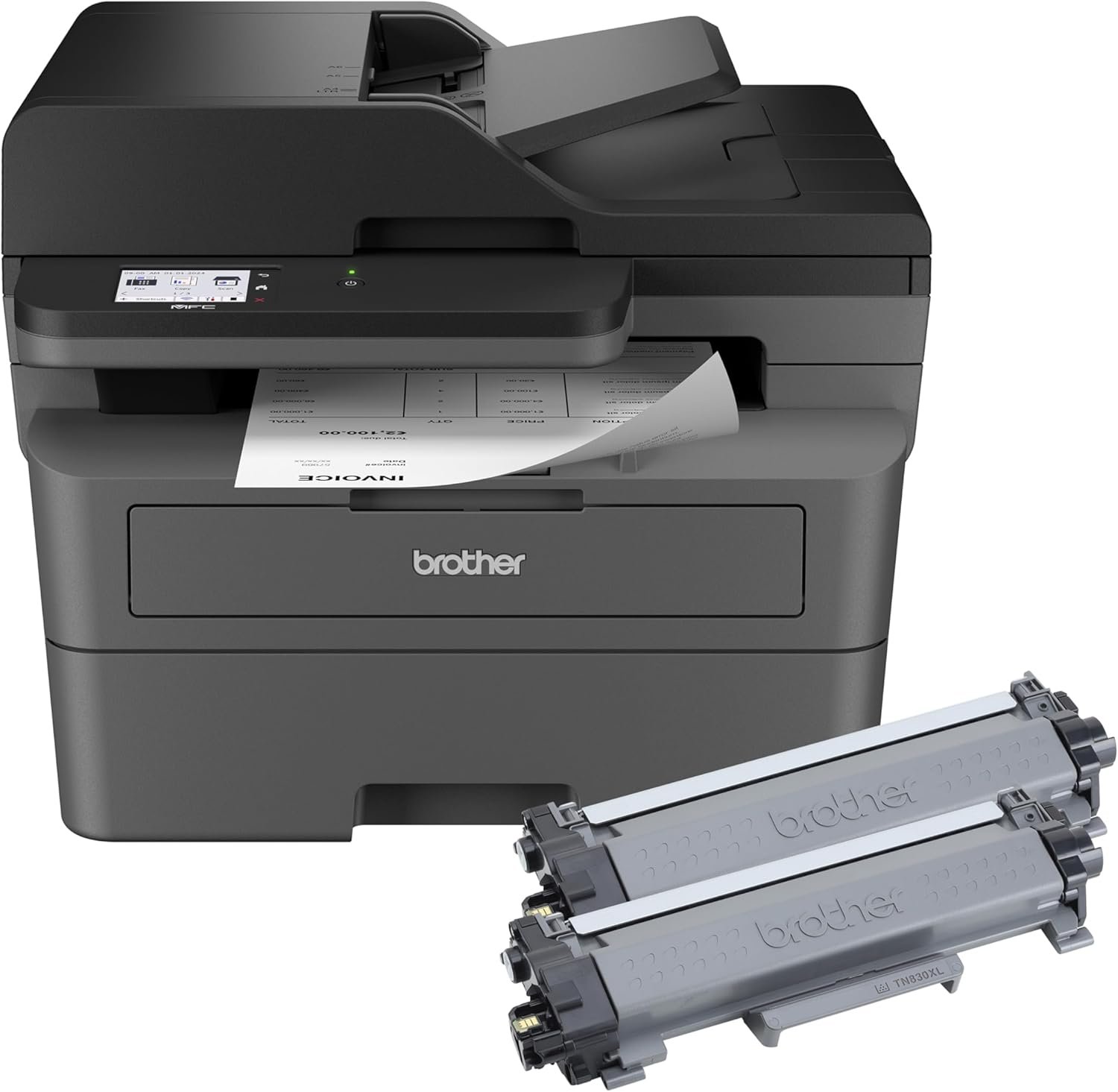
The Brother MFC-L2820DW XL combines monochrome laser printing with multifunctional capabilities, making it suitable for small businesses requiring efficient document management. Its high-yield toner cartridge and automatic duplex printing reduce long-term costs while maintaining print quality. The dual-band wireless connectivity and Ethernet port ensure reliable access for multiple devices, while the 250-sheet paper tray minimizes refills. These features collectively support a balance between productivity and operational efficiency in environments with moderate to high print volumes.

Toner Capacity and Cost-Effectiveness
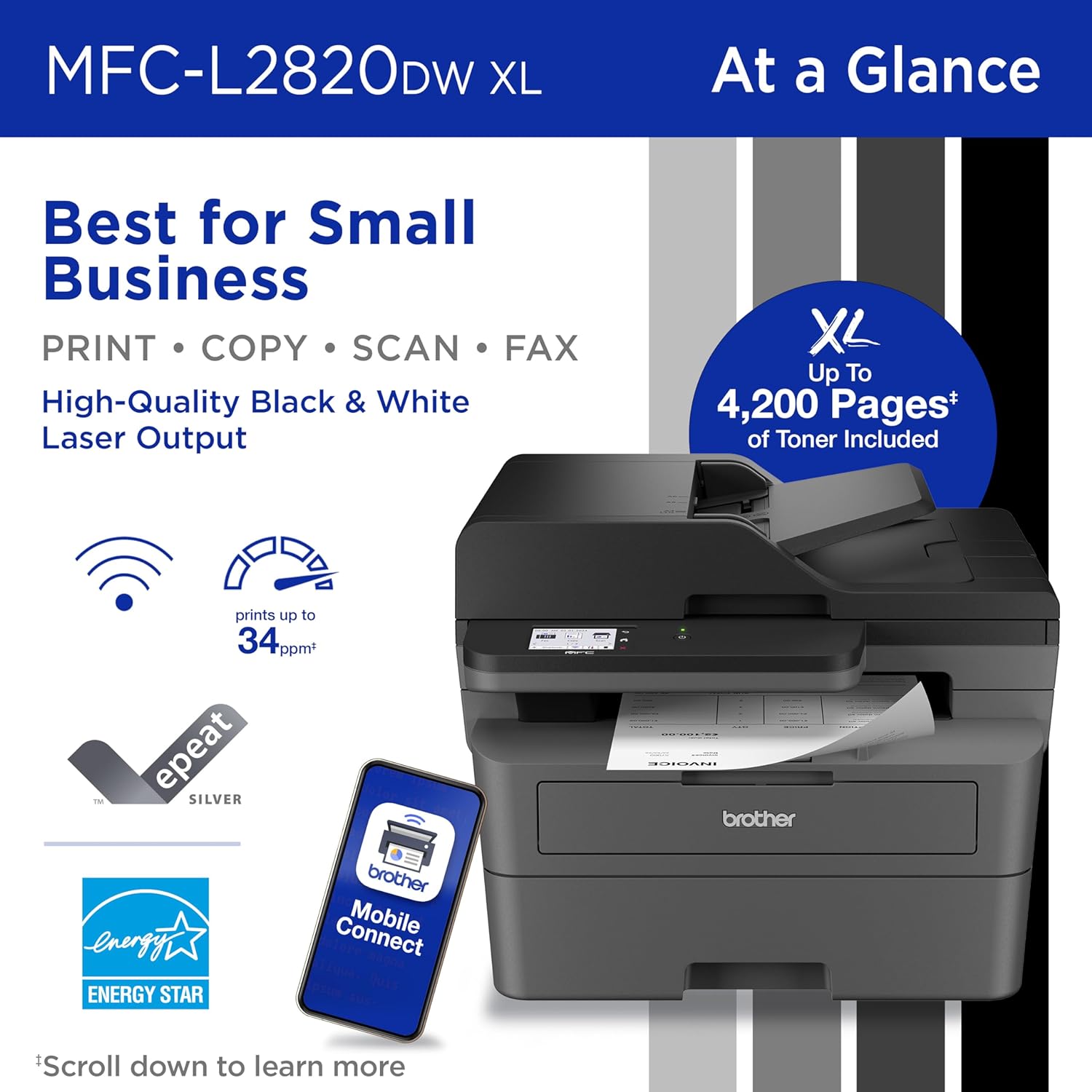
The Brother MFC-L2820DW XL’s toner capacity is a critical factor for businesses prioritizing cost efficiency. The included XL toner cartridge provides up to 4,200 pages of monochrome output, significantly exceeding the standard yield of similar models. This high-yield design reduces the frequency of toner replacements, lowering long-term expenses. For small businesses printing hundreds of pages daily, the extended toner life minimizes downtime and administrative overhead. The printer’s duty cycle rating of 12,000 pages per month further supports its suitability for environments with consistent printing demands. However, the toner yield is based on single-sided printing, meaning double-sided output may reduce the effective page count. Users should consider their specific print volume and page complexity when evaluating toner longevity.

Toner Yield and Page Count
The XL toner cartridge’s 4,200-page yield is based on ISO/IEC 19752 standards for monochrome printing, which measures output using letter-sized paper. This rating assumes standard print settings, though actual page counts may vary depending on document complexity and print quality settings. Businesses printing primarily text documents may achieve closer to the maximum yield, while those with mixed content or higher resolution settings may see a reduction. The toner’s ability to produce consistently crisp pages ensures reliable output without premature depletion. For users requiring extended toner life, the XL cartridge offers a cost-effective solution compared to standard-yield alternatives.
Toner Replacement and Management
The printer’s toner system is designed for easy maintenance, with the included XL cartridge eliminating the need for frequent replacements. However, users must ensure compatibility with Brother Genuine toner to maintain print quality and warranty validity. The Refresh EZ Print Subscription service offers an automated toner replenishment option, reducing the risk of unexpected shortages. While this service provides convenience, it requires a monthly subscription fee, which may impact budgeting for some users. The printer’s built-in toner tracking features help manage supply levels, but manual monitoring remains an option for those preferring to control costs independently.
Connectivity and Network Integration
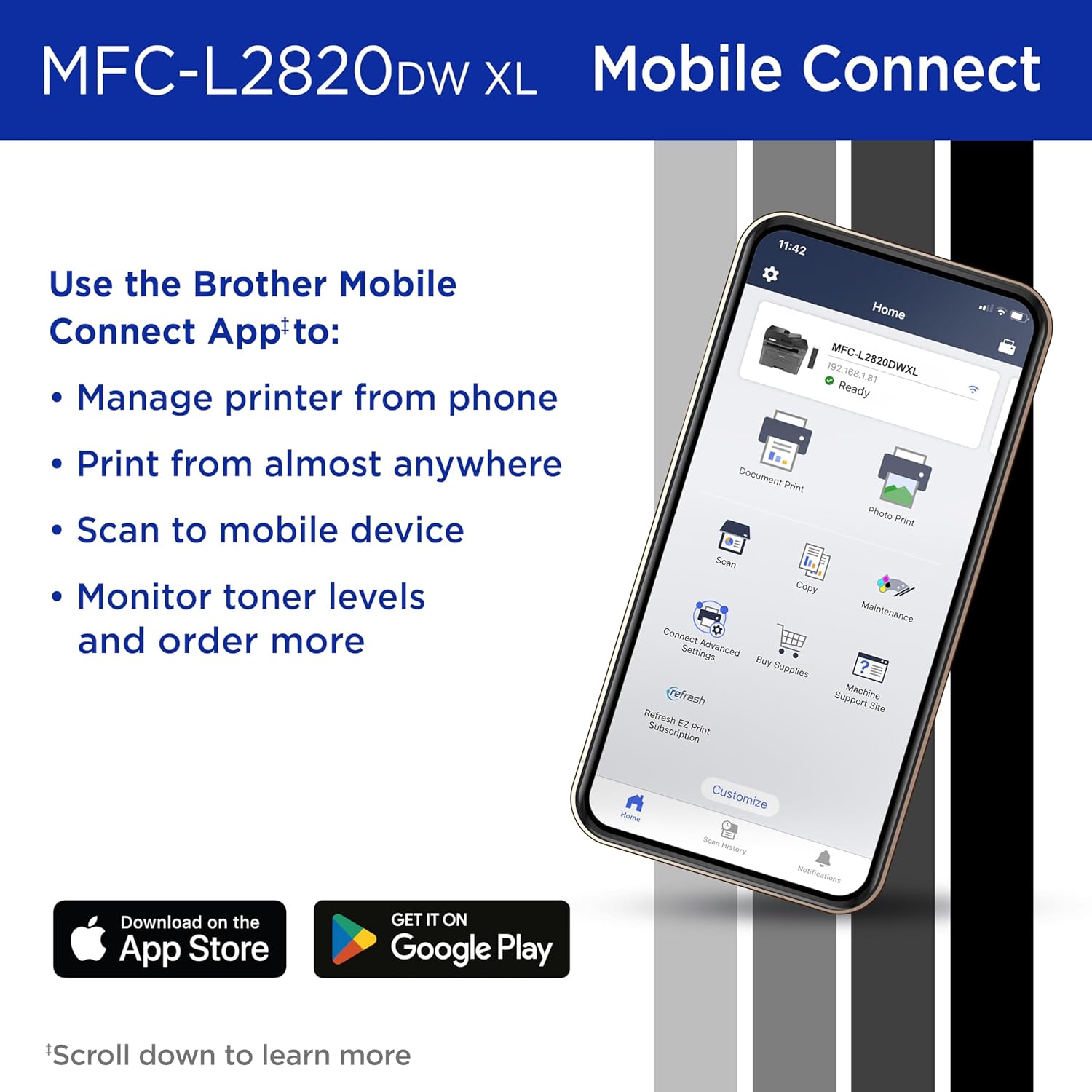
The Brother MFC-L2820DW XL’s connectivity options are essential for modern office environments requiring seamless device integration. The dual-band Wi-Fi (2.4GHz/5GHz) and Ethernet port enable stable, high-speed connections for multiple users, while the USB 2.0 interface supports direct printing from computers. The built-in 2.7-inch touchscreen simplifies navigation and cloud-based printing, allowing users to interact with services like Google Drive and Dropbox without additional software. For remote teams, the mobile printing capabilities via the Brother Mobile Connect app ensure flexibility, enabling print, scan, and management tasks from smartphones or tablets. However, the reliance on wireless connectivity may introduce latency issues in environments with unstable networks. The printer’s Ethernet port provides a more reliable alternative for businesses prioritizing consistent connectivity.

Cloud and Mobile Integration
The touchscreen interface and mobile app support enhance the printer’s usability for users managing digital workflows. The ability to print from and scan to cloud services streamlines document handling, reducing the need for physical file storage. The Brother Mobile Connect app also allows real-time monitoring of toner levels and print job status, improving operational oversight. However, the app requires a stable internet connection, which may be a limitation for users in areas with limited broadband access. The printer’s compatibility with major cloud platforms ensures broad utility, though additional setup may be required for less common services.
Network Performance and Reliability
The dual-band Wi-Fi and Ethernet connectivity provide robust options for networked environments. The dual-band feature helps mitigate interference from other wireless devices, ensuring consistent print job delivery. However, the printer’s performance in large networks with multiple connected devices may depend on the overall network infrastructure. The Ethernet port offers a more predictable connection, making it ideal for businesses with dedicated print servers or centralized management systems. While the printer’s network capabilities are well-suited for small to medium-sized offices, users in highly complex IT environments may require additional configuration to optimize performance.
Print Quality and Output Consistency
The Brother MFC-L2820DW XL’s laser print technology ensures high-quality monochrome output suitable for professional documents. The 1200 x 1200 DPI resolution produces sharp text and clear graphics, meeting the demands of business correspondence and reports. The automatic duplex printing feature enhances document readability by reducing paper usage, while the 50-page auto document feeder simplifies multi-page scanning and copying tasks. The printer’s ability to maintain consistent toner density across pages ensures uniform output without visible banding or streaking. However, the monochrome limitation may be a drawback for users requiring color printing, as the printer does not support color toner or ink systems.
Text and Graphics Output
The printer’s monochrome laser technology excels in producing crisp text and legible graphics, making it ideal for business documents, invoices, and reports. The 1200 x 1200 DPI resolution ensures fine detail in both text and images, though complex graphics may require additional print settings to maintain clarity. The automatic duplex printing feature improves document organization by printing on both sides, reducing paper waste without compromising readability. The printer’s ability to maintain consistent toner coverage across pages ensures reliable output, though users should monitor toner levels to avoid potential print quality degradation.
Media Compatibility and Handling
The printer supports a range of media types, including plain paper, envelopes, and legal-sized sheets, accommodating diverse printing needs. The 250-sheet paper tray and 50-page auto document feeder reduce manual intervention, making it suitable for high-volume environments. However, the printer’s media size limitations may restrict its use for specialized applications requiring larger formats. The toner system is optimized for standard paper weights, and users should avoid using overly thick or thin media to prevent print quality issues. The printer’s ability to handle envelopes and other specialty media enhances its versatility for businesses with varied printing requirements.

Pros & Cons
Pros
- High-Yield Toner Cartridge: The XL toner provides up to 4,200 pages, reducing replacement frequency and long-term costs.
- Dual-Band Wi-Fi and Ethernet: Reliable connectivity options support multiple devices and networked environments.
- Automatic Duplex Printing: Reduces paper usage and enhances document organization without compromising quality.
- 2.7″ Touchscreen Interface: Simplifies navigation and cloud-based printing for users managing digital workflows.
- 50-Page Auto Document Feeder: Streamlines multi-page scanning, copying, and faxing tasks.
- Energy Efficiency: ENERGY STAR® and EPEAT® Silver ratings ensure eco-friendly operation.
- Mobile App Integration: The Brother Mobile Connect app enables remote printing and toner tracking.
- Robust Duty Cycle: 12,000 pages per month supports consistent use in small to medium-sized offices.
Cons
- Limited Media Size Support: Only accommodates up to legal-sized paper, excluding larger formats.
- Monochrome Only: No color printing capability may limit use for certain applications.
- Subscription-Based Toner Service: The Refresh EZ Print Subscription requires a monthly fee for automated toner replenishment.
- Dependence on Wireless Connectivity: Potential latency issues in unstable network environments.
- No Built-In Color Scanning: The monochrome scanner may not meet needs for color document handling.
- Manual Toner Management: Users must monitor toner levels to avoid unexpected shortages without subscription services.
Final Verdict: Who This Printer Is Best For (and Who Should Skip It)
The Brother MFC-L2820DW XL is best suited for small businesses requiring efficient monochrome printing, scanning, copying, and faxing in a compact footprint. Its high-yield toner cartridge, automatic duplex printing, and dual-band connectivity make it ideal for environments with moderate to high print volumes. The 2.7-inch touchscreen and mobile app integration enhance usability for users managing digital workflows, while the 50-page auto document feeder simplifies multi-page tasks. However, the printer’s monochrome-only design and limited media size support may exclude users requiring color printing or larger paper formats. Businesses with fluctuating print volumes or those prioritizing color output should consider alternative models. For small offices focused on cost-effective, reliable monochrome printing, the MFC-L2820DW XL offers a balanced solution with strong performance and sustainability features.
Frequently Asked Questions (FAQs)
What is the toner capacity of the Brother MFC-L2820DW XL?
The Brother MFC-L2820DW XL includes an XL toner cartridge that provides up to 4,200 pages of monochrome output, based on ISO/IEC 19752 standards. This high-yield design reduces the frequency of toner replacements, making it cost-effective for businesses with consistent printing needs.
How does the printer handle multi-page scanning and copying?
The printer features a 50-page auto document feeder that simplifies multi-page scanning, copying, and faxing tasks. This component reduces manual intervention, ensuring efficient processing of documents with multiple pages without the need for frequent paper reloading.
What connectivity options are available for the MFC-L2820DW XL?
The printer offers dual-band Wi-Fi (2.4GHz/5GHz), Ethernet, and USB 2.0 connectivity. These options provide flexibility for users to connect to the printer from multiple devices, including computers, smartphones, and networked environments.
Can the printer handle color printing?
No, the Brother MFC-L2820DW XL is a monochrome laser printer and does not support color printing. It is designed for high-quality black-and-white output, making it suitable for business documents, reports, and invoices.
What is the print speed of the printer?
The Brother MFC-L2820DW XL can print up to 34 pages per minute (ppm) in monochrome mode. This speed is suitable for environments with moderate to high print volumes, though performance may vary based on print settings and document complexity.
Is the printer energy efficient?
Yes, the printer is ENERGY STAR® compliant and EPEAT® Silver rated, indicating it meets energy efficiency standards. These certifications highlight its eco-friendly operation, which helps reduce power consumption and environmental impact.
What are the media size limitations for the printer?
The printer supports media sizes up to legal (8.5 x 14 inches). It is compatible with plain paper, envelopes, and other standard media types, though it does not accommodate larger formats or specialty papers beyond this range.
How does the printer handle duplex printing?
The printer includes automatic duplex printing, which prints on both sides of the paper to reduce paper usage. This feature enhances document organization and sustainability, though users should ensure proper toner levels to maintain print quality.