
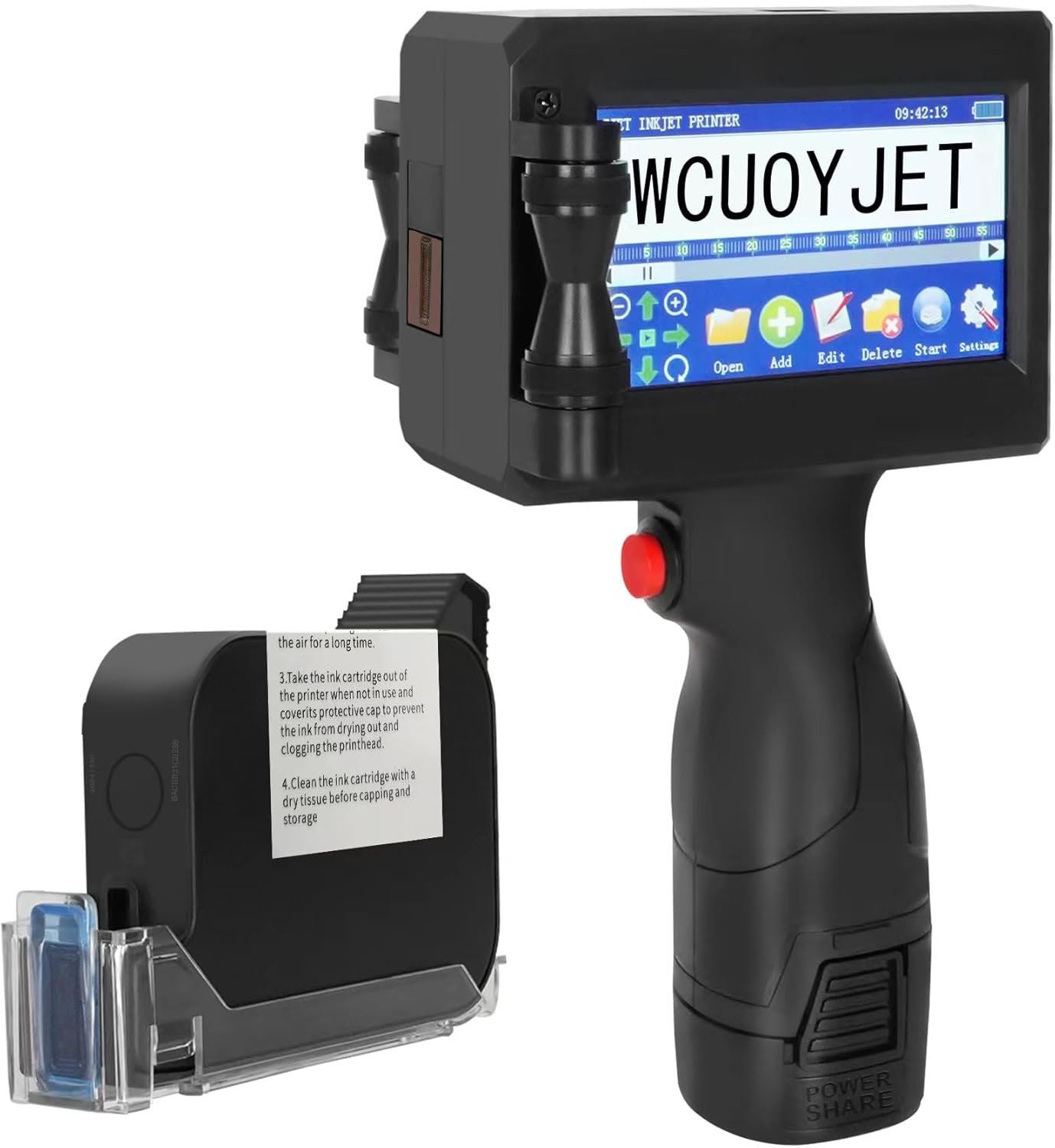
The Importance of Choosing the Right Printer
In today’s fast-paced environments, selecting the right printer can significantly impact productivity and operational efficiency. Whether you’re managing a small business, working in logistics, or handling inventory in an industrial setting, the right printing solution must meet specific requirements. Printers vary widely in technology, performance, and adaptability, making it essential to evaluate factors like print quality, speed, media compatibility, and durability. For users requiring mobility, a handheld printer offers unique advantages, such as the ability to print on diverse surfaces without the constraints of a fixed workstation. However, these devices often come with trade-offs, including limited media size, slower print speeds, and specialized ink requirements. Understanding these factors helps users determine whether a handheld inkjet printer like the H760 is the optimal choice for their workflow. This review examines the H760’s capabilities, focusing on its suitability for industrial, commercial, and mobile applications, while highlighting its strengths and limitations based on technical specifications and user feedback.
Quick Overview
| Feature | Details |
|---|---|
| Printer Type | Handheld Inkjet Printer |
| Printing Technology | Inkjet |
| Print Resolution | 600 dpi (Monochrome/Color) |
| Print Speed | 60.0 ppm (Monochrome/Color) |
| Media Compatibility | Labels, Paper, Plastic, Metal, Wood, and Other Surfaces |
| Connectivity | USB |
| Ink Type | Quick-Drying Black Ink |
| Battery Life | 2200mAh Removable Lithium-Ion |
| Weight | 2.09 Pounds |
| Dimensions | 9.05″D x 5″W x 3.85″H |
| Supported Media Sizes | 10 x 15 Centimeters |
| Additional Features | 4.3-Inch Touch Screen, USB Flash Drive, Stylus |
The H760’s combination of portability and versatility makes it suitable for environments requiring on-the-go printing. Its ability to print on unconventional materials expands its use beyond traditional office settings, while the USB connectivity and onboard storage provide flexibility for data management. However, its compact design and single USB port may limit advanced connectivity options for users requiring broader integration with digital workflows.

Print Quality and Resolution
The H760’s print quality is defined by its 600 dpi resolution, which ensures sharp text and clear graphics for most industrial and commercial applications. This resolution is sufficient for printing labels, batch numbers, and barcodes, making it ideal for environments where clarity is critical. The printer’s ability to produce consistent output across different media types, including metal, plastic, and wood, is a key advantage for users working with diverse materials. However, the resolution may not meet the demands of high-end graphic design or photo printing, where higher dpi is typically required.

Text and Barcode Clarity
The H760 excels in printing text and barcodes, with its 600 dpi resolution ensuring legibility even on textured or uneven surfaces. The touch screen interface allows users to customize text size, font, and spacing, making it easier to generate precise labels and identifiers. The printer’s ability to print variable data, such as dates and serial numbers, is particularly useful for inventory management and product tracking. However, the lack of advanced image processing features means that complex graphics may not render as smoothly as on dedicated label printers.
Graphic and Image Output
While the H760 can print basic images and logos, its inkjet technology may not produce the same level of detail as laser or thermal printers. The quick-drying ink helps prevent smudging on non-porous surfaces, but it may not be as effective on absorbent materials like paper. Users requiring high-fidelity image reproduction should consider alternative printing technologies, as the H760’s focus on speed and portability comes at the expense of photo-quality output.
Portability and Design
The H760’s compact design and lightweight build make it an excellent choice for users needing a portable printing solution. Weighing just 2.09 pounds, the printer is easy to carry and operate in various environments, from warehouses to construction sites. The 4.3-inch touch screen provides an intuitive interface for configuring print settings and previewing output, reducing the learning curve for new users. However, the device’s limited battery life and single USB port may restrict its use in scenarios requiring extended operation or integration with multiple devices.

Battery Life and Power Requirements
The H760 is equipped with a 2200mAh lithium-ion battery, which provides several hours of continuous use. While this is sufficient for short-term tasks, it may not meet the demands of long shifts or high-volume printing. The printer’s power consumption of 20 watt-hours suggests it is energy-efficient, but users requiring extended battery life should consider carrying a spare power source. The lack of a docking station or charging port on the device may also limit its convenience for frequent users.
Connectivity and Data Management
The H760’s USB connectivity allows for direct data transfer from computers or external storage devices, making it suitable for users who need to print from USB drives or local files. The included USB flash drive provides a convenient way to store and transfer print data, but the printer’s reliance on USB may limit its compatibility with wireless or cloud-based workflows. For users requiring more advanced connectivity options, such as Wi-Fi or Bluetooth, the H760 may not be the best choice.
Print Speed and Workload Capacity
The H760’s print speed of 60.0 ppm (pages per minute) is adequate for most industrial and commercial applications, particularly when printing on labels or small-format media. This speed ensures that users can complete printing tasks efficiently without significant delays. However, the printer’s single-pass design and lack of duplex printing capabilities may limit its effectiveness for high-volume printing or tasks requiring double-sided output. Users with large print jobs should consider the printer’s duty cycle and recommended workload to avoid overuse and potential wear on the print engine.

Duty Cycle and Longevity
The H760 is designed for moderate use, with a duty cycle that supports continuous operation for several hours. While it is suitable for environments with regular printing needs, it may not be ideal for high-volume or 24/7 operations. The printer’s reliance on a single ink cartridge and the absence of a dedicated maintenance mode may also affect its longevity in demanding settings. Users should monitor ink levels and perform regular maintenance to ensure optimal performance over time.
Media Compatibility and Surface Adaptability
One of the H760’s standout features is its ability to print on a wide range of materials, including metal, plastic, and wood. This adaptability makes it suitable for applications such as product labeling, asset tagging, and field documentation. However, the printer’s performance on highly absorbent or uneven surfaces may vary, and users should test materials before relying on the printer for critical tasks. The lack of a dedicated media tray or adjustable settings for different surfaces may also limit its versatility in certain scenarios.

Pros & Cons
Pros
- Versatile Media Compatibility: The H760 can print on unconventional surfaces like metal, plastic, and wood, expanding its use beyond traditional office environments.
- User-Friendly Interface: The 4.3-inch touch screen allows for easy customization of print settings, including text formatting and variable data input.
- Quick-Drying Ink: The 42ml ink cartridge ensures fast drying times, reducing the risk of smudging on non-porous materials.
- Portable Design: Weighing just 2.09 pounds, the printer is easy to transport and operate in various settings, from warehouses to construction sites.
- Integrated Storage: The included USB flash drive provides a convenient way to store and transfer print data without relying on external devices.
- Stable Performance: The printer’s 600 dpi resolution and consistent output make it reliable for printing labels, barcodes, and basic graphics.
Cons
- Limited Media Size: The supported media size of 10 x 15 centimeters restricts its use for larger-format printing tasks.
- Single USB Port: The lack of multiple connectivity options may limit integration with advanced digital workflows or wireless networks.
- No Duplex Printing: The printer’s simplex design is unsuitable for tasks requiring double-sided output, such as multi-page documents or labels.
- Battery Life Constraints: While the 2200mAh battery provides several hours of use, it may not meet the demands of extended operations without a power source.
- Limited Image Quality: The 600 dpi resolution is sufficient for basic graphics but may not meet the standards of high-fidelity image printing.
- No Maintenance Mode: The absence of a dedicated maintenance interface may make long-term upkeep more challenging for frequent users.
Final Verdict: Who This Printer Is Best For (and Who Should Skip It)
The H760 handheld inkjet printer is best suited for users requiring a portable, versatile printing solution for industrial, commercial, and mobile applications. Its ability to print on unconventional materials, combined with a user-friendly interface and quick-drying ink, makes it ideal for tasks such as product labeling, asset tagging, and field documentation. The compact design and integrated storage options further enhance its appeal for users who need a lightweight, self-contained printing device.
However, the H760 may not be the best choice for users with high-volume printing needs, complex graphic design requirements, or those relying on advanced connectivity options like Wi-Fi or cloud integration. Its limited media size, single USB port, and lack of duplex printing capabilities may also restrict its use in environments demanding broader functionality. For users prioritizing speed, image quality, or extended battery life, alternative printing technologies such as laser or thermal printers may offer better performance. Overall, the H760 is a practical choice for specific applications, but its limitations should be carefully considered before purchase.

Frequently Asked Questions (FAQs)
What types of materials can the H760 print on?
The H760 can print on a variety of surfaces including wood, cardboard, stone, MDF, steel, tubes, metal, plastic, cloth, bottles, aluminum, cables, and paper. This versatility makes it suitable for industrial, commercial, and field applications where unconventional materials are required.
How long does the H760’s battery last?
The H760 is equipped with a 2200mAh lithium-ion battery that provides several hours of continuous use. While sufficient for short-term tasks, users requiring extended operation should consider carrying a spare power source.
Can the H760 print on large media sizes?
The H760 supports media sizes up to 10 x 15 centimeters, making it suitable for standard labels and small-format printing. It is not designed for larger-format or double-sided printing tasks.
What is the print resolution of the H760?
The H760 offers a print resolution of 600 dpi, which is adequate for producing clear text and basic graphics. However, it may not meet the standards of high-fidelity image printing or photo reproduction.
Is the H760 suitable for high-volume printing?
The H760 is designed for moderate use with a duty cycle that supports continuous operation for several hours. While it can handle regular printing tasks, it may not be ideal for high-volume or 24/7 operations without additional maintenance.
Can the H760 print on absorbent materials like paper?
The H760’s quick-drying ink helps prevent smudging on non-porous surfaces, but its performance on highly absorbent materials like paper may vary. Users should test materials before relying on the printer for critical tasks.
What connectivity options does the H760 offer?
The H760 provides USB connectivity for direct data transfer from computers or external storage devices. It does not support wireless or cloud-based workflows, limiting its integration with advanced digital systems.
Does the H760 support duplex printing?
The H760 is designed for simplex printing and does not support duplex printing. Users requiring double-sided output should consider alternative printing technologies or additional setup for multi-page documents.