
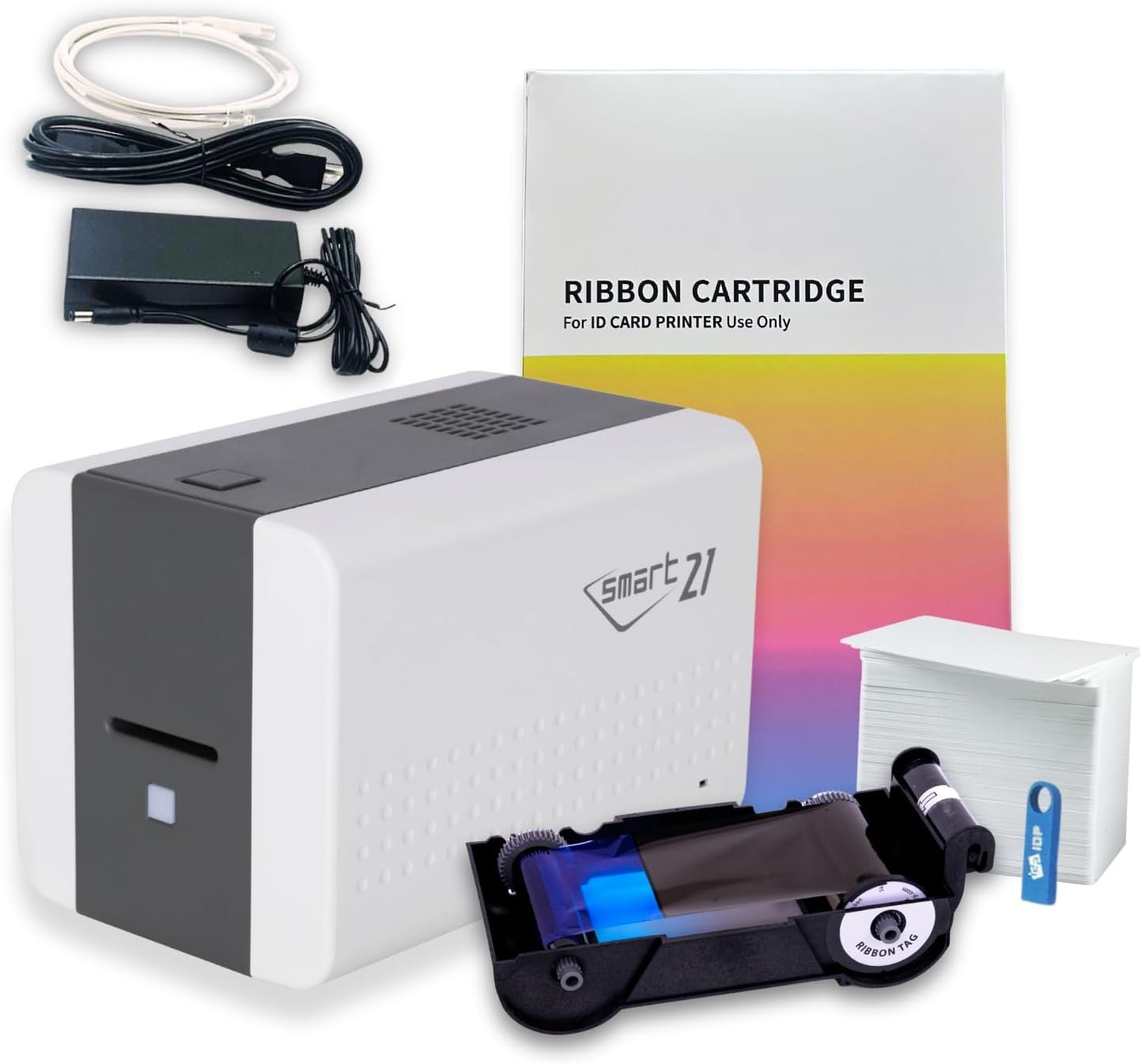
The Importance of Choosing the Right ID Card Printer
In today’s fast-paced business environment, the ability to quickly produce high-quality ID cards can significantly impact operational efficiency. Whether managing access control for a corporate campus, creating membership cards for a gym, or issuing loyalty cards for a retail chain, the right printer can streamline workflows and reduce reliance on external vendors. However, selecting the appropriate device requires careful consideration of factors such as print speed, media compatibility, and ease of integration. For small to mid-sized organizations with moderate printing demands, a simplex printer like the IDP SMART-21SK-EZ offers a compelling balance of affordability and performance. This review evaluates the printer’s technical specifications, operational capabilities, and suitability for various use cases, helping users determine whether this system aligns with their specific needs. By analyzing print resolution, throughput, connectivity options, and media versatility, this analysis provides a comprehensive overview of the SMART-21SK-EZ’s strengths and limitations in the context of 2026’s printing landscape.
Quick Overview
| Feature | Details |
|---|---|
| Printer Type | Dye Sublimation ID Card Printer |
| Print Technology | Dye Sublimation with YMCKO Ribbon |
| Print Resolution | 300×300 DPI (Color), 1200 DPI (Monochrome) |
| Print Speed | 150 Color Cards/Hour, 600 Monochrome Cards/Hour |
| Media Size | CR80 (3.37″ x 2.125″) |
| Supported Media | PVC Plastic Cards, Card Stock |
| Connectivity | USB 2.0/3.0 |
| Duty Cycle | 600 Cards/Run |
| Included Components | Printer, Ribbon, 100 PVC Cards, Software |
| Warranty | Limited |
| Power Consumption | 48 Watts |
The SMART-21SK-EZ combines high-resolution printing with a compact footprint, making it ideal for environments where space is limited. Its USB connectivity simplifies integration with Windows-based systems, while the included YMCKO ribbon and PVC cards eliminate the need for additional purchases. These features position the printer as a practical solution for organizations requiring consistent, on-demand card production without the overhead of high-volume printing systems.

Print Quality and Resolution
The SMART-21SK-EZ delivers professional-grade output through its dye sublimation technology, which transfers ink onto the card surface for vibrant, durable prints. This method ensures that text, logos, and photos maintain clarity and color consistency across multiple prints. The printer’s maximum color resolution of 300×30,000 DPI provides sufficient detail for most ID card applications, including barcodes and QR codes. For monochrome prints, the 1200 DPI resolution ensures crisp text and sharp edges, which is critical for readability in access control systems. However, users with strict color accuracy requirements, such as those printing high-contrast graphics or detailed photographs, may find the resolution slightly limited compared to laser or inkjet alternatives. The printer’s ability to produce consistent color across all cards also reduces the risk of misprints, making it suitable for environments where visual uniformity is essential.

Color and Monochrome Output
The SMART-21SK-EZ’s dual-resolution capability allows it to handle both color and monochrome printing efficiently. Its dye sublimation process ensures that colors remain vibrant even after prolonged exposure to light or environmental factors, which is particularly important for outdoor access badges. The printer’s monochrome resolution of 1200 DPI is well-suited for printing text-heavy cards, such as employee ID badges or membership passes. However, users requiring extremely fine detail in monochrome prints, such as technical diagrams or intricate designs, may find the resolution insufficient. The printer’s ability to maintain consistent color saturation across multiple prints also minimizes the risk of color variation, which is a common concern with dye sublimation technology.
Photo and Graphic Compatibility
While the SMART-21SK-EZ is primarily designed for text and barcode printing, its color resolution is adequate for basic photo applications. The included IDP EasyCapture™ tool simplifies photo capture for ID badges, but users may need to adjust settings to achieve optimal results for complex graphics. The printer’s single-sided printing capability means that photos or detailed graphics will only be printed on one side, which may be a limitation for applications requiring full-page visuals. For organizations that frequently print high-resolution images or detailed graphics, a dual-sided printer or a different printing technology may be more appropriate.
Print Speed and Throughput
The SMART-21SK-EZ is engineered for moderate to high-volume printing, with a maximum color print speed of 150 cards per hour and a monochrome capacity of 600 cards per hour. These speeds are suitable for environments where cards are needed on a regular basis, such as schools, gyms, and small businesses. The printer’s ability to handle both color and monochrome prints in a single session reduces downtime and increases overall efficiency. However, users with extremely high print volumes, such as large corporations or government agencies, may find the printer’s throughput insufficient compared to dedicated high-speed card printers. The printer’s duty cycle of 600 cards per run also ensures that it can handle extended printing sessions without overheating, making it a reliable choice for continuous use.

Handling High-Volume Workloads
While the SMART-21SK-EZ is capable of producing over 150 color cards per hour, its performance may degrade when printing large batches of mixed media. The printer’s single-sided design and reliance on a ribbon-based system can slow down throughput when switching between color and monochrome prints. For organizations with fluctuating printing demands, the printer’s ability to handle a variety of card types without requiring frequent maintenance is a significant advantage. However, users with consistently high-volume needs may benefit from a printer with a higher duty cycle or a more advanced media feeding system.
Efficiency for On-Demand Printing
The SMART-21SK-EZ’s design emphasizes ease of use and quick turnaround times, making it ideal for on-demand printing scenarios. Its compact size and USB connectivity simplify setup, while the included software streamlines the printing process. The printer’s ability to produce high-quality cards in a short period is particularly beneficial for applications such as onboarding new employees or issuing temporary access badges. However, users requiring immediate printing of multiple cards may find the printer’s speed slightly slower than dedicated high-speed systems, which could impact productivity in time-sensitive situations.
Connectivity and Compatibility
The SMART-21SK-EZ’s USB 2.0/3.0 interface ensures seamless integration with Windows-based systems, eliminating the need for additional networking infrastructure. This connectivity option is particularly advantageous for small businesses and organizations with limited IT resources, as it simplifies setup and maintenance. The printer’s compatibility with both Windows 10/11 and Linux operating systems expands its appeal to a wider range of users. However, the absence of wireless or network connectivity limits its suitability for environments requiring remote printing or multi-user access. The printer’s reliance on a single USB port also means that users must ensure a stable connection to avoid interruptions during printing sessions.

Software Integration and Usability
The included IDesigner software provides a user-friendly interface for managing print jobs, customizing card designs, and integrating with the IDP EasyCapture™ tool. The software’s compatibility with Windows-based systems ensures that users can leverage existing workflows without significant adjustments. However, the lack of Mac compatibility may be a drawback for organizations with a mixed computing environment. The printer’s control panel, featuring an LED button, further simplifies operation, but users requiring advanced customization or batch processing may find the software’s capabilities limited compared to more sophisticated printing solutions.
Limitations of USB-Only Connectivity
While USB connectivity offers simplicity and reliability, it also restricts the printer’s flexibility in environments with multiple users or remote access needs. The absence of network printing capabilities means that the printer cannot be integrated into centralized printing systems or accessed from mobile devices. This limitation may be a concern for organizations that require print-on-demand capabilities across different locations or departments. However, for users with straightforward printing requirements and a centralized Windows network, the USB interface remains a practical and cost-effective solution.
Media Support and Versatility
The SMART-21SK-EZ supports a range of media types, including PVC plastic cards and card stock, making it suitable for various applications such as ID badges, membership cards, and loyalty cards. The printer’s CR80 media size is standard for most card printing applications, ensuring compatibility with a wide range of card designs and formats. However, the lack of support for larger or specialized media types may limit its versatility for niche use cases. The printer’s ability to handle both color and monochrome prints also expands its applicability, though users requiring high-quality photo prints may need to consider alternative printing technologies.

Compatibility with Different Card Materials
The printer’s support for PVC plastic cards ensures durability and resistance to environmental factors, making it ideal for outdoor or high-traffic environments. However, users requiring cards with additional security features, such as holographic elements or microprinting, may find the printer’s capabilities insufficient. The inclusion of card stock as an option provides flexibility for temporary or internal use, but the lack of support for specialized materials like RFID-enabled cards may be a limitation for certain applications. The printer’s ability to handle multiple media types without requiring frequent adjustments is a significant advantage for users with diverse printing needs.
Media Handling and Feeding
The SMART-21SK-EZ’s hand-fed media system simplifies loading and unloading cards, reducing the risk of jams or misfeeds. This design is particularly beneficial for users with limited space or those who prefer manual control over the printing process. However, the reliance on manual feeding may increase the time required for large print runs, especially when switching between different media types. The printer’s media tray capacity of 80 cards ensures that users can complete multiple print jobs without frequent interruptions, though this may not be sufficient for high-volume operations.

Pros & Cons
Pros
- High-Resolution Printing: The SMART-21SK-EZ delivers sharp text and vibrant colors suitable for most ID card applications, including barcodes and QR codes.
- Efficient Throughput: With a maximum color print speed of 150 cards per hour and 600 monochrome cards per hour, the printer handles moderate to high-volume printing effectively.
- User-Friendly Design: The compact size, LED control panel, and included software simplify setup and operation, making it ideal for small to mid-sized organizations.
- Versatile Media Support: The printer supports both PVC plastic cards and card stock, offering flexibility for different use cases such as access control and membership cards.
- Included Components: The starter kit includes a ribbon, 100 PVC cards, and software, reducing the need for additional purchases.
- Reliable Connectivity: USB 2.0/3.0 interface ensures stable and straightforward integration with Windows-based systems.
Cons
- Limited Media Compatibility: The printer does not support specialized card materials such as RFID-enabled or holographic cards, which may be necessary for certain applications.
- Single-Sided Printing: The lack of duplex printing capability means that photos or detailed graphics will only be printed on one side, which may be a limitation for full-page visuals.
- USB-Only Connectivity: The absence of wireless or network printing options restricts flexibility in environments requiring remote access or multi-user printing.
- No Mac Compatibility: The printer’s reliance on Windows-based software may be a drawback for organizations with a mixed computing environment.
- Moderate Throughput: While suitable for moderate volumes, the printer may struggle with extremely high print demands compared to dedicated high-speed systems.
- Manual Media Feeding: The hand-fed system, while simple, may increase the time required for large print runs or switching between media types.
Final Verdict: Who This Printer Is Best For (and Who Should Skip It)
The IDP SMART-21SK-EZ is best suited for small to mid-sized organizations with moderate printing needs, such as gyms, schools, and small businesses. Its high-resolution printing, user-friendly design, and included components make it an attractive option for environments where on-demand card production is essential. The printer’s compatibility with Windows-based systems and support for both color and monochrome prints further enhance its versatility. However, users requiring high-speed printing, specialized media support, or remote access capabilities may find the SMART-21SK-EZ insufficient for their needs. Organizations with strict color accuracy requirements, high-volume printing demands, or a need for duplex printing should consider alternative solutions such as laser or inkjet printers. Overall, the SMART-21SK-EZ offers a practical and cost-effective solution for its target audience, though its limitations in connectivity and media compatibility may exclude it from more demanding applications.

Frequently Asked Questions (FAQs)
What printing technology does the IDP SMART-21SK-EZ use?
The SMART-21SK-EZ utilizes dye sublimation technology, which transfers ink onto the card surface for vibrant, durable prints. This method ensures consistent color saturation and sharp text, making it suitable for ID badges, access control cards, and membership passes.
Is the SMART-21SK-EZ compatible with Mac computers?
The printer is designed for Windows-based systems and does not support Mac OS. Users with a mixed computing environment may need to consider alternative solutions or use a Windows machine for printing.
What is the maximum print speed of the SMART-21SK-EZ?
The printer can produce up to 150 color cards per hour and 600 monochrome cards per hour. These speeds are suitable for moderate to high-volume printing in environments such as schools, gyms, and small businesses.
Can the SMART-21SK-EZ print on both sides of the card?
No, the printer is designed for simplex printing and can only print on one side of the card. This makes it ideal for applications requiring single-sided output, such as access control badges and membership cards.
What types of media does the SMART-21SK-EZ support?
The printer supports CR80-sized PVC plastic cards and card stock. These materials are suitable for a variety of applications, including ID badges, loyalty cards, and temporary access passes.
Does the SMART-21SK-EZ include software for customizing card designs?
Yes, the printer comes with IDesigner software that allows users to customize card designs, manage print jobs, and integrate with the IDP EasyCapture™ photo capture tool for ID badge creation.
What is the power consumption of the SMART-21SK-EZ?
The printer consumes 48 watts of power during operation, which is energy-efficient for its intended use in office and small business environments.
Can the SMART-21SK-EZ handle high-volume printing needs?
While the printer is suitable for moderate to high-volume printing, its throughput may not meet the demands of extremely high-volume operations. It is best suited for environments where on-demand printing is required rather than continuous, large-scale production.