

The Importance of Choosing the Right Printer
In today’s fast-paced world, the ability to print documents efficiently and reliably is a critical need for both personal and professional users. Whether you’re a student preparing for exams, a business professional on the move, or a remote worker managing multiple tasks, having access to a printer that meets your specific requirements can significantly impact productivity. The right printer should not only deliver high-quality output but also adapt to varying environments and usage scenarios. From the quiet confines of a home office to the bustling atmosphere of a conference room, the printer must perform consistently without compromising on speed or reliability. Additionally, considering factors such as connectivity options, print resolution, and portability can help users make informed decisions that align with their workflow. As technology continues to evolve, the demand for versatile, user-friendly printing solutions has never been higher, making it essential to evaluate printers based on their ability to meet diverse needs while maintaining performance standards.
Quick Overview
| Feature | Details |
|---|---|
| Printer Type | Thermal Printer |
| Connectivity | Bluetooth, USB |
| Print Technology | Thermal |
| Print Resolution | 300 dpi (Black & White) |
| Print Speed | 3 ppm (Monochrome) |
| Media Sizes | A4, Letter (8.5 x 11 inches) |
| Supported Formats | Word, PDF, TXT, Excel, Images |
| Print Weight | 0.99 pound |
| Dimensions | 10.55 x 2.28 x 1.18 inches |
| Power Source | 1 A batteries (included) |
| Warranty | Limited |
| Included Components | Installation guide, Paper, Printer, USB cable |
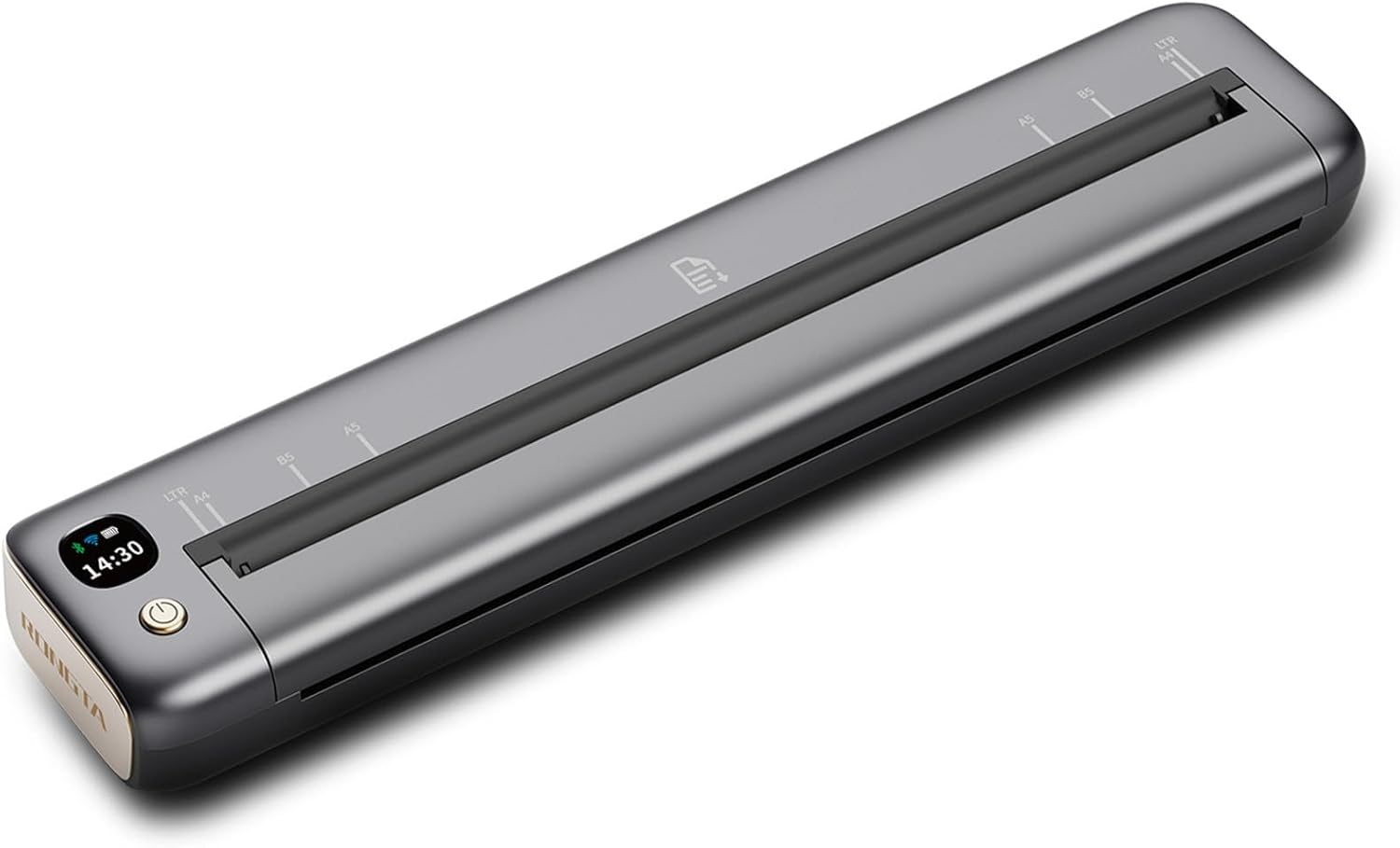
The Rongta F81 thermal printer is designed with portability and ease of use in mind. Its lightweight build and compact size make it ideal for travel and on-the-go printing, while its compatibility with both Bluetooth and USB connections ensures flexibility in how users interact with the device. The printer’s ability to handle standard thermal paper and support multiple file formats enhances its versatility for various tasks, from printing documents to creating receipts. These features collectively position the F81 as a practical solution for users who prioritize mobility and convenience without sacrificing print quality.

Connectivity and Compatibility: A Key Factor in Printer Selection
The Rongta F81’s connectivity options play a crucial role in its usability across different environments. By supporting both Bluetooth and USB connections, the printer offers users multiple ways to initiate printing tasks. Bluetooth connectivity allows for wireless printing from smartphones and tablets, which is particularly beneficial for users who frequently travel or work in locations where wired connections are not feasible. The USB port provides a reliable alternative for users who prefer a direct connection, especially when working with laptops or desktop computers. This dual connectivity approach ensures that the printer can adapt to various user preferences and scenarios, making it a versatile choice for both home and office settings. However, the printer’s limitations in supporting Linux and Chrome OS highlight the importance of considering device compatibility when selecting a printer. Users operating on these platforms may need to explore alternative solutions or ensure that their operating system supports the necessary drivers for the F81.
Bluetooth Connectivity and Wireless Printing
The Rongta F81’s Bluetooth capability simplifies the printing process for users who rely on mobile devices. By pairing the printer with a smartphone or tablet via the “SoPrint” app, users can initiate printing with minimal effort, eliminating the need for physical cables. This feature is particularly advantageous for individuals who frequently travel or work in environments where mobility is a priority. The app’s user-friendly interface further enhances the experience by allowing users to select file types and adjust print settings before initiating a print job. However, the requirement to use thermal paper for printing is a notable constraint. Users must ensure they have the appropriate paper stock on hand, as the printer does not support standard paper. This limitation may impact users who require printing on different media types, necessitating careful planning and preparation.
USB Connectivity and Direct Printing
For users who prefer a more straightforward approach, the USB connectivity option provides a reliable method for printing from computers. By connecting the Rongta F81 to a laptop or desktop via USB, users can leverage the printer’s capabilities without the need for additional software installations. The included USB cable simplifies the setup process, allowing users to quickly access the printer’s features and functions. This direct connection is particularly beneficial for users who handle large volumes of print jobs or require consistent output quality. However, the lack of Bluetooth support for laptops means that users must rely on the USB port for printing from these devices, which could be a drawback for those who prioritize wireless convenience. Overall, the combination of Bluetooth and USB connectivity options ensures that the Rongta F81 remains a flexible solution for a wide range of printing needs.
Device Compatibility and Operating System Support
The Rongta F81’s compatibility with iOS, Android, and Windows devices makes it a practical choice for users who operate within these ecosystems. The “SoPrint” app enhances the printing experience by providing a seamless interface for managing print jobs and adjusting settings. However, the printer’s exclusion of Linux and Chrome OS support is a significant consideration for users who rely on these operating systems. While the printer’s specifications do not explicitly mention support for these platforms, the absence of driver availability suggests that users may face challenges in integrating the F81 into their workflow. This limitation highlights the importance of verifying device compatibility before purchasing, as it can impact the printer’s usability for certain users.
The Role of the “SoPrint” App in Enhancing User Experience
The “SoPrint” app is an essential component of the Rongta F81’s functionality, offering users a convenient way to manage their printing tasks. The app’s design prioritizes simplicity, allowing users to connect to the printer quickly and efficiently. Features such as file type selection and print settings customization provide users with greater control over their output, enhancing the overall printing experience. Additionally, the app’s availability as a free download makes it accessible to a wide range of users, further contributing to the printer’s appeal. However, the reliance on the app for wireless printing may be a drawback for users who prefer a more direct connection method. Overall, the “SoPrint” app plays a vital role in ensuring that the Rongta F81 remains a user-friendly and efficient printing solution.
Print Quality and Output: Meeting User Expectations
The Rongta F81’s print quality is a critical factor in determining its suitability for various tasks. With a maximum print resolution of 300 dpi for black-and-white prints, the printer delivers clear and legible text, making it ideal for documents such as reports, invoices, and receipts. The thermal printing technology used by the F81 ensures that the output remains consistent without the need for ink or toner, which is a significant advantage for users looking to reduce consumable costs. However, the reliance on thermal paper may limit the printer’s versatility, as it cannot accommodate standard paper types. This limitation could be a concern for users who require printing on different media, as they must ensure they have the appropriate paper stock available. Despite this constraint, the printer’s ability to produce high-quality output at a reasonable speed makes it a viable option for users who prioritize print clarity and reliability.

Thermal Printing Technology and Its Implications
The use of thermal printing technology in the Rongta F81 has several implications for its performance and usability. Unlike inkjet or laser printers, thermal printers do not require ink or toner, which reduces maintenance and operational costs. This makes the F81 an attractive option for users who are looking for a low-maintenance printing solution. The thermal paper used in the printer is designed to produce high-quality prints without the need for additional consumables, which is particularly beneficial for users who frequently print small volumes of documents. However, the reliance on thermal paper also means that users must be mindful of the paper’s characteristics, as it can be more sensitive to heat and light compared to standard paper. This sensitivity may impact the longevity of printed documents, especially if they are exposed to environmental factors such as humidity or direct sunlight.
Print Speed and Duty Cycle Considerations
The Rongta F81’s print speed of 3 pages per minute (ppm) for black-and-white prints is a key consideration for users who need to handle multiple print jobs efficiently. While this speed is adequate for most casual printing needs, it may fall short for users who require faster output, such as those in high-volume environments. The printer’s duty cycle, which refers to the maximum number of pages it can print without requiring maintenance, is an important factor in determining its suitability for different usage scenarios. Although the specifications do not provide detailed information on the duty cycle, the printer’s design for portable use suggests that it is intended for moderate to light printing tasks. Users who anticipate frequent or heavy usage should consider whether the F81’s capabilities align with their specific requirements.
Print Resolution and Document Clarity
The Rongta F81’s print resolution of 300 dpi ensures that text and graphics are rendered with clarity and precision, making it suitable for a wide range of documents. This resolution is particularly beneficial for users who need to produce professional-looking reports, invoices, or receipts. The consistent output quality provided by the thermal printing technology enhances the printer’s reliability, as it minimizes the risk of smudges or faded text. However, the printer’s performance with graphics and images may be limited compared to more advanced printing technologies. Users who frequently print complex documents or high-resolution images may find the F81’s capabilities to be a constraint, as the thermal paper may not support the same level of detail as other printing media. Despite this limitation, the printer’s ability to produce clear and legible text makes it a practical choice for many users.

Pros and Cons: Evaluating the Rongta F81’s Strengths and Limitations
Pros
- Lightweight and Portable Design: The Rongta F81’s compact size and lightweight build make it easy to transport, ideal for users who need to print on the go. Its design allows for convenient storage and quick access, enhancing its usability in various environments.
- Dual Connectivity Options: The printer’s support for both Bluetooth and USB connectivity provides users with flexibility in how they interact with the device. This dual approach caters to different user preferences, whether they prioritize wireless convenience or a direct connection.
- High Print Resolution: With a maximum print resolution of 300 dpi, the Rongta F81 delivers clear and legible text, making it suitable for a variety of document types, including reports and invoices.
- User-Friendly App Integration: The “SoPrint” app simplifies the printing process, offering a seamless interface for managing print jobs and adjusting settings. This integration enhances the overall user experience, particularly for those who rely on mobile devices.
- Low Maintenance Requirements: The thermal printing technology used by the F81 reduces the need for ink or toner, lowering maintenance costs and operational expenses. This makes the printer an attractive option for users seeking a low-maintenance solution.
- Compatibility with Multiple Devices: The printer’s ability to connect with iOS, Android, and Windows devices ensures that it can be integrated into various workflows, enhancing its versatility for different user needs.
Cons
- Limited Media Support: The Rongta F81 exclusively supports thermal paper, which may be a drawback for users who require printing on standard paper types. This limitation could impact the printer’s usability in certain scenarios where alternative media are needed.
- No Support for Linux and Chrome OS: The printer’s exclusion of support for Linux and Chrome OS platforms may pose challenges for users who rely on these operating systems. This limitation could affect the printer’s integration into their workflow, requiring additional steps or alternative solutions.
- Print Speed Constraints: While the printer’s print speed of 3 ppm is adequate for casual use, it may not meet the demands of users who require faster output for high-volume printing tasks. This could be a significant consideration for those in busy environments.
- Dependence on Thermal Paper: The reliance on thermal paper for printing means that users must ensure they have the appropriate stock available. This dependence could lead to potential issues if thermal paper is not readily accessible, impacting the printer’s usability.
- No Duplex Printing Capability: The absence of duplex printing functionality means that users will need to manually flip pages for double-sided printing. This limitation could be inconvenient for those who frequently print documents requiring both sides.
Final Verdict: Who This Printer Is Best For (and Who Should Skip It)
The Rongta F81 thermal printer is an excellent choice for users who prioritize portability and ease of use, particularly those who frequently travel or work in environments where wireless printing is essential. Its lightweight design and dual connectivity options make it a practical solution for individuals who need to print documents on the go, whether for business meetings, travel, or personal use. The printer’s high print resolution ensures that text and graphics are clear and legible, making it suitable for a variety of document types. Additionally, the low maintenance requirements of the thermal printing technology reduce operational costs, which is a significant advantage for users seeking a cost-effective printing solution.
However, the Rongta F81 may not be the best choice for users who require printing on standard paper or those who operate on Linux or Chrome OS platforms. The printer’s exclusive support for thermal paper and lack of compatibility with certain operating systems could limit its usability in specific scenarios. Users who anticipate high-volume printing or need faster output may also find the printer’s print speed and resolution to be insufficient for their needs. Overall, the Rongta F81 is well-suited for casual users and those who value portability and simplicity, but it may fall short for more demanding printing environments where versatility and speed are critical factors.

Frequently Asked Questions (FAQs)
Can the Rongta F81 printer print on standard paper?
The Rongta F81 thermal printer is designed to work exclusively with thermal paper. It does not support standard paper types, so users must ensure they have the appropriate thermal paper stock available for printing.
Is the Rongta F81 compatible with Linux or Chrome OS?
The Rongta F81 printer does not support Linux or Chrome OS platforms. Users operating on these operating systems may need to explore alternative printing solutions or verify compatibility with the printer’s drivers.
How do I connect the Rongta F81 to my smartphone?
To connect the Rongta F81 to your smartphone, download the “SoPrint” app, turn on the printer, and pair it via Bluetooth. Once connected, select the desired file type to start printing.
What is the maximum print speed of the Rongta F81?
The Rongta F81 thermal printer has a maximum print speed of 3 pages per minute (ppm) for black-and-white prints, making it suitable for casual use but potentially slower for high-volume printing tasks.
Does the Rongta F81 support duplex printing?
The Rongta F81 does not support duplex printing. Users will need to manually flip the paper for double-sided printing, which may be inconvenient for those who frequently print on both sides.
What is the battery life of the Rongta F81?
The Rongta F81 requires 1 A battery and includes it in the package. The battery life will depend on usage patterns, but the printer is designed for portability and convenience without requiring frequent recharging.
Can the Rong,ta F81 print images and graphics?
The Rongta F81 supports printing images and graphics, but the thermal printing technology may limit the level of detail compared to more advanced printing methods. Users should expect clear and legible output for most document types.
What are the recommended media sizes for the Rongta F81?
The Rongta F81 supports media sizes including A4, Letter (8.5 x 11 inches), B5, and A5. Users should ensure they are using thermal paper within these dimensions for optimal printing results.