Canon imageCLASS MF269dw Review: All-in-One Laser Printer for Small Business Efficiency
The Importance of Choosing the Right Printer for Small Business Operations
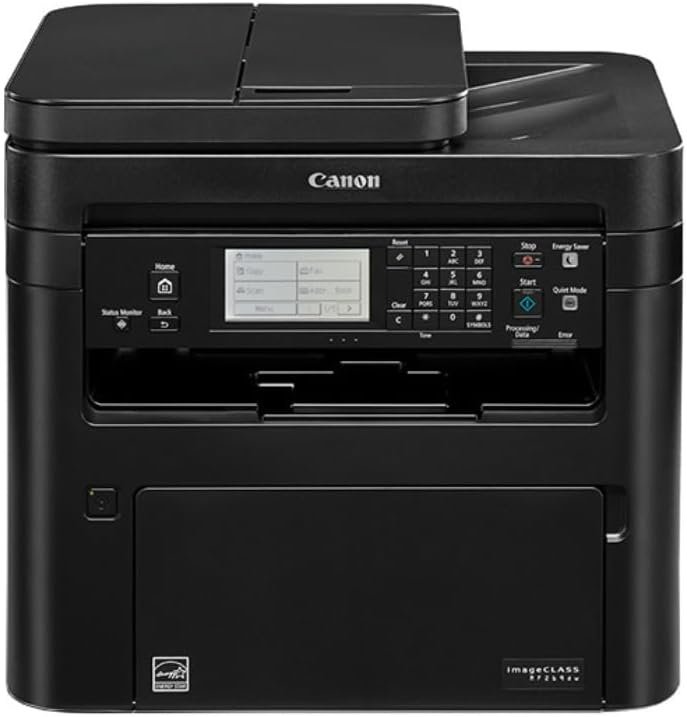
In today’s fast-paced business environment, selecting the right printer can significantly impact operational efficiency. Small and medium-sized businesses often require reliable, multifunctional printing solutions that balance speed, cost-effectiveness, and ease of use. The Canon imageCLASS MF269dw represents a strategic choice for organizations seeking a printer that combines laser printing technology with advanced connectivity features. This all-in-one device offers duplex printing, wireless connectivity, and mobile compatibility, making it suitable for environments where document management, scanning, and copying are frequent tasks. Its design prioritizes minimal maintenance and energy efficiency, aligning with modern workplace demands for sustainability. However, the decision to adopt this printer should consider factors such as print volume, media compatibility, and long-term operational costs. Understanding these elements ensures that the printer meets specific business needs without compromising on performance or flexibility. For users prioritizing speed, connectivity, or cost efficiency, the MF269dw provides a compelling case for integration into their workflow.
Quick Overview
| Feature | Details |
|---|---|
| Printer Type | All-in-One Laser Printer |
| Printing Technology | Laser (Toner) |
| Supported Functions | Print, Scan, Copy |
| Print Resolution | 600 x 600 dpi (Color/Black and White) |
| Print Speed | Up to 30 pages per minute (Monochrome/Color) |
| Media Sizes | 3″ x 5″ to 8.5″ x 14″ (Letter, Legal, Envelopes) |
| Connectivity | Wireless (Wi-Fi Direct), Mobile App Compatibility |
| Duplex Printing | Automatic |
| Warranty | 90-Day Limited Warranty |
| Toner System | High-Yield Toner Option (Not Included) |
The Canon imageCLASS MF269dw is designed for small to medium-sized offices requiring a multifunctional printer with wireless connectivity and duplex printing capabilities. Its combination of laser printing technology and energy-efficient features makes it suitable for environments prioritizing speed and cost-effective document management. The device’s compatibility with mobile devices and its support for various media sizes enhance its adaptability to different printing needs.

Print Performance and Speed: Balancing Efficiency and Volume
The Canon imageCLASS MF269dw delivers consistent print speeds of up to 30 pages per minute for both monochrome and color output, making it well-suited for environments with moderate to high print volumes. Its laser printing technology ensures durable output with minimal maintenance, reducing the need for frequent toner replacements. The printer’s quick first print time of approximately 5 seconds minimizes downtime, allowing users to start printing almost immediately after initiating a job. This performance is particularly advantageous in settings where rapid document turnaround is critical, such as administrative offices or customer service departments.

Laser Printing Technology and Toner Efficiency
Laser printers like the MF269dw utilize a toner-based printing system that produces sharp, high-contrast text and graphics. The printer’s toner system is designed for long-term use, with high-yield toner options available for extended print runs. While the included product does not come with toner, the printer’s ability to handle high-yield toner ensures that users can maintain consistent output without frequent replacements. This feature is particularly beneficial for businesses requiring large volumes of printed materials, as it reduces the frequency of toner refills and associated operational costs.
Duplex Printing and Energy Efficiency
The built-in automatic duplex printing function helps reduce paper consumption by printing on both sides of the page. This not only lowers material costs but also contributes to energy efficiency by minimizing the power required for printing. The printer’s energy-saving features align with modern workplace sustainability goals, making it an attractive option for organizations committed to reducing their environmental footprint. The dual-sided printing capability also enhances document organization, as it automatically manages page orientation and alignment.
Print Quality and Resolution
The MF269dw produces print quality with a resolution of 600 x 600 dpi, which is suitable for most business documents, including reports, forms, and correspondence. While it may not match the color accuracy of high-end inkjet printers, its laser technology ensures consistent, smudge-free text and graphics. The printer’s ability to handle various media types, including plain paper and envelopes, further enhances its versatility in different office environments.
Connectivity and Mobility: Seamless Integration with Modern Workflows
The Canon imageCLASS MF269dw is designed with modern connectivity in mind, offering wireless printing capabilities and compatibility with mobile devices. This feature is particularly valuable for businesses that require flexible printing solutions, as it allows users to print from smartphones, tablets, and computers without the need for physical connections. The printer’s support for Wi-Fi Direct and the Canon PRINT Business app ensures that users can access printing functions remotely, enhancing productivity in distributed work environments.

Wireless Printing and Mobile App Integration
The MF269dw’s wireless capabilities enable users to print directly from mobile devices without the need for a computer. This is especially useful for employees who frequently work on the go or need to print documents from their personal devices. The Canon PRINT Business app provides a user-friendly interface for managing print jobs, accessing settings, and monitoring ink/toner levels. This integration simplifies the printing process and reduces the time required to set up and manage print tasks.
Network Compatibility and Security Features
The printer’s network compatibility ensures that it can be seamlessly integrated into existing office networks, allowing multiple users to access its functions simultaneously. Its built-in security features, such as administrator-controlled settings and short-term memory storage, help protect sensitive data by limiting unauthorized access. These features are essential for businesses handling confidential information, as they provide an additional layer of protection against potential security threats.
Cross-Platform Compatibility
The MF269dw’s support for iOS and Android devices ensures that it can be used across different operating systems, making it a versatile choice for organizations with diverse device ecosystems. This compatibility is particularly beneficial in environments where employees use a mix of personal and company-issued devices, as it eliminates the need for additional hardware or software to manage printing tasks.
Cost Efficiency and Maintenance: Reducing Long-Term Operational Expenses
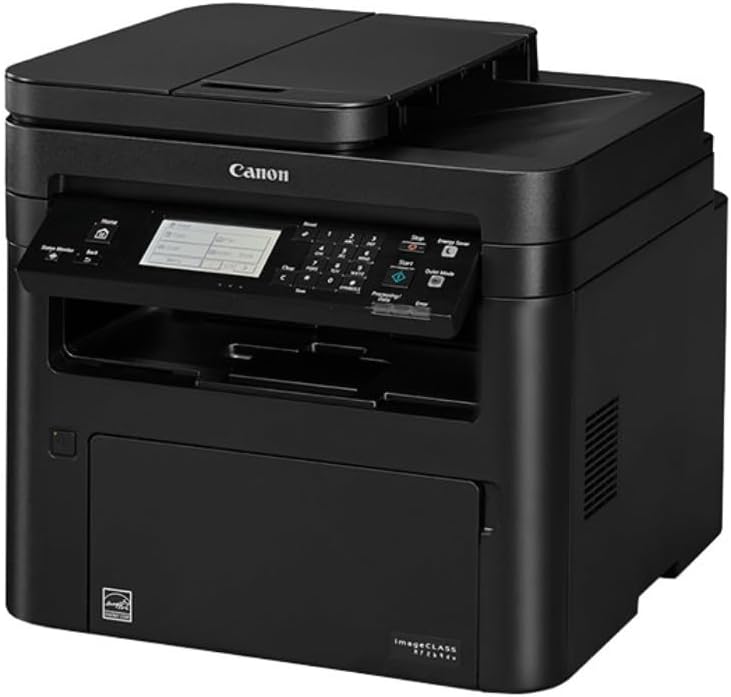
The Canon imageCLASS MF269dw is engineered to minimize long-term operational costs through its energy-efficient design and low-maintenance requirements. The printer’s built-in duplex printing function reduces paper consumption, which in turn lowers material costs and contributes to energy savings. Additionally, the device’s laser printing technology ensures that toner usage is optimized, reducing the frequency of toner replacements and associated expenses.
Energy Efficiency and Paper Conservation
The printer’s energy-saving features are designed to reduce power consumption without compromising performance. Its ability to handle high-yield toner options further enhances cost efficiency by extending the lifespan of toner cartridges. These features make the MF269dw an attractive option for businesses looking to reduce their environmental impact while maintaining operational efficiency.
Maintenance and Reliability
The MF269dw’s design emphasizes minimal maintenance, with components that are easy to access and replace. The printer’s reliability is supported by its robust build quality and the absence of complex mechanical parts that could lead to frequent breakdowns. This reliability is particularly important for businesses that rely on consistent printing to maintain workflow efficiency.
Consumable Management
While the included product does not come with toner, the printer’s compatibility with high-yield toner options ensures that users can manage consumables effectively. The ability to monitor toner levels through the Canon PRINT Business app helps users plan replacements in advance, preventing unexpected downtime and ensuring continuous printing operations.

Pros & Cons
Pros
- High Print Speed: The MF269dw’s ability to print up to 30 pages per minute makes it suitable for environments with high-volume printing needs.
- Wireless and Mobile Compatibility: The printer’s support for Wi-Fi Direct and mobile app integration enhances its adaptability to modern work environments.
- Energy Efficiency: The built-in duplex printing function reduces paper and energy consumption, aligning with sustainability goals.
- Robust Build Quality: The printer’s durable construction ensures long-term reliability with minimal maintenance.
- Security Features: Administrator-controlled settings and short-term memory storage provide enhanced data protection for sensitive documents.
- Versatile Media Support: The ability to handle various media types, including envelopes and legal-sized paper, increases its usability across different tasks.
Cons
- No Included Toner: The product does not come with toner, requiring users to purchase high-yield toner separately, which may increase initial costs.
- Limited Color Output: While the printer produces sharp text, its color output may not match the quality of high-end inkjet printers for graphic-intensive tasks.
- Dependence on Network Connectivity: The wireless functionality requires a stable network connection, which could pose challenges in environments with unreliable internet.
- No Fax Functionality: The absence of a fax feature may be a drawback for businesses that still rely on traditional fax communication.
- Moderate Print Quality for Photos: The printer’s laser technology is optimized for text and graphics, making it less suitable for photo printing compared to dedicated photo printers.
Final Verdict: Who This Printer Is Best For (and Who Should Skip It)
The Canon imageCLASS MF269dw is best suited for small to medium-sized businesses that require a reliable, multifunctional printer with wireless connectivity and duplex printing capabilities. Its high print speed and energy-efficient design make it ideal for environments where document management and cost-effectiveness are priorities. The printer’s compatibility with mobile devices and its robust security features further enhance its appeal for offices handling sensitive data. However, businesses with high-volume color printing needs or those requiring fax functionality may find the MF269dw less suitable. Additionally, organizations with limited network infrastructure or those prioritizing photo printing should consider alternative solutions. Overall, the MF269dw provides a balanced combination of performance, efficiency, and reliability, making it a strong contender for the right use case.
Frequently Asked Questions (FAQs)
Is the Canon imageCLASS MF269dw suitable for small business use?
The Canon imageCLASS MF269dw is well-suited for small businesses due to its high print speed, wireless connectivity, and multifunctional capabilities. Its energy-efficient design and automatic duplex printing help reduce operational costs, making it an efficient choice for office environments with moderate to high print volumes.
Can the Canon imageCLASS MF269dw print on different media types?
Yes, the MF269dw supports a variety of media types, including plain paper, envelopes, and legal-sized paper. Its compatibility with different paper sizes and types enhances its versatility for various printing tasks in a business setting.
What connectivity options does the Canon imageCLASS MF269dw offer?
The printer offers wireless connectivity through Wi-Fi Direct and is compatible with the Canon PRINT Business app for mobile printing. These features allow users to print from iOS and Android devices without the need for a physical connection.
Does the Canon imageCLASS MF269dw include toner?
The Canon imageCLASS MF269dw does not include toner with the purchase. Users must purchase high-yield toner separately, which is designed for extended print runs and cost-effective usage.
How energy-efficient is the Canon imageCLASS MF269dw?
The MF269dw is designed with energy-saving features, including automatic duplex printing that reduces paper and energy consumption. These features align with sustainability goals and help lower long-term operational costs.
What security features are available on the Canon imageCLASS MF269dw?
The printer includes security features such as administrator-controlled settings and short-term memory storage. These help protect sensitive data by limiting unauthorized access and ensuring secure document handling.
Is the Canon imageCLASS MF269dw compatible with mobile devices?
Yes, the MF269dw is compatible with iOS and Android devices through the Canon PRINT Business app. This allows users to print directly from their mobile devices without the need for a computer connection.
What is the print resolution of the Canon imageCLASS MF269dw?
The printer produces print output with a resolution of 600 x 600 dpi, which is suitable for most business documents. This resolution ensures sharp text and clear graphics, though it may not match the color accuracy of high-end inkjet printers.