Canon Color imageCLASS MF644Cdw Review: Versatile Laser Printer for Small Businesses
The Importance of Choosing the Right Printer for Business Operations
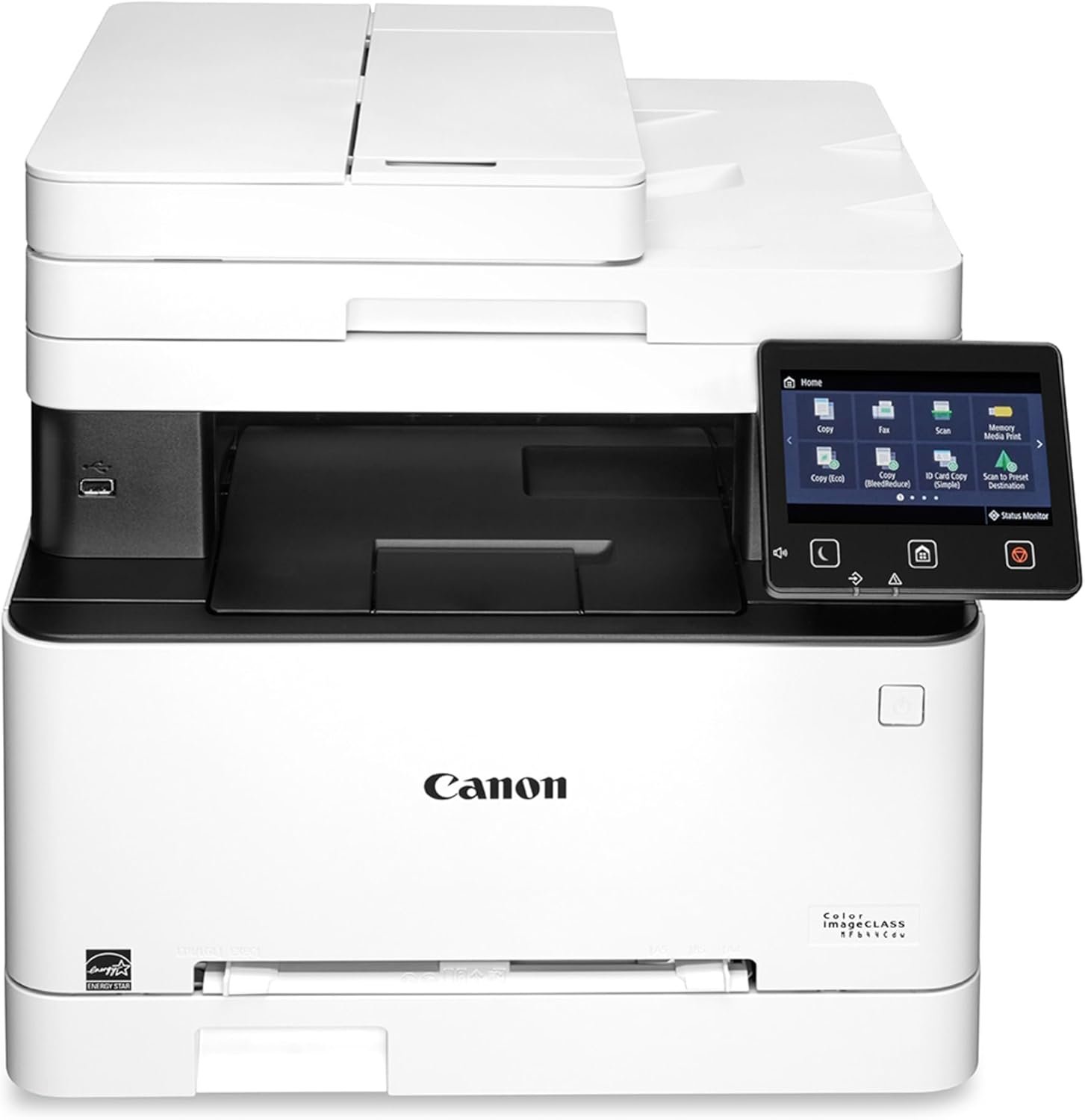
In today’s fast-paced business environment, selecting the right printer is critical for maintaining productivity and efficiency. Whether managing daily print tasks, handling document workflows, or ensuring secure data handling, the right printer can significantly impact operational effectiveness. For small to medium-sized businesses, the Canon Color imageCLASS MF644Cdw stands out as a multifunctional device that combines printing, scanning, copying, and faxing capabilities into a single unit. Its design addresses common challenges such as print speed, media compatibility, and connectivity, making it a viable option for environments with moderate to high print volumes. This printer’s ability to support wireless connectivity, mobile printing, and automatic duplex printing aligns with modern workplace demands, while its reliability and cost-efficient toner system reduce long-term operational costs. Understanding the features and performance metrics of the Canon Color imageCLASS MF644Cdw enables businesses to evaluate whether it meets their specific needs, from office printing to secure document management.
Quick Overview
| Feature | Details |
|---|---|
| Printer Type | Color Laser Printer |
| Printing Technology | Laser |
| Supported Functions | Print, Scan, Copy, Fax |
| Print Resolution | At least 600×600 dpi (color), 600 dpi (black and white) |
| Print Speed | 22 ppm (color), 22 ppm (monochrome) |
| Media Sizes | 3 x 5, 8.5 x 14 inches |
| Connectivity | Wi-Fi, Ethernet, USB |
| Duplex Printing | Automatic |
| Warranty | 3-year limited warranty |
| Power Consumption | 850 Watts |
| Toner System | High-capacity toner cartridges |
| Maximum Media Size | 8.5 x 14 inches |
| Input Capacity | 50 sheets |
The Canon Color imageCLASS MF644Cdw is designed for small to medium-sized businesses requiring a multifunctional printer with reliable performance and connectivity. Its combination of laser printing, wireless capabilities, and automatic duplex printing makes it suitable for environments where efficiency and cost-effectiveness are priorities.

Connectivity and Mobility: Seamless Integration with Modern Workflows
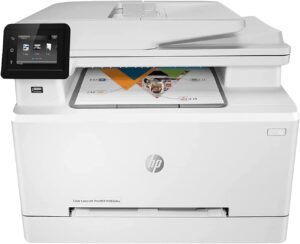
The Canon Color imageCLASS MF644Cdw excels in its ability to integrate with contemporary business environments through robust connectivity options and mobile-ready features. Its support for Wi-Fi, Ethernet, and USB ensures compatibility with a wide range of devices, from traditional desktop computers to modern mobile devices. The inclusion of a 5-inch color touchscreen enhances user interaction, offering an intuitive interface for managing print jobs and accessing the Application Library for customized workflows. Additionally, the printer’s Wi-Fi Direct functionality allows direct connections to mobile devices without the need for an external router, streamlining document printing on the go. These connectivity features are particularly beneficial for businesses that require flexible printing solutions, enabling users to manage print tasks remotely while maintaining productivity. The printer’s support for mobile printing and scanning further enhances its utility in environments where employees frequently work from multiple locations or need to access documents from portable devices.

Wireless Connectivity and Mobile Integration
The printer’s Wi-Fi and Ethernet capabilities ensure seamless integration with existing network infrastructures, allowing for easy setup and management. The Wi-Fi Direct feature enables direct printing from smartphones and tablets, eliminating the need for additional routers or complex configurations. This is particularly advantageous for users who prioritize convenience and efficiency in their printing workflows. The printer’s compatibility with Amazon Alexa and Vera controllers also expands its functionality, enabling voice-activated commands for common tasks such as initiating scans or checking ink levels. These features collectively enhance the printer’s adaptability to modern work environments, where mobility and remote access are essential.
Touchscreen Interface and Customization
The 5-inch color touchscreen provides an intuitive user experience, offering quick access to frequently used functions and settings. Device administrators can customize the interface to simplify daily tasks, such as setting default print options or configuring network settings. This level of customization is beneficial for businesses with specific workflow requirements, allowing for streamlined operations and reduced user errors. The touchscreen also supports the Application Library, which provides access to various productivity tools and services, further enhancing the printer’s utility in a business setting.
Mobile Printing and Scanning Capabilities
The Canon Color imageCLASS MF644Cdw supports mobile printing through its Wi-Fi Direct and cloud connectivity options, enabling users to print documents from their smartphones or tablets without the need for a physical connection. This feature is particularly useful for remote workers or those who frequently need to access documents from mobile devices. The printer’s scanning capabilities are also enhanced by its one-pass document feeder, which allows for efficient scanning of multiple pages in a single pass. This feature is ideal for businesses that require frequent document digitization, such as those involved in record-keeping or client management.
Print Quality and Performance: Balancing Speed and Reliability
The Canon Color imageCLASS MF644Cdw delivers consistent print quality that meets the demands of small to medium-sized businesses. Its laser printing technology ensures sharp text and clear graphics, making it suitable for both everyday documents and professional materials. The printer’s maximum print speed of 22 pages per minute (ppm) for both color and monochrome printing is well-suited for environments with moderate to high print volumes. However, the first print time of 10.3 seconds indicates that the printer may take slightly longer to initialize, which could be a consideration for users requiring immediate print output. The printer’s ability to handle automatic duplex printing reduces paper consumption, contributing to cost savings and environmental sustainability. These performance characteristics make the Canon Color imageCLASS MF644Cdw a reliable choice for businesses that prioritize efficiency and cost-effectiveness in their printing operations.

Laser Printing Technology and Output Quality
As a laser printer, the Canon Color imageCLASS MF644Cdw utilizes toner-based printing technology to produce high-quality prints. The printer’s resolution of at least 600×600 dpi for color and 600 dpi for black-and-white printing ensures that text remains crisp and graphics are clear, even when printed at higher speeds. This level of detail is particularly beneficial for businesses that require professional-grade prints, such as marketing materials or client reports. The printer’s ability to handle a variety of media types, including plain paper and specialty sheets, further enhances its versatility in different printing scenarios.
Print Speed and Duty Cycle Considerations
The printer’s maximum print speed of 22 ppm for both color and monochrome printing is suitable for environments with consistent print demands. However, the first print time of 10.3 seconds may be a consideration for users who require immediate output. The printer’s duty cycle, which refers to its ability to handle continuous printing without overheating or mechanical failure, is designed for moderate to high-volume environments. While the exact duty cycle specifications are not explicitly provided, the printer’s robust build and reliable performance suggest that it is well-suited for businesses with regular printing needs. The inclusion of a high-capacity toner cartridge also contributes to its efficiency, reducing the frequency of toner replacements and minimizing downtime.
Automatic Duplex Printing and Paper Management
The Canon Color imageCLASS MF644Cdw’s automatic duplex printing feature helps reduce paper consumption by printing on both sides of the paper automatically. This not only lowers printing costs but also contributes to environmental sustainability by minimizing paper waste. The printer’s single-sheet feeder and 50-sheet input tray provide efficient paper management, ensuring that print jobs are processed smoothly without frequent manual intervention. These features are particularly beneficial for businesses that prioritize cost-effective printing solutions and sustainable practices.
Cost Efficiency and Long-Term Value: Reducing Operational Expenses
The Canon Color imageCLASS MF644Cdw is designed with cost efficiency in mind, offering features that help reduce long-term operational expenses. Its high-capacity toner cartridges and ability to print multiple pages onto a single sheet contribute to lower consumable costs, making it an attractive option for businesses looking to minimize printing expenses. The printer’s support for two-sided printing further enhances its cost-effectiveness by reducing paper usage. Additionally, the 3-year limited warranty provides peace of mind, ensuring that users can rely on the printer’s performance without incurring additional maintenance costs. These cost-saving features make the Canon Color imageCLASS MF644Cdw a compelling choice for businesses that prioritize both efficiency and affordability in their printing operations.

High-Capacity Toner Cartridges and Consumable Costs
The printer’s high-capacity toner cartridges are designed to reduce the frequency of toner replacements, lowering the overall cost of consumables over time. The inclusion of a standard two-sided printing option further enhances cost efficiency by minimizing paper usage. Businesses that require frequent printing can benefit from these features, as they help reduce both toner and paper expenses. The printer’s ability to print multiple pages onto a single sheet also contributes to cost savings, making it a practical choice for environments with high print volumes.
Warranty and Maintenance Support
The Canon Color imageCLASS MF644Cdw comes with a 3-year limited warranty, providing users with assurance regarding the printer’s reliability and performance. This warranty covers parts and labor, ensuring that users can address any issues without incurring additional costs. The printer’s intuitive maintenance videos and user-friendly interface also contribute to its ease of maintenance, reducing the need for professional support. These factors collectively enhance the printer’s long-term value, making it a cost-effective solution for businesses that require reliable printing solutions.
Energy Efficiency and Environmental Impact
The printer’s energy consumption of 850 watts is relatively standard for a laser printer of its size, but its design includes features that contribute to energy efficiency. The ability to print on both sides of the paper and the use of high-capacity toner cartridges help reduce overall energy usage by minimizing the need for frequent replacements. These features align with the growing emphasis on sustainable business practices, making the Canon Color imageCLASS MF644Cdw a suitable choice for environmentally conscious organizations.

Pros & Cons
Pros
- High Print Speed: The printer’s maximum print speed of 22 ppm for both color and monochrome printing ensures efficient handling of moderate to high-volume print jobs, making it suitable for small to medium-sized businesses.
- Automatic Duplex Printing: The built-in automatic duplex feature reduces paper consumption by printing on both sides of the paper, contributing to cost savings and environmental sustainability.
- Robust Connectivity Options: The printer supports Wi-Fi, Ethernet, and USB connectivity, allowing seamless integration with a variety of devices and networks, including mobile devices and cloud-based services.
- User-Friendly Interface: The 5-inch color touchscreen provides an intuitive user experience, with customizable settings that simplify daily tasks and enhance workflow efficiency.
- 3-Year Warranty: The 3-year limited warranty offers peace of mind, covering parts and labor for potential issues, reducing long-term maintenance costs.
- Mobile Printing and Scanning: The printer’s support for mobile printing and scanning through Wi-Fi Direct and cloud connectivity enables remote access to print and scan functions, enhancing flexibility in a business environment.
- High-Capacity Toner Cartridges: The use of high-capacity toner cartridges reduces the frequency of toner replacements, lowering consumable costs over time.
- Energy Efficiency: The printer’s design includes features that contribute to energy efficiency, such as automatic duplex printing and efficient toner usage, aligning with sustainable business practices.
Cons
- Limited Media Size Support: The printer’s maximum media size of 8.5 x 14 inches may not accommodate larger paper sizes, potentially limiting its use in environments that require specialized media types.
- Moderate First Print Time: The printer’s first print time of 10.3 seconds may be a consideration for users who require immediate print output, as it could introduce a slight delay in starting print jobs.
- Weight and Space Requirements: The printer’s weight of 48.4 pounds and space requirements of 23.4 x 23.0 x 21.3 inches may pose challenges for businesses with limited physical space or mobility constraints.
- Lack of Advanced Security Features: While the printer includes basic security features, it lacks more advanced options such as encryption for data transmission or secure print release, which may be a concern for businesses handling sensitive information.
- Limited Duty Cycle Specifications: The exact duty cycle for the printer is not explicitly provided, which may make it difficult for users to assess its suitability for high-volume environments without additional information.
- No Built-In Paper Trays for High-Volume Printing: The printer’s single-sheet feeder and 50-sheet input tray may not be sufficient for businesses requiring high-volume printing without frequent manual intervention.
Final Verdict: Who This Printer Is Best For (and Who Should Skip It)
The Canon Color imageCLASS MF644Cdw is best suited for small to medium-sized businesses that require a multifunctional printer with reliable performance, cost efficiency, and seamless connectivity. Its combination of laser printing, wireless capabilities, and automatic duplex printing makes it an ideal choice for environments where efficiency and affordability are priorities. The printer’s user-friendly interface, support for mobile printing and scanning, and 3-year warranty further enhance its appeal for businesses looking to minimize operational costs and maintenance efforts. However, businesses with high-volume printing needs or those requiring advanced security features may find the Canon Color imageCLASS MF644Cdw less suitable. Its limited media size support, moderate first print time, and lack of advanced security options may pose challenges for users with specific requirements. Overall, the Canon Color imageCLASS MF644Cdw is a practical and cost-effective solution for businesses that prioritize versatility and reliability in their printing operations.
The printer’s design and features make it particularly well-suited for environments where moderate to high print volumes are expected, and where connectivity and mobility are essential. Its ability to handle a variety of print tasks through a single device reduces the need for multiple peripherals, streamlining office operations. However, businesses that require specialized media handling, advanced security measures, or high-volume printing without frequent manual intervention may need to consider alternative options. The Canon Color imageCLASS MF644Cdw remains a strong contender for businesses seeking a balanced combination of performance, cost efficiency, and ease of use in a multifunctional printer.

Frequently Asked Questions (FAQs)
What connectivity options does the Canon Color imageCLASS MF644Cdw support?
The Canon Color imageCLASS MF644Cdw supports Wi-Fi, Ethernet, and USB connectivity, enabling seamless integration with a variety of devices and networks. It also includes Wi-Fi Direct for direct printing from mobile devices without an external router.
Can the Canon Color imageCLASS MF644Cdw print on both sides of the paper automatically?
Yes, the printer features automatic duplex printing, which reduces paper consumption by printing on both sides of the paper automatically. This helps lower printing costs and supports environmental sustainability.
What is the maximum print speed of the Canon Color imageCLASS MF644Cdw?
The printer offers a maximum print speed of 22 pages per minute (ppm) for both color and monochrome printing, making it suitable for moderate to high-volume print jobs in small to medium-sized businesses.
How does the Canon Color imageCLASS MF644Cdw handle mobile printing and scanning?
The printer supports mobile printing through Wi-Fi Direct and cloud connectivity, allowing users to print documents from smartphones and tablets. It also includes a one-pass document feeder for efficient scanning of multiple pages.
What security features does the Canon Color imageCLASS MF644Cdw offer?
The printer includes security features such as short-term memory storage for documents and basic encryption for data transmission. However, it lacks more advanced security options like secure print release or encryption for sensitive data.
What is the warranty coverage for the Canon Color imageCLASS MF644Cdw?
The printer comes with a 3-year limited warranty, covering parts and labor for potential issues. This warranty provides peace of mind for users, reducing long-term maintenance costs.
Can the Canon Color imageCLASS MF644Cdw handle large paper sizes?
The printer supports media sizes up to 8.5 x 14 inches, which is suitable for standard letter-sized paper. It does not accommodate larger paper sizes, which may limit its use in environments requiring specialized media.
What is the weight and space requirement for the Canon Color imageCLASS MF644Cdw?
The printer weighs 48.4 pounds and requires a desktop space of 23.4 x 23.0 x 21.3 inches. This size may pose challenges for businesses with limited physical space or mobility constraints.