
The Importance of Choosing the Right Printer
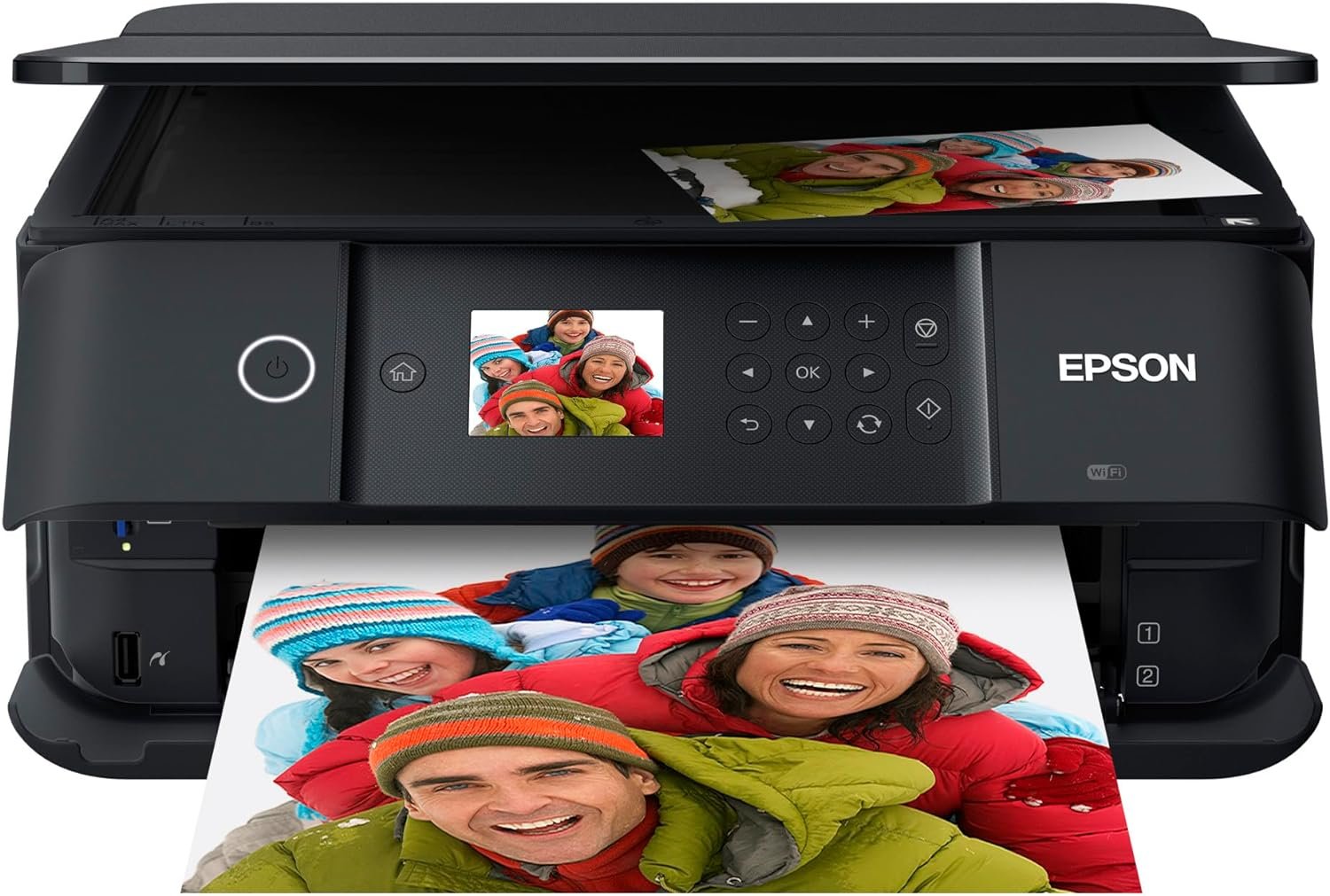
Selecting an appropriate printer can significantly impact productivity, cost efficiency, and output quality across various environments. Whether for home use, small business operations, or creative projects, the right printer must align with specific workflow demands and output expectations. Printers vary widely in technology, performance, and features, making it essential to evaluate factors such as print resolution, speed, connectivity, and media compatibility. For users requiring high-quality photo printing or professional-grade document output, the Epson Expression Premium XP-6100 represents a compelling option. This model combines advanced inkjet technology with versatile connectivity and dedicated photo features, catering to both casual and semi-professional users. However, its suitability depends on understanding its technical capabilities, maintenance requirements, and limitations. This review provides an in-depth analysis of the XP-6100’s specifications, performance characteristics, and real-world applications, helping buyers determine if it meets their printing needs in 2026.
Quick Overview
| Feature | Details |
|---|---|
| Printer Type | Inkjet (Claria Premium Ink) |
| Connectivity | Wireless, USB |
| Print Resolution | 5760 x 1440 dpi (color), 5760 x 1440 dpi (black-and-white) |
| Print Speed | 11.3 ppm (color), 15.8 ppm (black) |
| Media Sizes | 3.5″ x 5″, 4″ x 6″, 5″ x 7″, 8″ x 10″, 8.5″ x 11″, A4, B5, A5, A6, half letter, executive |
| Supported Media | Paper (plain) |
| Scanning | Photo scanner |
| Copying | Black-and-white and color copy |
| Ink System | 5-color inks (Cyan, Magenta, Yellow, Photo Black, Black) |
| Warranty | Limited warranty |
| Weight | 14.6 pounds |
| Power Consumption | 13 watts |
The Epson Expression Premium XP-6100 is designed for users seeking high-quality photo printing and document output. Its combination of inkjet technology, wireless connectivity, and dedicated photo trays makes it suitable for home offices, creative professionals, and small businesses. The printer’s resolution and speed capabilities support both everyday printing and specialized tasks like photo development. However, its reliance on genuine ink and limited media compatibility may influence its suitability for certain workflows.

Print Quality and Resolution Performance

High-Resolution Output for Photos and Documents
The Epson Expression Premium XP-6100 delivers exceptional print quality through its 5760 x 1440 dpi resolution, ensuring sharp text and vibrant color reproduction. This resolution is particularly beneficial for photo printing, enabling detailed output that retains clarity even when enlarged. The printer’s dedicated photo tray and support for 8″ x 10″ prints make it ideal for users requiring high-quality photographic output. Additionally, the 5-color ink system enhances color accuracy and depth, making it suitable for both professional and personal use. The inclusion of a dedicated photo black ink cartridge further improves the contrast and richness of printed images, catering to users with specific photo printing needs.
Color Accuracy and Media Compatibility
The printer’s color management system ensures consistent and accurate color reproduction across various media types. While the product specifications indicate support for plain paper, users may need to adjust settings for optimal results on different paper stocks. The 5-color ink system allows for nuanced color gradients, making it well-suited for creative projects and high-quality document printing. However, the lack of support for specialty media such as glossy or matte photo paper may limit its appeal for users requiring advanced media options. The printer’s resolution remains consistent across media, though texture and absorbency of the paper can affect final output quality.
Print Speed and Workload Capacity

Efficient Print Speeds for Everyday Use
The Epson Expression Premium XP-6100 offers print speeds of 11.3 ppm in color and 15.8 ppm in black, which are competitive for its class. These speeds are sufficient for most home and small business environments, where users typically print documents, photos, and basic graphics. The printer’s ability to produce 4″ x 6″ photos in as little as 15 seconds highlights its efficiency for time-sensitive tasks. However, the print speed may not match the performance of higher-end laser printers or professional-grade inkjet models, which could be a consideration for users requiring faster output for high-volume printing.
Duty Cycle and Longevity Considerations
The printer’s duty cycle is designed for moderate to high-volume use, with a recommended workload capacity that supports continuous operation without significant degradation. The 13-watt power consumption ensures energy efficiency, making it suitable for environments where operational costs are a concern. The printer’s build quality and internal components are engineered for reliability, though prolonged use may require periodic maintenance, such as cleaning the print head and replacing ink cartridges. The limited warranty and reliance on genuine ink cartridges should be factored into long-term cost considerations for users planning extended use.
Connectivity and Device Compatibility

Wireless and USB Connectivity Options
The Epson Expression Premium XP-6100 offers both wireless and USB connectivity, providing flexibility for different user preferences. The wireless feature enables seamless printing from smartphones, tablets, and computers, reducing the need for physical connections. However, the printer’s compatibility with voice-activated printing through Amazon Alexa and Vera controllers adds convenience for users integrating smart home systems. The USB port allows for direct printing from external storage devices, making it accessible for users who prefer wired connections. While these options enhance usability, the lack of support for newer wireless protocols or cloud-based printing services may limit its appeal for tech-savvy users.
Cross-Device Compatibility and Setup
The printer’s compatibility with a wide range of devices, including cameras, PCs, and mobile devices, ensures versatility for different workflows. The included software and drivers for Windows and Mac operating systems simplify setup and management, though users may need to install additional applications for advanced features. The printer’s ability to handle multiple file formats and print from memory cards further enhances its usability. However, the reliance on a dedicated setup process and potential compatibility issues with certain devices could pose challenges for less technically inclined users.
Maintenance and Consumable Considerations

Ink System and Cartridge Requirements
The Epson Expression Premium XP-6100 uses Claria Premium Ink cartridges, which are designed for high-quality output and durability. The 5-color ink system includes dedicated photo black and standard black cartridges, ensuring optimal performance for different printing tasks. While genuine ink cartridges provide consistent results, the cost and availability of these cartridges may influence long-term expenses. Users should note that the printer is not compatible with third-party ink, which could be a drawback for those seeking cost-effective alternatives. The printer’s ink system is engineered for reliability, though frequent cartridge replacements may be necessary for heavy users.
Cleaning and Maintenance Needs
Regular maintenance is essential to ensure the Epson Expression Premium XP-6100 operates at peak performance. The printer includes features such as automatic cleaning cycles and a 2.4″ color LCD for monitoring print head status, which help prevent clogs and misalignment. However, users may need to manually clean the print head or adjust settings for optimal print quality, particularly when using different media types. The printer’s built-in diagnostics and error messages provide guidance for troubleshooting common issues, though the absence of advanced maintenance tools may require user intervention for more complex problems.

Pros & Cons
Pros
- High-Resolution Output: The 5760 x 1440 dpi resolution ensures sharp text and vibrant color reproduction, ideal for photos and documents.
- Dedicated Photo Features: Includes a photo tray and photo black ink cartridge for enhanced photo printing quality.
- Versatile Connectivity: Supports wireless, USB, and voice-activated printing for flexible device integration.
- Automatic Duplex Printing: Reduces paper usage and enhances efficiency for document printing.
- User-Friendly Interface: The 2.4″ color LCD provides clear feedback and simplifies print job management.
- Compatibility with Multiple Devices: Works with cameras, PCs, smartphones, and tablets for seamless printing.
- Energy Efficiency: Consumes 13 watts, making it suitable for environments with energy cost considerations.
Cons
- Genuine Ink Requirement: Reliance on Epson cartridges may increase long-term costs compared to third-party alternatives.
- Limited Media Compatibility: Supports only plain paper, which may not meet the needs of users requiring specialty media.
- Print Speed Limitations: While adequate for everyday use, the speed may not match higher-end laser printers or professional inkjets.
- Setup Complexity: The initial configuration and software installation may pose challenges for less technically inclined users.
- Weight and Portability: The 14.6-pound design is not ideal for users requiring a compact or mobile printer.
- Warranty Coverage: The limited warranty may not provide extensive support for extended use or repair scenarios.
Final Verdict: Who This Printer Is Best For (and Who Should Skip It)
The Epson Expression Premium XP-6100 is best suited for users who prioritize high-quality photo printing and document output, particularly in home or small business environments. Its combination of advanced inkjet technology, dedicated photo features, and versatile connectivity makes it an excellent choice for creative professionals, photographers, and individuals with specific printing needs. The printer’s resolution and color accuracy are well-suited for tasks requiring detailed output, such as photo albums, greeting cards, and professional-looking CDs/DVDs. However, users seeking faster print speeds, support for specialty media, or lower long-term costs may find the XP-6100 less ideal. The reliance on genuine ink cartridges and limited media compatibility could also deter users looking for more cost-effective or flexible printing options. For those requiring a printer that balances quality and efficiency without compromising on maintenance or operational costs, the XP-6100 remains a strong contender in its category.

Frequently Asked Questions (FAQs)
What print resolution does the Epson Expression Premium XP-6100 offer?
The Epson Expression Premium XP-6100 provides a print resolution of 5760 x 1440 dpi for both color and black-and-white prints, ensuring high-quality output for photos and documents.
Can the Epson XP-6100 print photos on specialty media?
The printer is designed for plain paper use and does not support specialty media such as glossy or matte photo paper, which may limit its appeal for advanced photo printing.
What connectivity options are available for the Epson XP-6100?
The printer supports both wireless and USB connectivity, allowing users to print from smartphones, tablets, computers, and external storage devices.
Does the Epson XP-6100 require genuine ink cartridges?
Yes, the printer is designed to work exclusively with Epson Genuine Cartridges, and using non-genuine ink may affect print quality and warranty coverage.
How long does it take to print a 4″ x 6″ photo with the Epson XP-6100?
The printer can produce a 4″ x 6″ photo in as little as 15 seconds, making it efficient for time-sensitive photo printing tasks.
What is the warranty coverage for the Epson XP-6100?
The printer comes with a limited warranty, which covers defects in materials and workmanship but may not provide extensive support for extended use or repair scenarios.
Is the Epson XP-6100 suitable for high-volume printing?
The printer is designed for moderate to high-volume use, with a duty cycle that supports continuous operation. However, its print speed and ink system may not be ideal for extremely high-volume environments.
Can the Epson XP-6100 print on different paper sizes?
The printer supports a variety of paper sizes, including 3.5″ x 5″, 4″ x 6″, 5″ x 7″, 8″ x 10″, 8.5″ x 11″, A4, B5, A5, A6, half letter, and executive sizes.