
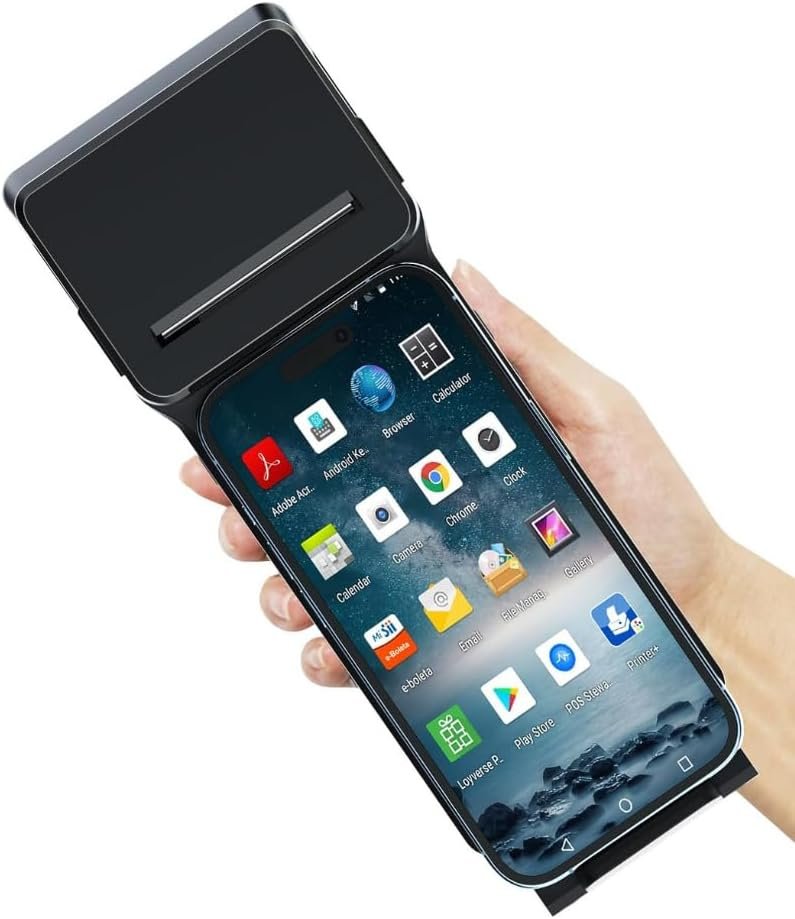
The Importance of Selecting the Right Printer for Your Workflow
In today’s fast-paced business environment, the choice of a printer can significantly impact operational efficiency. Whether managing retail transactions, logistics tracking, or on-site inventory management, a reliable printing solution must balance speed, durability, and versatility. The right printer can streamline workflows, reduce downtime, and ensure critical information is consistently available. For mobile operations, portability and connectivity are paramount, while for high-volume environments, print speed and media compatibility become key considerations. Understanding these factors helps businesses select a printer that aligns with their specific needs, whether it’s a compact device for field work or a robust machine for continuous use. This review evaluates the POS XP-P1 Portable Thermal Printer, focusing on its ability to meet these demands through its design, performance, and feature set.
Quick Overview
| Feature | Details |
|---|---|
| Printer Type | Portable Thermal Printer |
| Printing Technology | Direct Thermal |
| Print Resolution | 203 x 203 DPI |
| Print Speed | Up to 70 mm/s |
| Paper Width | 58mm |
| Connectivity | USB, Bluetooth |
| Media Compatibility | 58mm thermal paper (0.06-0.08mm thickness) |
| Battery Life | 2 hours 15 minutes (1500 mAh) |
| Dimensions | 2.4″D x 8.3″W x 3.3″H |
| Weight | 0.27 kg (9.4 oz) |
| Scanner Capabilities | 1D/2D barcode scanning (QR, PDF417) |
| Operating System Support | Windows, Linux, Android, iOS |
The POS XP-P1 combines portability with essential printing and scanning functions, making it suitable for on-the-go operations. Its thermal printing technology eliminates the need for ink or toner, reducing maintenance and operating costs. The 58mm paper width and standard media compatibility ensure flexibility in document creation, while the USB and Bluetooth connectivity options provide seamless integration with a variety of devices.

Print Technology and Media Compatibility
The POS XP-P1 leverages direct thermal printing technology, a common choice for mobile and high-volume environments. This method uses heat to produce images on thermal paper, eliminating the need for ink or toner. The printer’s 203 x 203 DPI resolution ensures legible text and clear barcode output, which is critical for receipt printing and inventory tracking. Direct thermal printing is particularly advantageous in scenarios where frequent paper changes or maintenance are impractical, such as field sales or delivery operations.

Thermal Paper Specifications
The XP-P1 is designed for use with standard 58mm wide thermal paper, a size commonly found in retail and logistics settings. The supported paper thickness range of 0.06 mm to 0.08 mm allows for both receipt and label printing, accommodating different business needs. However, users should note that thermal paper is sensitive to heat and light, which may affect long-term storage or exposure to environmental factors. This limitation is inherent to the technology and should be considered when planning document retention strategies.
Media Compatibility and Use Cases
While the printer is optimized for thermal paper, its design does not support inkjet or laser media. This restricts its use to applications where thermal output is sufficient, such as transaction receipts, shipping labels, and barcode scanning. The lack of support for alternative media types means the XP-P1 is best suited for environments where thermal printing is the primary requirement, rather than for multifunctional printing tasks.
Connectivity and Integration Capabilities
The POS XP-P1 offers dual connectivity options—USB and Bluetooth—which enhance its versatility for different operational setups. USB connectivity ensures a stable and fast data transfer rate, making it ideal for desktop integration or when working with devices that prioritize wired connections. Bluetooth support, on the other hand, enables wireless printing from mobile devices, reducing the need for physical cables and improving mobility. This dual approach caters to both fixed and mobile environments, aligning with the printer’s portable design.

Device Compatibility and Ecosystem Integration
The printer’s compatibility with Windows, Linux, Android, and iOS devices ensures broad accessibility across different operating systems. This is particularly beneficial for businesses with mixed device environments or those requiring cross-platform functionality. However, the reliance on Bluetooth and USB interfaces means that integration with newer or less common platforms may require additional configuration or adapters. The absence of Wi-Fi support, while keeping the device lightweight, limits its use in fully wireless environments.
App-Based Control and User Experience
The XP-P1’s control method relies on a dedicated app, which provides a user-friendly interface for managing print jobs and scanner functions. The app’s design simplifies task execution, such as initiating scans or adjusting print settings, without the need for complex hardware interactions. However, the app’s availability and functionality are limited to the supported operating systems, which may affect its usability in environments with less common device configurations.
Durability and Operational Longevity
The POS XP-P1 is engineered for durability, with a design that prioritizes reliability in mobile and field applications. The 1500 mAh rechargeable battery provides up to 2 hours and 15 minutes of continuous printing, which is sufficient for short-term operations but may require frequent recharging for extended use. The printer’s lightweight build (0.27 kg) and compact dimensions make it easy to transport, though its battery life may be a consideration for users requiring longer operational periods without access to power sources.

Duty Cycle and Environmental Considerations
While the XP-P1 is suitable for moderate to high-volume printing in controlled environments, its duty cycle is not explicitly specified in the technical documentation. This means users should consider the printer’s intended use and ensure it aligns with the expected workload. The device’s thermal paper usage and lack of ink/toner support also mean it is not suited for long-term document archiving or environments with high exposure to heat or light.
Maintenance and Consumables
The printer requires minimal maintenance due to its direct thermal printing technology, which eliminates the need for ink or toner refills. However, the thermal paper itself is a consumable that must be regularly replaced. Users should factor in the cost and availability of thermal paper rolls when planning for ongoing operations. The absence of a built-in paper tray or automatic paper feeding mechanism may also impact efficiency in high-volume settings.

Pros & Cons
Pros
- Portability: The compact design and lightweight build make it ideal for field work and mobile operations.
- Direct Thermal Printing: Eliminates the need for ink or toner, reducing maintenance and operating costs.
- High Print Resolution: 203 x 203 DPI ensures legible text and clear barcode output.
- Dual Connectivity: USB and Bluetooth options provide flexibility in device integration.
- Barcode Scanning: Integrated 1D/2D scanning capabilities enhance inventory and logistics management.
- Cross-Platform Compatibility: Supports Windows, Linux, Android, and iOS devices for broad accessibility.
Cons
- Limited Media Compatibility: Only supports thermal paper, excluding inkjet or laser media.
- Battery Life Constraints: 2 hours 15 minutes of continuous printing may require frequent recharging.
- No Wi-Fi Support: Restricts integration in fully wireless environments.
- Thermal Paper Sensitivity: Susceptible to heat and light, affecting long-term document storage.
- Manual Paper Handling: Lacks automatic feeding mechanisms, potentially slowing high-volume operations.
Final Verdict: Who This Printer Is Best For (and Who Should Skip It)
The POS XP-P1 Portable Thermal Printer is best suited for businesses requiring mobile printing and barcode scanning capabilities in environments where thermal output is sufficient. Its portability, direct thermal printing, and dual connectivity options make it ideal for retail, logistics, and field operations. However, users with high-volume printing needs or those requiring support for alternative media types may find the XP-P1 limiting. The printer’s battery life and thermal paper sensitivity also make it less suitable for extended use without power access or for long-term document retention. For businesses prioritizing mobility and simplicity, the XP-P1 offers a practical solution, but those seeking multifunctionality or extended operational capacity may need to consider alternative models.

Frequently Asked Questions (FAQs)
What printing technology does the POS XP-P1 use?
The POS XP-P1 uses direct thermal printing technology, which produces images on thermal paper without the need for ink or toner. This method is ideal for applications requiring quick, reliable printing with minimal maintenance.
Can the XP-P1 print on standard thermal paper?
Yes, the XP-P1 is designed for use with standard 58mm wide thermal paper, supporting paper thicknesses between 0.06 mm and 0.08 mm. This compatibility ensures flexibility in printing receipts and labels.
How long does the battery last on a single charge?
The XP-P1’s 1500 mAh battery provides up to 2 hours and 15 minutes of continuous printing. USB-C fast charging allows for quick recharge times, though frequent recharging may be necessary for extended use.
What connectivity options are available?
The XP-P1 supports both USB and Bluetooth connectivity, enabling seamless integration with a variety of devices. USB ensures stable data transfer, while Bluetooth offers wireless printing from mobile devices.
Does the XP-P1 support Wi-Fi connectivity?
No, the XP-P1 does not include Wi-Fi connectivity. It relies on USB and Bluetooth interfaces, which may limit its use in fully wireless environments.
What types of barcode scanning does the XP-P1 support?
The XP-P1 includes integrated 1D and 2D barcode scanning capabilities, supporting QR codes and PDF417 formats. This feature enhances inventory management and tracking in logistics and retail applications.
Is the XP-P1 suitable for high-volume printing?
The XP-P1 is designed for moderate to high-volume printing in controlled environments. However, its thermal paper usage and lack of automatic feeding mechanisms may impact efficiency in extremely high-volume settings.
What operating systems is the XP-P1 compatible with?
The XP-P1 is compatible with Windows, Linux, Android, and iOS devices, ensuring broad accessibility across different platforms and device ecosystems.