
The Importance of Choosing the Right Printer
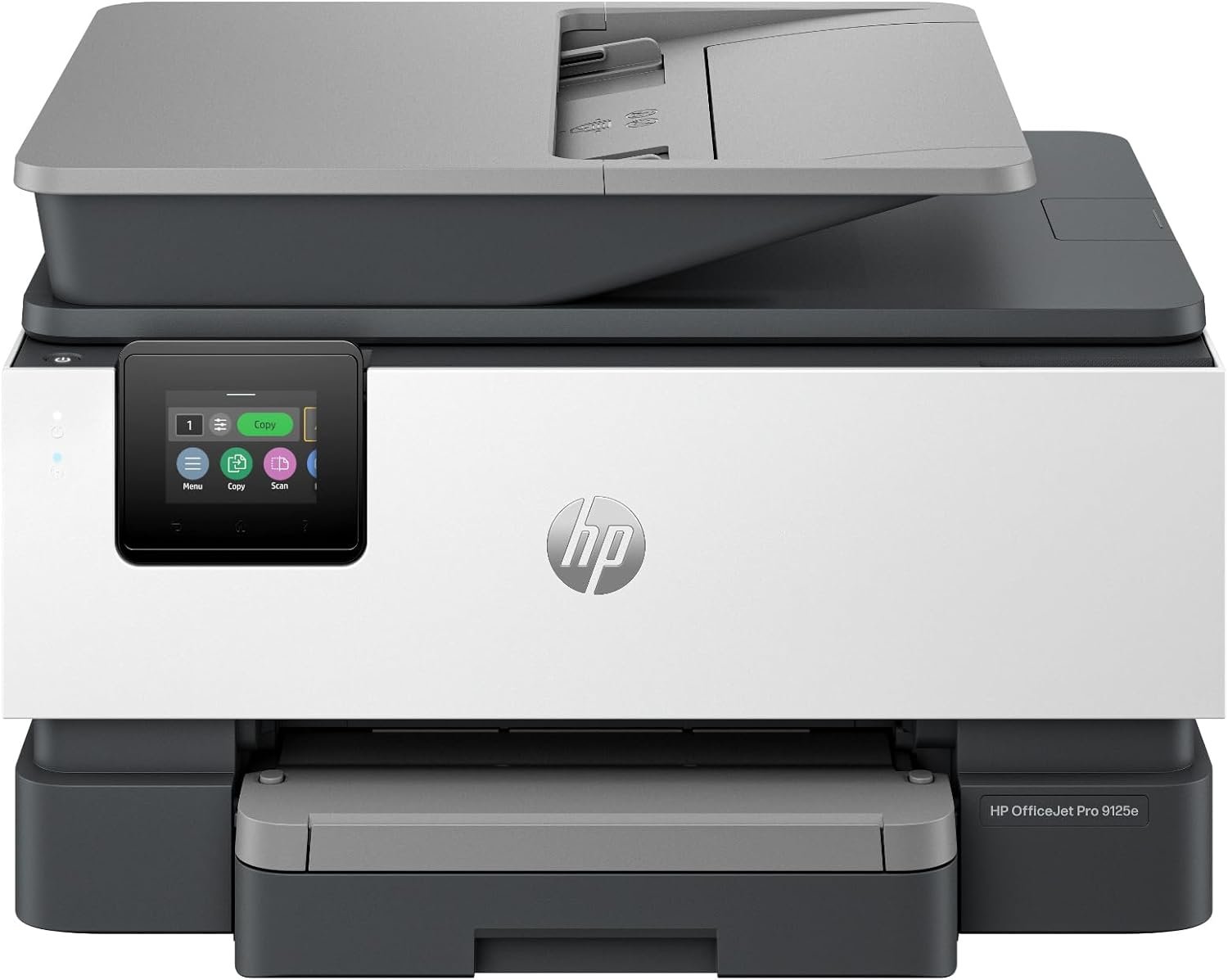
Selecting the optimal printer for an office environment involves balancing performance, reliability, and operational efficiency. Modern workplaces demand versatile devices capable of handling high-volume printing, multifunctional tasks, and seamless integration with digital workflows. The HP OfficeJet Pro 9125e is engineered to meet these challenges, offering a robust solution for businesses requiring professional-grade color output. Its design emphasizes speed, connectivity, and adaptability, making it suitable for environments where time-sensitive documents, marketing materials, and internal communications are frequently processed. Understanding the technical specifications and functional capabilities of such a printer is critical for organizations aiming to optimize productivity while minimizing downtime. This review evaluates the HP OfficeJet Pro 9125e based on its performance metrics, compatibility with standard office workflows, and integration with digital ecosystems. By analyzing its print speed, media compatibility, and security features, we provide a comprehensive assessment to help decision-makers align printer capabilities with operational needs.
Quick Overview
| Feature | Details |
|---|---|
| Printer Type | Color inkjet all-in-one (AIO) |
| Print Technology | Four-color inkjet cartridges |
| Print Speed | Up to 18 ppm color, 22 ppm black |
| Connectivity | Ethernet, USB, dual-band Wi-Fi |
| Media Support | Paper (plain), A4, A5, 8.5 x 11.7 in |
| Duty Cycle | Designed for office environments |
| Ink System | HP Instant Ink-compatible cartridges |
| Security Features | HP Wolf Pro Security |
| Warranty | One-year limited hardware warranty |
| Additional Functions | Scan, copy, fax, duplex printing |
The HP OfficeJet Pro 9125e combines speed and versatility to support office workflows, with features like wireless connectivity and AI-driven optimization. Its 250-sheet input tray and automatic document feeder streamline document handling, while the dual-sided printing capability reduces paper usage. These specifications make it well-suited for environments requiring frequent color printing and multifunctional operations.
Print Speed and Throughput
The HP OfficeJet Pro 9125e is designed to deliver high-speed output, with color print speeds of up to 18 pages per minute (ppm) and monochrome speeds reaching 22 ppm. These metrics are critical for offices processing large volumes of documents, such as marketing materials, reports, and presentations. The printer’s duty cycle is optimized for continuous use in office environments, ensuring reliability during peak demand periods. The inclusion of an AI-enabled feature enhances print efficiency by automatically adjusting settings to minimize wasted pages and improve layout accuracy. This adaptability is particularly beneficial for users who frequently print web pages or emails, as it reduces the likelihood of misaligned content or unnecessary page breaks. The printer’s ability to handle complex documents with precision ensures that output quality remains consistent even during high-volume operations.

Color Print Performance
The printer’s color print resolution reaches up to 4800 x 1200 optimized dpi on specialized media, making it suitable for professional-grade color documents such as brochures and flyers. While this resolution is ideal for high-quality graphics, it may not match the precision of laser printers for sharp text. However, the use of HP’s AI technology ensures that web pages and emails are printed with minimal layout distortion, which is crucial for maintaining the integrity of digital content. The four-color ink system provides a wide color gamut, allowing for vibrant and accurate color reproduction. This makes the HP OfficeJet Pro 9125e a strong contender for businesses that require both color and black-and-white printing capabilities.
Black-and-White Print Efficiency
For monochrome printing, the HP OfficeJet Pro 9125e achieves a resolution of 1200 x 1200 rendered dpi, which is sufficient for most office documents. The printer’s black-and-white print speed of 22 ppm ensures that text-heavy documents such as reports and spreadsheets are processed quickly. This performance is particularly advantageous for environments where efficiency in handling large volumes of black-and-white output is essential. The printer’s ability to maintain consistent quality across both color and monochrome tasks reduces the need for manual adjustments, streamlining the printing process.
Duty Cycle and Workload Capacity
The HP OfficeJet Pro 9125e is built to handle the demands of an office environment, with a duty cycle that supports continuous operation without compromising performance. Its 250-sheet input tray and automatic document feeder (ADF) allow for efficient processing of multi-page documents, reducing the need for manual intervention. The printer’s design ensures that it can sustain high-volume printing without overheating, which is critical for maintaining reliability over extended periods. This makes it an ideal choice for businesses that require consistent output without frequent maintenance or downtime.
Connectivity and Integration
The HP OfficeJet Pro 9125e offers multiple connectivity options, including Ethernet, USB, and dual-band Wi-Fi, ensuring compatibility with a wide range of devices. The dual-band Wi-Fi feature enhances network stability by automatically detecting and resolving connection issues, which is particularly beneficial in environments with multiple devices. This reliability reduces the risk of print job interruptions, ensuring that documents are delivered on time. The printer’s integration with the HP Print App allows users to print, scan, copy, or fax directly from their smartphones, PCs, or tablets, simplifying the printing process for remote or mobile users. This level of connectivity is essential for modern offices that rely on digital workflows and require seamless integration with various devices.

Wireless Printing Capabilities
The dual-band Wi-Fi technology in the HP OfficeJet Pro 9125e provides a more stable and faster connection compared to single-band networks. This is particularly advantageous in environments with high network traffic, where traditional Wi-Fi may experience latency or signal interference. The printer’s ability to automatically detect and resolve connection issues minimizes the risk of print job failures, ensuring that users can access their printer without manual troubleshooting. This feature is especially useful for businesses with multiple users accessing the printer simultaneously, as it maintains consistent performance across all devices.
Mobile and Device Compatibility
The HP OfficeJet Pro 9125e’s compatibility with smartphones, PCs, and tablets makes it a versatile choice for offices with diverse device ecosystems. The HP Print App simplifies the printing process by allowing users to send print jobs from their mobile devices without the need for physical access to the printer. This mobility is particularly beneficial for remote workers or those who frequently travel, as it enables them to manage print tasks from anywhere. The printer’s support for a wide range of devices ensures that it can integrate seamlessly into existing office workflows without requiring additional hardware or software investments.
Network Security and Data Protection
The HP OfficeJet Pro 9125e includes built-in HP Wolf Pro Security, which provides a suite of customizable tools to enhance network security. This feature is critical for businesses that handle sensitive data, as it helps protect against cyber threats and malware. The printer’s security measures include encryption for data transmission, access control settings, and regular firmware updates to address potential vulnerabilities. These safeguards ensure that the printer remains a secure component of an office’s digital infrastructure, reducing the risk of data breaches or unauthorized access.

Pros and Cons
Pros
- High Print Speed: The HP OfficeJet Pro 9125e delivers up to 18 ppm color and 22 ppm black printing, making it suitable for environments requiring rapid output.
- Wireless Connectivity: Dual-band Wi-Fi ensures stable and fast network performance, reducing print job interruptions.
- AI-Enabled Features: HP’s AI technology optimizes print settings to enhance layout accuracy and reduce wasted pages.
- Versatile Multifunctionality: The printer supports scanning, copying, and faxing, providing a comprehensive office solution.
- User-Friendly Interface: The 2.7″ touch screen and HP Print App simplify navigation and management of print tasks.
- Security Features: HP Wolf Pro Security enhances network protection against cyber threats and malware.
- Duplex Printing: Automatic double-sided printing reduces paper usage and supports sustainable office practices.
- Reliable Performance: The printer’s duty cycle is designed for continuous use, ensuring stability in high-volume environments.
Cons
- Ink Consumption: The four-color ink system may require frequent refills, increasing ongoing maintenance costs.
- Limited Media Compatibility: While the printer supports standard paper sizes, it may not accommodate specialized media types without additional accessories.
- Initial Setup Complexity: Configuring the printer’s wireless features and security settings may require technical expertise.
- Noise Levels: The printer’s operation may produce noticeable noise during high-speed printing, which could be disruptive in quiet office spaces.
- Print Quality Variability: While color output is vibrant, text clarity may not match the precision of laser printers for high-volume black-and-white use.
- Warranty Limitations: The one-year limited hardware warranty may not cover extended usage scenarios without additional service agreements.
Final Verdict: Who This Printer Is Best For (and Who Should Skip It)
The HP OfficeJet Pro 9125e is an excellent choice for small to mid-sized offices requiring a versatile, high-speed color printer with multifunctional capabilities. Its ability to handle complex documents, combined with wireless connectivity and AI-driven optimization, makes it well-suited for environments where efficiency and reliability are paramount. The printer’s security features and user-friendly interface further enhance its appeal for businesses prioritizing data protection and ease of use. However, businesses with extremely high-volume printing needs or those requiring specialized media compatibility may find the HP OfficeJet Pro 9125e less suitable. Additionally, organizations with strict cost control measures may need to consider the ongoing ink expenses and potential maintenance requirements. Overall, the HP OfficeJet Pro 9125e is a strong contender for offices seeking a balanced blend of performance, versatility, and security in a single device.

Frequently Asked Questions (FAQs)
What is the maximum print speed of the HP OfficeJet Pro 9125e?
The HP OfficeJet Pro 9125e delivers up to 18 pages per minute (ppm) in color and 22 ppm in black-and-white printing. These speeds are optimized for office environments requiring rapid output of both color and monochrome documents.
Does the HP OfficeJet Pro 9125e support wireless printing?
Yes, the printer includes dual-band Wi-Fi technology, which enhances network stability and automatically resolves connection issues. This ensures reliable wireless printing from laptops, PCs, and mobile devices.
What security features does the HP OfficeJet Pro 9125e offer?
The printer includes HP Wolf Pro Security, which provides customizable tools to protect against cyber threats and malware. It also supports encrypted data transmission and access control settings to enhance network protection.
Can the HP OfficeJet Pro 9125e handle duplex printing?
Yes, the printer features automatic duplex printing, which reduces paper usage by printing on both sides of the page. This functionality supports sustainable office practices and streamlines document management.
What media sizes does the HP OfficeJet Pro 9125e support?
The printer supports standard paper sizes including A4, A5, and 8.5 x 11.7 inches. It is compatible with plain paper and may require additional accessories for specialized media types.
How does the AI feature improve print quality?
HP’s AI technology optimizes print settings to enhance layout accuracy and reduce wasted pages. It ensures that web pages and emails are printed with minimal layout distortion, maintaining the integrity of digital content.
What is the warranty coverage for the HP OfficeJet Pro 9125e?
The printer comes with a one-year limited hardware warranty. Users may extend coverage to two years by accepting the HP+ Offer, which includes additional support and service agreements.
Is the HP OfficeJet Pro 9125e suitable for high-volume printing?
The printer is designed for office environments with continuous use, featuring a duty cycle optimized for high-volume operations. Its 250-sheet input tray and automatic document feeder support efficient processing of multi-page documents.