
The Importance of Choosing the Right Printer
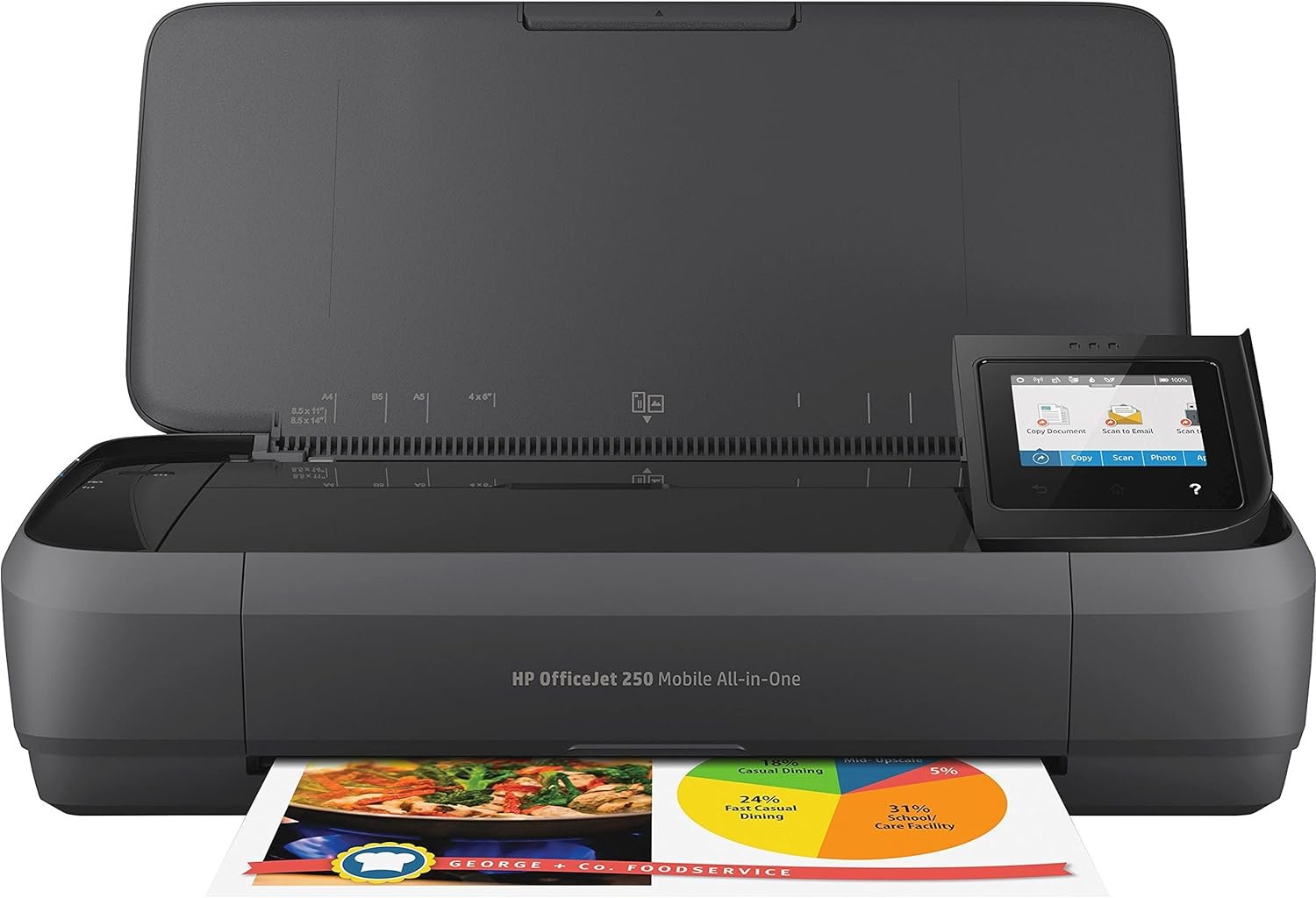
Selecting the optimal printer for your workflow involves evaluating how well its specifications align with your printing needs. Whether you’re managing home office tasks, handling business documents, or requiring mobility for on-the-go printing, the right printer must balance print quality, speed, and connectivity. For users prioritizing portability, a compact all-in-one printer with wireless capabilities can offer significant flexibility. The HP OfficeJet 250 Wireless Mobile Printer addresses these needs by combining a portable design with essential functions like printing, scanning, and copying. Its battery-powered operation and cloud integration make it suitable for environments where traditional wired connections are impractical. However, the printer’s performance must meet expectations for tasks such as document reproduction, photo printing, and media compatibility. This review examines how the HP OfficeJet 250’s technical specifications, design, and supported functions align with various usage scenarios, helping users determine if it’s the best fit for their printing requirements.
Quick Overview
| Feature | Details |
|---|---|
| Printer Type | Inkjet All-in-One |
| Supported Functions | Print, Scan, Copy |
| Print Resolution | 4800 x 1200 dpi (Color), 600 x 600 dpi (Black & White) |
| Media Sizes | 3 x 5 in to 8.5 x 14 in, Letter, Legal, Envelopes |
| Connectivity | Wireless (Wi-Fi), USB 2.0 |
| Duty Cycle | 1,500 pages/month (Monochrome), 1,000 pages/month (Color) |
| Ink System | Pigment-based HP 62 Series Cartridges |
| Warranty | One-Year Limited Hardware Warranty |
The HP OfficeJet 250’s combination of portability and multifunctionality makes it ideal for users who require printing capabilities without a fixed workstation. Its wireless connectivity and battery-powered design allow for printing in environments where traditional power sources are unavailable, while its supported media types cater to both standard documents and specialty paper formats. These features position it as a versatile option for small offices, remote workers, and individuals with limited desk space.

Portability and Mobility in Printing
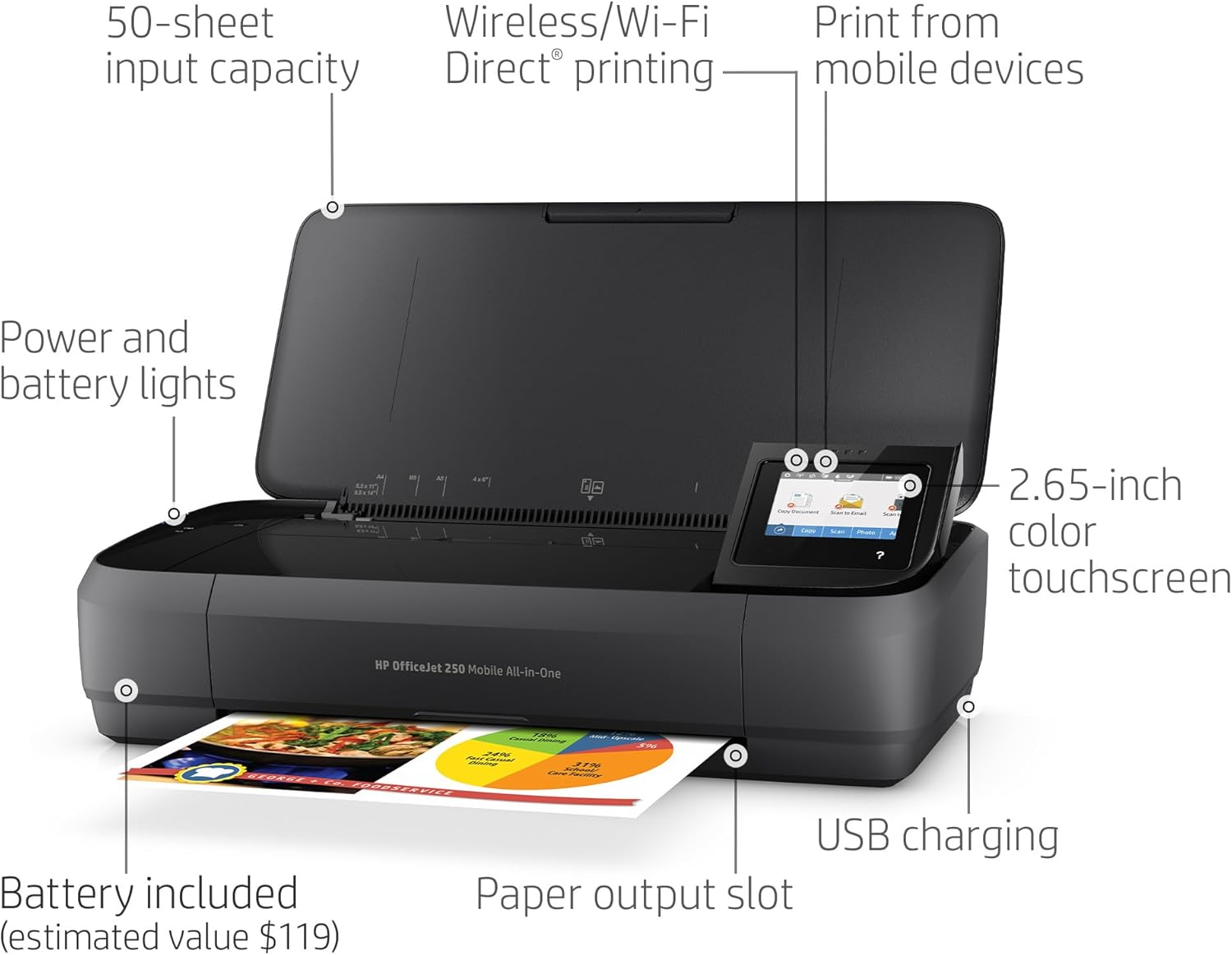
The HP OfficeJet 250’s compact design and battery-powered operation make it a standout option for users who prioritize mobility. Its ability to function without a wired connection eliminates the need for a dedicated power source or network access, allowing printing in a variety of environments. The printer’s battery life and fast-charging capability further enhance its portability, enabling users to print documents on the go without frequent recharging. This feature is particularly beneficial for professionals who frequently travel or work in settings where traditional printers are not available. The inclusion of a 10-page automatic document feeder and a 2.65-inch color touchscreen also contributes to its usability, offering a user-friendly interface for managing print jobs and scanning tasks. However, the printer’s reliance on battery power may limit its use in scenarios requiring continuous, high-volume printing.

Battery Life and Charging Efficiency
The HP OfficeJet 250’s battery life is a key factor in its portability, allowing users to print documents without being tethered to a power source. The printer’s battery can support up to 90% charge in just 90 minutes when the system is turned off, ensuring quick recharging for extended use. This fast-charging capability is particularly advantageous for users who need to print frequently while traveling or working in environments where access to electrical outlets is limited. The printer’s battery capacity also supports multiple print sessions, making it suitable for users who require intermittent printing rather than continuous operation. However, the battery life may diminish over time with frequent use, which could impact its reliability for long-term, high-volume printing tasks.
Compact Design and Mobility
The HP OfficeJet 250’s compact size and lightweight design make it easy to transport and store, fitting into backpacks, briefcases, or car compartments. This portability is ideal for users who need to print documents in multiple locations, such as remote workers, students, or field professionals. The printer’s ability to operate without a network connection further enhances its mobility, allowing users to print from mobile devices or laptops without requiring a router. However, the lack of a built-in power adapter means users must rely on external power sources for extended use, which may be a limitation for those who need to print in locations without access to AC power.
Wireless Connectivity and Cloud Integration
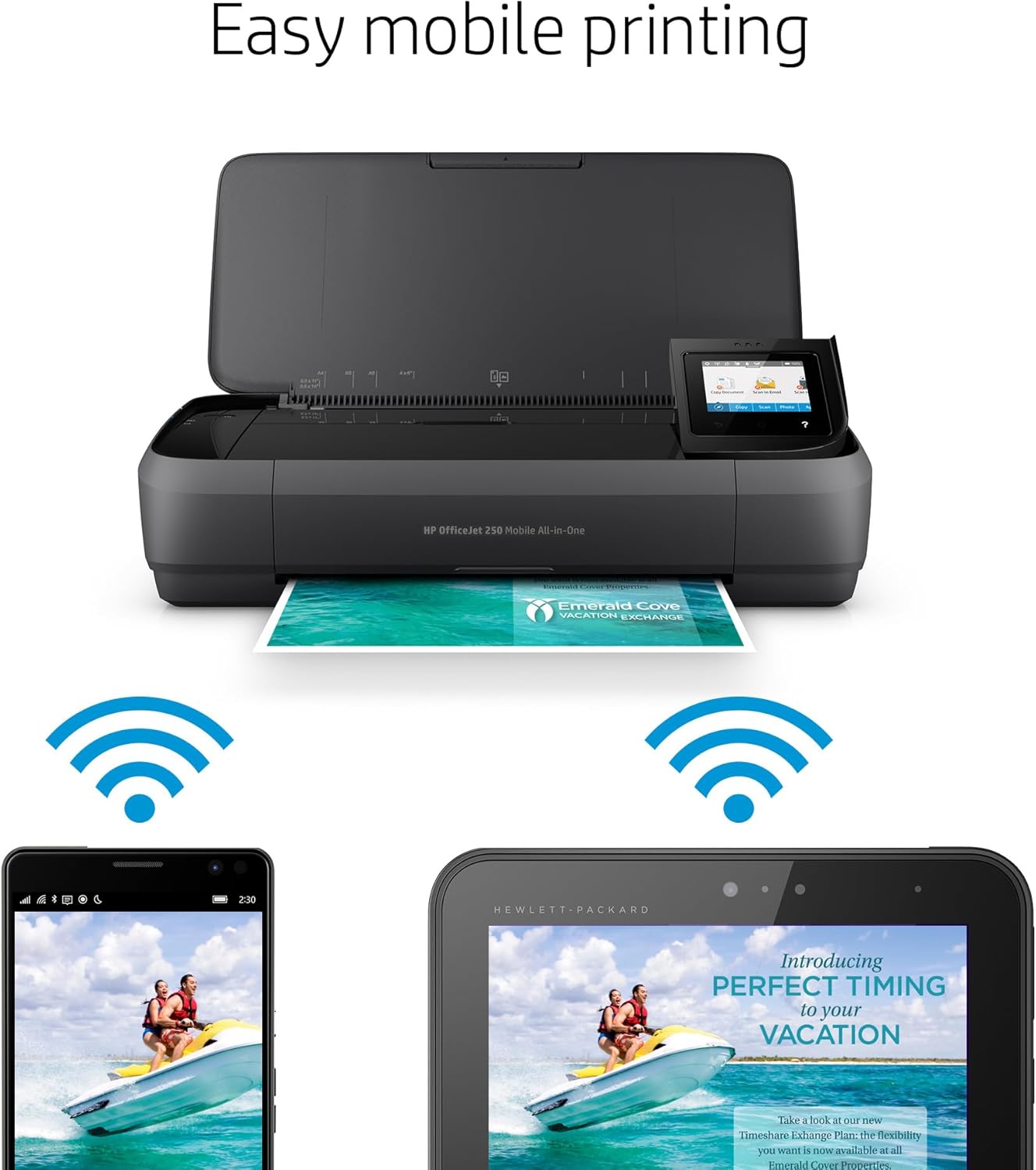
The HP OfficeJet 250’s wireless capabilities enable users to print, scan, and copy documents from mobile devices without the need for a physical connection. This feature is particularly useful for users who need to manage print jobs on the go or access cloud-stored documents. The printer’s compatibility with cloud services like Google Drive, Dropbox, and iCloud expands its versatility, allowing users to print from various platforms. However, the reliance on wireless connectivity may introduce potential delays or connectivity issues, especially in environments with limited Wi-Fi coverage. Despite these considerations, the printer’s wireless functionality remains a significant advantage for users seeking flexibility in their printing workflow.
Print Quality and Resolution
The HP OfficeJet 250 delivers competitive print quality for its intended use cases, particularly in scenarios requiring standard document reproduction and basic photo printing. Its maximum color print resolution of 4800 x 1200 dpi ensures sharp text and clear graphics, making it suitable for business documents, brochures, and everyday printing tasks. The black-and-white print resolution of 600 x 600 dpi provides adequate clarity for text-heavy documents, although it may not match the precision of higher-end printers for specialized applications. The printer’s ability to handle a variety of media types, including cardstock, envelopes, and specialty paper, further enhances its versatility. However, users with high-resolution printing needs, such as professional photography or detailed graphics, may find the HP OfficeJet 250’s capabilities insufficient for demanding output requirements.

Color and Monochrome Output
The HP OfficeJet 250’s color printing performance is well-suited for standard office tasks and casual use, offering vibrant colors and good detail retention for images and graphics. The printer’s pigment-based ink system ensures that printed documents maintain their color integrity over time, making it a reliable choice for users who require consistent color output. In monochrome printing, the printer’s 600 x 600 dpi resolution provides clear text and sharp edges, which is appropriate for reports, forms, and other document types. However, users who require extremely high-resolution black-and-white prints, such as those in graphic design or publishing, may need to consider more advanced printers with higher resolution capabilities.
Media Compatibility and Print Quality
The HP OfficeJet 250’s support for a wide range of media sizes and types, including letter, legal, envelopes, and photo paper, makes it suitable for diverse printing needs. The printer’s ability to handle cardstock and specialty paper formats adds to its versatility, allowing users to print on different materials without requiring additional equipment. However, the printer’s print quality may vary depending on the type of paper used, with thinner or lower-quality media potentially affecting the sharpness of printed images. Users who frequently print on specialty paper or require precise control over print settings may need to invest in higher-quality media to achieve optimal results.
Connectivity and Device Compatibility
The HP OfficeJet 250’s connectivity options provide flexibility for users who need to print from multiple devices. Its wireless capabilities allow for seamless integration with smartphones, tablets, and laptops, enabling users to manage print jobs remotely. The printer’s compatibility with cloud storage services like Google Drive, Dropbox, and iCloud further enhances its utility, allowing users to print documents from anywhere without needing to transfer files to a computer. However, the printer’s reliance on wireless connectivity may introduce potential delays or connectivity issues, especially in environments with limited Wi-Fi coverage. Additionally, the printer’s USB 2.0 port offers a wired connection option for users who prefer direct printing or need to transfer data quickly. While these connectivity features make the HP OfficeJet 250 suitable for a wide range of users, they may not meet the needs of those requiring advanced networking capabilities or specialized device integration.

Wireless Setup and Cloud Printing
The HP OfficeJet 250’s wireless setup process is designed to be user-friendly, with HP Auto Wireless Connect enabling quick pairing with mobile devices and computers. This feature simplifies the setup process, allowing users to start printing without the need for complex configurations. The printer’s cloud printing capabilities, which support services like Google Drive and Dropbox, provide additional convenience for users who need to access and print documents from remote locations. However, the effectiveness of these features depends on the stability of the wireless network, and users with unreliable internet connections may experience delays or print job failures. Despite these considerations, the printer’s connectivity options remain a significant advantage for users seeking flexibility in their printing workflow.
USB and Mobile Device Compatibility
In addition to wireless connectivity, the HP OfficeJet 250 offers a USB 2.0 port for direct printing from computers, providing a reliable alternative for users who prefer wired connections. This feature is particularly useful for users who need to print large files or require a stable connection for high-volume printing. The printer’s compatibility with mobile devices through the HP Smart app further enhances its versatility, allowing users to scan documents using their smartphone cameras and print from cloud storage. However, the printer’s USB port does not support advanced features like direct printing from mobile devices, which may limit its appeal for users who require more seamless integration with smartphones and tablets.
Consumables and Maintenance
The HP OfficeJet 250’s use of HP 62 series cartridges ensures a balance between print yield and cost-effectiveness. The included setup cartridges provide approximately 200 pages for black printing and 120 pages for color, which is sufficient for users with moderate printing needs. The printer’s ability to print up to 1,500 pages per month in monochrome and 1,000 pages per month in color means that users can expect reasonable longevity before needing to replace cartridges. However, the cost of replacement cartridges may be a consideration for users who print frequently, as the printer’s ink system is not designed for high-volume, high-resolution printing. The printer’s manual duplexing feature also requires users to handle double-sided printing themselves, which may increase the time required for completing print jobs.

Ink Cartridge Efficiency and Cost
The HP OfficeJet 250’s pigment-based ink system is designed for durability, with printed documents maintaining their color integrity over time. This makes the printer a suitable choice for users who prioritize long-lasting prints, such as those creating marketing materials or archival documents. However, the printer’s ink yield may not be optimal for users who print in high volumes or require frequent color output, as the included cartridges have a limited page count. Users who print extensively may need to invest in higher-yield cartridges or consider alternative printers with more cost-effective consumables. The printer’s reliance on HP-branded ink also means that users cannot use third-party cartridges, which may be a drawback for those seeking more economical printing solutions.
Maintenance and Longevity
The HP OfficeJet 250’s maintenance requirements are relatively low, with the printer’s design minimizing the need for frequent cleaning or part replacements. The printer’s 1-year limited warranty provides basic coverage for hardware issues, but users who require extended support may need to consider additional service options. The printer’s ability to handle a variety of media types and its compact design contribute to its longevity, making it a reliable option for users with moderate printing needs. However, the printer’s manual duplexing feature and reliance on battery power may impact its long-term reliability for users with high-volume printing demands.
Durability and Reliability
The HP OfficeJet 250’s build quality and reliability are well-suited for users who require a durable, low-maintenance printer for occasional use. Its plastic construction and compact design make it resistant to damage from minor impacts, while its energy-efficient operation helps reduce long-term power consumption. The printer’s 1-year limited warranty provides basic coverage for hardware malfunctions, although users who require extended support may need to explore additional service options. The printer’s ability to handle a variety of media types and its wireless connectivity features contribute to its overall reliability, making it a suitable choice for users with moderate printing needs. However, the printer’s reliance on battery power and manual duplexing may limit its appeal for users who require continuous, high-volume printing or advanced reliability features.

Build Quality and Longevity
The HP OfficeJet 250’s plastic construction is designed to withstand everyday use, making it a durable option for users who require a printer that can handle occasional wear and tear. The printer’s compact size and lightweight design also contribute to its longevity, as it is less prone to damage from accidental drops or impacts. However, the printer’s reliance on battery power means that users must be mindful of its charging requirements to ensure consistent performance. The printer’s 1-year warranty provides basic coverage for hardware issues, but users who require extended support may need to consider additional service options to ensure long-term reliability.
Reliability for Occasional Use
The HP OfficeJet 250 is well-suited for users who require a printer for occasional, low-volume printing tasks. Its ability to handle a variety of media types and its wireless connectivity features make it a reliable option for small offices, remote workers, and individuals with limited desk space. The printer’s energy-efficient operation also helps reduce long-term power consumption, making it a cost-effective choice for users who print infrequently. However, the printer’s reliance on battery power and manual duplexing may limit its appeal for users who require continuous, high-volume printing or advanced reliability features.
Pros & Cons
Pros
- Portable and Wireless Design: The HP OfficeJet 250’s compact size and battery-powered operation make it ideal for users who need printing capabilities without a fixed workstation. This design is particularly beneficial for remote workers, students, and field professionals.
- High Print Resolution: With a maximum color print resolution of 4800 x 1200 dpi, the printer delivers sharp text and clear graphics, making it suitable for business documents, brochures, and everyday printing tasks.
- Versatile Media Compatibility: The printer supports a wide range of media sizes and types, including letter, legal, envelopes, and specialty paper, enhancing its versatility for different printing needs.
- Cloud and Mobile Integration: The HP OfficeJet 250’s compatibility with cloud services like Google Drive, Dropbox, and iCloud allows users to print from remote locations, improving convenience and flexibility.
- User-Friendly Interface: The 2.65-inch color touchscreen and HP Smart app provide an intuitive way to manage print jobs and scan documents, enhancing the overall user experience.
Cons
- Limited Paper Size Options: While the printer supports a variety of media sizes, its maximum media size is limited to 8.5 x 11 inches, which may not meet the needs of users requiring larger paper formats.
- Slower Monochrome Printing: The printer’s maximum monochrome print speed of 20 ppm is slower compared to dedicated monochrome printers, which could be a drawback for users with high-volume black-and-white printing needs.
- Manual Duplexing: The absence of an automatic duplexing feature requires users to manually flip pages for double-sided printing, increasing the time required to complete print jobs.
- Battery Dependency: The printer’s reliance on battery power may limit its use in scenarios requiring continuous, high-volume printing, as it requires access to external power sources for extended use.
- Limited Warranty Coverage: The one-year limited warranty provides basic hardware coverage but may not be sufficient for users who require extended support or protection against long-term wear and tear.
Final Verdict: Who This Printer Is Best For (and Who Should Skip It)
The HP OfficeJet 250 Wireless Mobile Printer is best suited for users who prioritize portability and flexibility in their printing needs. Its compact design, wireless connectivity, and cloud integration make it an excellent choice for remote workers, students, and individuals who require printing capabilities without a fixed workstation. The printer’s ability to handle a variety of media types and its user-friendly interface further enhance its appeal for casual and moderate printing tasks. However, the HP OfficeJet 250 may not be the best fit for users who require high-volume printing, advanced reliability features, or extended warranty coverage. Its slower monochrome print speed and reliance on battery power could also be drawbacks for users with specific printing requirements. Overall, the printer offers a practical solution for users who value mobility and versatility in their printing workflow, making it a suitable option for those with intermittent or on-the-go printing needs.
Frequently Asked Questions (FAQs)
How long does it take to charge the HP OfficeJet 250?
The HP OfficeJet 250 can be charged to 90% in 90 minutes when the system is turned off. This fast-charging capability ensures quick recharging for extended use, making it suitable for users who need to print on the go.
What types of paper can the HP OfficeJet 250 handle?
The HP OfficeJet 250 supports a variety of media types, including letter, legal, envelopes, and specialty paper formats such as cardstock and photo paper. This versatility makes it suitable for different printing needs, from standard documents to creative projects.
Can the HP OfficeJet 250 print from cloud storage services?
Yes, the HP OfficeJet 250 is compatible with cloud storage services like Google Drive, Dropbox, and iCloud. This feature allows users to print documents directly from these platforms, enhancing convenience and flexibility for remote printing.
What is the print resolution of the HP OfficeJet 250?
The HP OfficeJet 250 offers a maximum color print resolution of 4800 x 1200 dpi, providing sharp text and clear graphics. For black-and-white printing, it delivers 600 x 600 dpi resolution, which is suitable for standard document reproduction.
Is the HP OfficeJet 250 suitable for high-volume printing?
The HP OfficeJet 250 is designed for moderate printing needs, with a duty cycle of 1,500 pages per month for monochrome and 1,000 pages per month for color. While it can handle occasional high-volume printing, it may not be the best choice for users requiring continuous, high-volume output.
What is the warranty coverage for the HP OfficeJet 250?
The HP OfficeJet 250 comes with a one-year limited hardware warranty, providing basic coverage for hardware malfunctions. Users who require extended support may need to explore additional service options to ensure long-term reliability.
Can the HP OfficeJet 250 print on both sides of the paper?
The HP OfficeJet 250 features manual duplexing, which requires users to flip pages for double-sided printing. This process increases the time required to complete print jobs, making it less convenient compared to automatic duplexing options.
What are the connectivity options for the HP OfficeJet 250?
The HP OfficeJet 250 offers wireless connectivity via Wi-Fi and a USB 2.0 port for direct printing. Its compatibility with cloud services like Google Drive, Dropbox, and iCloud enhances its versatility, allowing users to print from various devices and platforms.