
Why Choosing the Right Label Printer Matters
In today’s fast-paced environments, labeling is more than a convenience—it’s a critical organizational tool. From labeling storage containers in home offices to tracking inventory in small businesses, the right label printer can streamline workflows and reduce errors. However, selecting the ideal device requires careful consideration of factors like portability, print quality, connectivity options, and media compatibility. The TYPONOS P21 Label Maker Machine represents a specialized solution for users who need compact, wireless labeling capabilities. Its thermal printing technology and Bluetooth connectivity make it suitable for both personal and professional applications, but its limitations in media versatility and print speed must be weighed against its convenience. This review evaluates how the P21 aligns with common printing needs, focusing on its strengths in mobility and design while addressing potential drawbacks for users with higher volume or specialized requirements.
Quick Overview
| Feature | Details |
|---|---|
| Printer Type | Thermal Label Printer |
| Technology | Thermal Printing |
| Functions | Label Printing |
| Print Resolution | Standard Thermal Resolution |
| Media Sizes | 12x40mm, 15x30mm, 15x40mm |
| Connectivity | Bluetooth (iOS/Android) |
| Duty Cycle | Low to Moderate Volume |
| Ink/Toner System | Thermal Labels |
| Warranty | Not Disclosed |
The TYPONOS P21’s compact design and Bluetooth integration make it ideal for users who prioritize portability over high-speed printing. Its thermal printing technology ensures durability for labels used in environments like kitchens or storage areas, while the limited media sizes restrict its use for large-scale labeling tasks. The reliance on a dedicated label tape rather than inkjet or laser systems simplifies maintenance but narrows the range of applications. These specifications position the P21 as a specialized tool for users with specific labeling needs rather than a general-purpose printer.

Portability and Design: A Compact Solution for Mobility
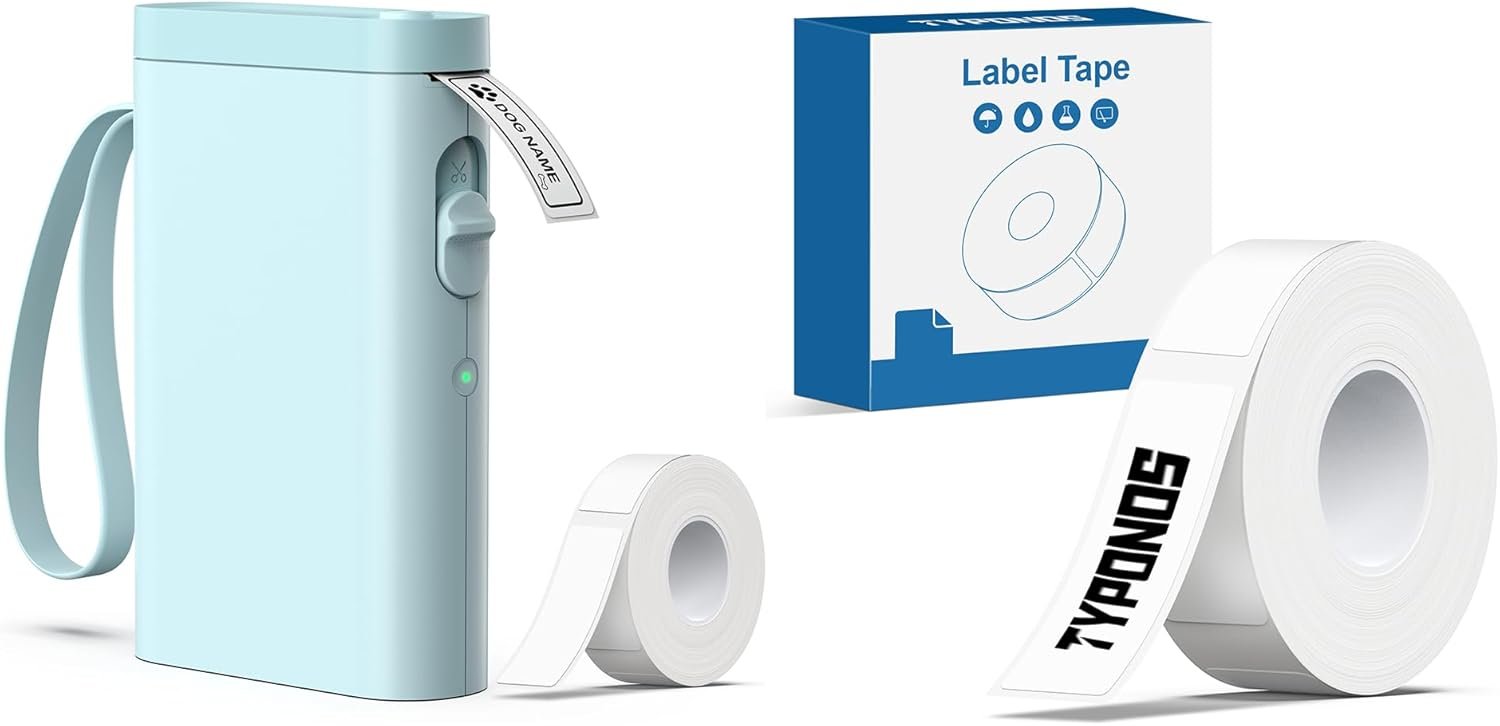
The TYPONOS P21’s design emphasizes portability, making it a strong contender for users who need a label printer that can move between locations. Its lightweight construction and compact size allow it to be carried easily between home and office environments, reducing the need for a fixed printing station. The inclusion of a built-in label roll minimizes setup time, as users can begin printing immediately without additional accessories. This feature is particularly beneficial for individuals managing multiple storage areas or those who require on-the-go labeling for tasks like organizing cables or labeling containers. However, the lack of a built-in power source means users must carry a charging cable or power bank, which could be a drawback for those needing extended mobility. The device’s reliance on Bluetooth connectivity further enhances its portability by eliminating the need for physical cables, though this also limits direct USB printing options.

Size and Weight: Optimized for Easy Handling
The P21’s dimensions and weight are carefully engineered to balance functionality with portability. Its reduced size compared to traditional label printers makes it suitable for small workspaces, while the weight distribution ensures it remains stable during operation. This design is particularly advantageous for users who need to label items in tight spaces, such as kitchen cabinets or toolboxes. However, the compact form factor may also present challenges for users requiring larger label sizes or more advanced printing features. The absence of a dedicated power adapter means users must rely on a USB port or rechargeable battery, which could be a limitation for those working in environments without consistent power access.
Connectivity and Setup: Seamless Bluetooth Integration
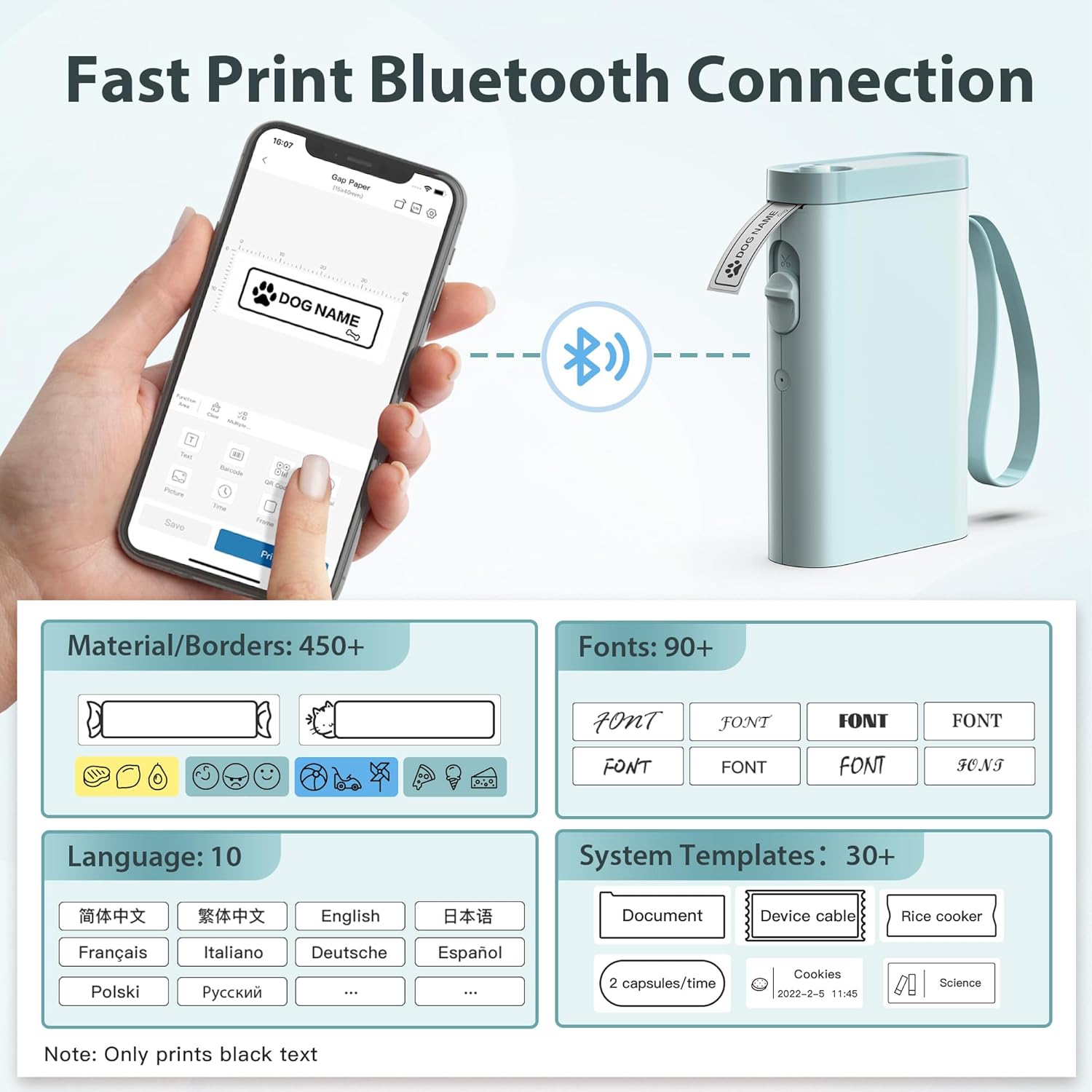
The P21’s Bluetooth connectivity simplifies the printing process by allowing users to wirelessly transfer label designs from their smartphones or tablets. The included app provides a user-friendly interface for selecting templates and customizing labels, which is ideal for users who prefer digital workflows. However, the app’s availability is limited to iOS and Android platforms, excluding users who rely on other operating systems. The setup process, while straightforward, requires users to download the Labelnize app and follow specific steps to pair the device, which may be a barrier for those unfamiliar with Bluetooth pairing procedures. Despite these considerations, the wireless connectivity enhances the P21’s appeal for users who value convenience over traditional printing methods.
Print Quality and Resolution: Thermal Technology in Action
The TYPONOS P21 employs thermal printing technology, which is well-suited for monochrome labels that require durability and clarity. Thermal printing works by heating a special coating on the label tape, creating images without the need for ink or toner. This method results in high-contrast text and graphics, making the P21 ideal for applications where readability is critical, such as labeling containers or tracking items. The resolution of the printed output is consistent with standard thermal printers, producing sharp text and clear barcodes, though it may not match the precision of inkjet or laser printers for more complex graphics. The use of thermal labels also ensures that the printed content remains legible under normal conditions, though prolonged exposure to heat or direct sunlight may affect longevity.

Label Design and Customization: Versatile Templates for Creativity
The P21’s app provides a range of customizable templates, allowing users to create labels with text, QR codes, barcodes, and decorative borders. This flexibility is particularly useful for users who need to label items with specific information, such as expiration dates or product codes. The availability of over 450 materials and 90 fonts enables a high degree of personalization, making the P21 a good choice for users who value aesthetic appeal in their labels. However, the fixed label length limits the ability to create custom-sized labels, which may be a drawback for users who require more flexibility in design. The app’s interface is intuitive, but the lack of advanced editing tools could be a limitation for users with more complex labeling needs.
Monochrome Output: Practical for Everyday Use
The P21’s monochrome printing capability is well-suited for most labeling applications, as it ensures consistent color reproduction without the complexity of color management. This is particularly beneficial for users who need to label items with text, barcodes, or simple graphics, as it eliminates the need for color calibration or specialized inks. The monochrome output also reduces the risk of print errors, as there are fewer variables to manage compared to color printing. However, users who require colored labels or more intricate designs may find the P21’s capabilities limited. The thermal printing process also means that the printed content may fade over time, though this is typically mitigated by using high-quality label tapes designed for longevity.
Media Compatibility and Label Options: Limited but Practical
The TYPONOS P21 is designed to work exclusively with thermal label tapes, which are compatible with both TYPONOS and NELKO P21 printers. This restriction simplifies maintenance, as users do not need to worry about ink or toner refills, but it also limits the range of media options available. The label tapes are available in standard sizes, including 12x40mm, 15x30mm, and 15x40mm, which are suitable for most common labeling tasks. However, the lack of support for continuous label tape means users must replace the entire roll when it is depleted, which could be inconvenient for high-volume users. The reliance on a single type of media also means that users must ensure they have the correct label tape on hand for each printing session, which may be a drawback for those who need to label a variety of items.

Label Tape Specifications: Durability and Application
The thermal label tape used with the P21 is designed for durability, ensuring that printed content remains legible under normal conditions. The tape’s coating is resistant to fading and smudging, making it suitable for use in environments such as kitchens, storage areas, or outdoor settings. However, prolonged exposure to extreme temperatures or moisture may affect the longevity of the printed labels, though this is a common limitation of thermal printing technology. The label tape is also compatible with both TYPONOS and NELKO printers, which provides some flexibility for users who may need to switch between devices. The inclusion of a preloaded label roll is a convenience, but users must be aware that the tape is not refillable, which could be a drawback for those requiring frequent label printing.
Label Size and Format: Fixed Dimensions for Simplicity
The P21’s label sizes are fixed, with options including 12x40mm, 15x30mm, and 15x40mm. This design choice simplifies the printing process by eliminating the need for complex size adjustments, making it ideal for users who require consistency in their labels. The fixed dimensions are well-suited for most common labeling tasks, such as labeling bottles, storage boxes, or cables, but they may not accommodate more specialized applications that require custom sizes. The lack of support for continuous label tape means that users must replace the entire roll when it is depleted, which could be inconvenient for high-volume users. However, the simplicity of the design ensures that the P21 remains easy to use, even for those with limited technical expertise.

Pros and Cons: Balancing Convenience and Limitations
Pros
- Portable Design: The P21’s compact size and lightweight construction make it ideal for users who need a label printer that can be carried between locations. This is particularly beneficial for those managing multiple storage areas or requiring on-the-go labeling.
- Bluetooth Connectivity: The wireless pairing with iOS and Android devices enhances convenience, eliminating the need for physical cables. This feature is especially useful for users who prefer digital workflows and quick setup.
- Customizable Templates: The app provides over 450 materials and 90 fonts, allowing users to create a wide range of label designs. This flexibility is ideal for users who value aesthetic appeal and personalization in their labels.
- Monochrome Output: The consistent color reproduction ensures that printed content remains legible without the complexity of color management, making it suitable for most labeling tasks.
- Quick Setup: The inclusion of a preloaded label roll and straightforward app integration reduces the time required to begin printing, which is advantageous for users with limited setup time.
Cons
- Limited Media Compatibility: The P21 is restricted to thermal label tapes, which limits the range of media options available. Users must ensure they have the correct label tape on hand for each printing session, which may be inconvenient for those requiring frequent label printing.
- No Continuous Label Tape Support: The lack of support for continuous label tape means users must replace the entire roll when it is depleted, which could be a drawback for high-volume users.
- Fixed Label Sizes: The pre-determined label dimensions may not accommodate more specialized applications that require custom sizes, limiting the versatility of the device.
- Dependence on App: The reliance on the Labelnize app for setup and customization may be a barrier for users unfamiliar with Bluetooth pairing procedures or those who prefer direct printing methods.
- No USB Connectivity: The absence of USB ports restricts direct printing options, making it less flexible for users who need to print from multiple devices or integrate with existing workflows.
Final Verdict: Who This Printer Is Best For (and Who Should Skip It)
The TYPONOS P21 Label Maker Machine is best suited for users who prioritize portability and simplicity in their labeling needs. Its compact design, Bluetooth connectivity, and customizable templates make it an excellent choice for home users, small business owners, and individuals managing multiple storage areas. The thermal printing technology ensures durability for labels used in environments like kitchens or storage areas, while the monochrome output provides consistent readability. However, the P21 is not ideal for users requiring high-volume printing, color labels, or specialized media types. Its fixed label sizes and reliance on a single media type limit its versatility, making it less suitable for industrial or commercial applications. For users who need a reliable, lightweight label printer for everyday use, the P21 offers a convenient solution. However, those with more complex requirements or higher printing volumes should consider alternative options that provide greater flexibility and scalability.
Frequently Asked Questions (FAQs)
What printing technology does the TYPONOS P21 use?
The TYPONOS P21 employs thermal printing technology, which heats a special coating on label tape to produce images. This method ensures high-contrast, durable labels without the need for ink or toner.
Can the P21 label printer print continuous labels?
The P21 does not support continuous label tape. Users must replace the entire label roll when it is depleted, which may be inconvenient for high-volume printing tasks.
What label sizes are compatible with the P21?
The P21 supports fixed label sizes of 12x40mm, 15x30mm, and 15x40mm. These dimensions are suitable for most common labeling tasks but limit customization options.
How do I connect the P21 to my smartphone?
The P21 connects via Bluetooth to iOS and Android devices. Users must download the Labelnize app, pair the device, and select templates to start printing.
Is the P21 suitable for commercial use?
The P21 is designed for home and small office environments. Its low to moderate duty cycle and fixed label sizes make it less ideal for high-volume or industrial labeling applications.
What are the limitations of using thermal labels?
Thermal labels may fade over time when exposed to extreme temperatures or direct sunlight. They are best suited for environments with moderate conditions and are not recommended for long-term archival use.
Can the P21 print colored labels?
The P21 is limited to monochrome printing. Users requiring colored labels or complex graphics should consider alternative label printers with inkjet or laser technology.
Does the P21 have a built-in power source?
The P21 does not have a built-in power source and requires a USB port or rechargeable battery for operation. Users must carry a charging cable or power bank for extended mobility.