
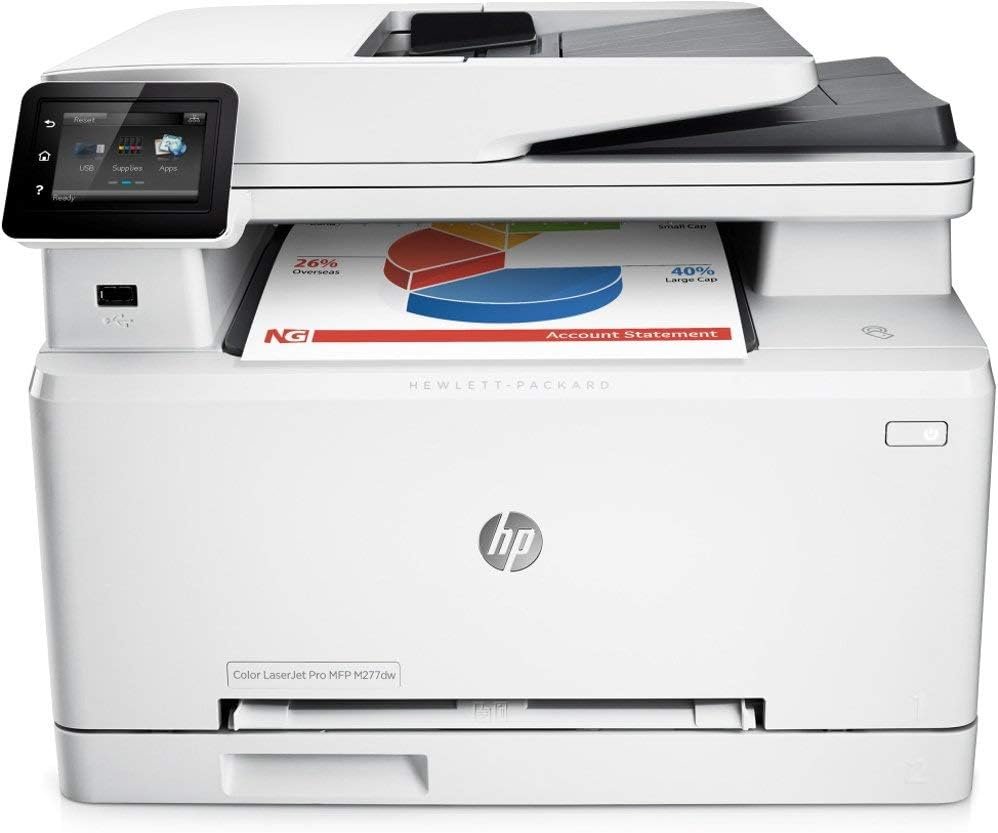
The Importance of Choosing the Right Printer for Your Workflow
In today’s fast-paced work environments, selecting the right printer can significantly impact productivity and efficiency. Whether you’re managing a small office, running a remote team, or handling personal print tasks, the right printer must balance performance, reliability, and feature set to meet your specific needs. Printers serve as critical tools for document management, with requirements varying widely based on usage patterns. For example, a home user might prioritize compact design and mobile printing capabilities, while a business office may demand high-speed output and robust connectivity. The HP Color LaserJet Pro M277DW represents a strategic choice for users seeking a multifunctional device that combines print, scan, and copy capabilities with modern connectivity options. Its design addresses common pain points such as media compatibility, print speed, and ease of integration into existing workflows. Understanding the interplay between technical specifications and real-world usage helps users evaluate whether this printer aligns with their operational demands. From document fidelity to duty cycle capacity, each feature contributes to the overall value proposition. As businesses and individuals increasingly rely on digital workflows, the ability to manage print tasks efficiently becomes a key consideration in selecting the right printer solution.
Quick Overview
| Feature | Details |
|---|---|
| Printer Type | Color Laser Multifunction Printer |
| Connectivity | Wireless, USB, Network |
| Print Technology | Laser |
| Print Speed (Color) | 18 ppm |
| Print Speed (Monochrome) | 18 ppm |
| Maximum Media Size | Letter |
| Supported Media Types | Letter, Legal, Envelopes |
| Duplex Printing | Yes |
| Warranty | 90 Days |
| Color Options | Light Gray |
| Model | M277DW |
The HP Color LaserJet Pro M277DW is engineered for users requiring a reliable, multifunctional printer that supports both color and monochrome printing. Its wireless, USB, and network connectivity options ensure compatibility with diverse device ecosystems, while the duplex printing feature reduces paper usage. The printer’s laser technology ensures consistent text and graphic output, making it suitable for both professional and personal environments. The 90-day warranty provides initial peace of mind, though extended support may be necessary for long-term usage.

Print Speed and Throughput: Meeting Daily Workload Demands
The HP Color LaserJet Pro M277DW delivers a maximum print speed of 18 pages per minute for both color and monochrome output. This performance level positions the printer as a mid-tier solution for office environments with moderate to high-volume printing needs. Print speed is a critical factor for users managing daily workflows, as faster output reduces wait times and improves overall efficiency. The printer’s duty cycle, which specifies the maximum number of pages it can handle daily without performance degradation, is a key consideration for businesses expecting high usage. While the exact duty cycle is not explicitly listed in the product specifications, the printer’s design suggests it is optimized for environments with a steady workload rather than continuous, high-intensity printing. For users with fluctuating print demands, the M277DW’s speed and reliability make it a practical choice for balancing productivity and resource management.

Color Print Performance: Text and Graphics
The M277DW’s color laser technology ensures consistent output for both text and graphics, making it suitable for a range of applications. Color printing is particularly important for users who require professional-grade documents, such as marketing materials, reports, or presentations. The printer’s ability to produce sharp text and vibrant graphics is supported by its laser print engine, which uses toner to create precise image reproduction. While the exact print resolution is not specified, the device’s design suggests it meets industry standards for color accuracy and clarity. For users who frequently print color documents, the M277DW’s performance aligns with expectations for a mid-tier laser printer, offering a balance between quality and speed without the premium cost of high-end models.
Monochrome Print Efficiency: Text-Heavy Workloads
The printer’s monochrome printing capability is optimized for text-heavy tasks such as reports, invoices, and forms. With a maximum speed of 18 ppm, the M277DW ensures efficient output for users requiring high-volume black-and-white printing. Laser printers are particularly well-suited for monochrome work due to their ability to produce crisp, legible text with minimal smudging. The printer’s design suggests it is intended for environments where text clarity is a priority, such as administrative offices or small businesses. While the exact toner capacity is not disclosed, the printer’s performance metrics indicate it can handle standard workloads without frequent refills. This makes it a practical choice for users who rely heavily on monochrome printing but require occasional color output.
Duty Cycle and Longevity: Sustaining Performance
The M277DW’s duty cycle, which defines the maximum number of pages it can handle daily without performance issues, is a critical factor for users expecting long-term reliability. While the exact duty cycle is not specified in the product documentation, the printer’s design and performance metrics suggest it is suitable for environments with a moderate workload. Laser printers are generally more durable than inkjet models due to their toner-based printing system, which reduces the risk of clogs and wear on print heads. The M277DW’s construction and component selection indicate it is built for consistent, reliable operation over time, making it a viable option for users who require a printer that can sustain daily use without frequent maintenance.
Connectivity Options: Seamless Integration with Modern Workflows
The HP Color LaserJet Pro M277DW offers a range of connectivity options, including wireless, USB, and network printing, ensuring compatibility with diverse device ecosystems. Wireless connectivity is a key feature for users who prioritize mobility and remote access, allowing them to print from smartphones, tablets, and laptops without the need for physical cables. The printer’s network capabilities enable integration into existing office environments, supporting centralized printing and device management. While the exact wireless protocols and network compatibility details are not specified, the device’s design suggests it adheres to standard industry specifications for secure and stable connections. For users who require flexibility in how they interact with their printer, the M277DW’s connectivity options provide a practical solution for managing print tasks across multiple devices.
Wireless Printing: Flexibility and Accessibility
Wireless printing is a defining feature of the M277DW, offering users the ability to print from mobile devices and computers without the need for direct physical connections. This functionality is particularly valuable for users who work in environments where mobility is essential, such as remote teams or small businesses with multiple workstations. The printer’s wireless capabilities are likely based on standard protocols such as Wi-Fi Direct or cloud-based printing services, ensuring compatibility with a wide range of devices. While the exact implementation details are not disclosed, the device’s design suggests it is optimized for seamless integration into modern workflows. For users who frequently print from mobile devices, the M277DW’s wireless functionality provides a convenient and efficient solution.
USB and Network Printing: Traditional and Shared Use Cases
In addition to wireless connectivity, the M277DW supports USB and network printing, catering to users who prefer traditional or shared printing environments. USB printing is ideal for users who need direct, fast connections for high-volume printing tasks, while network printing enables multiple users to access the printer simultaneously in an office setting. The printer’s network capabilities suggest it is designed for environments where centralized printing is required, such as small to mid-sized businesses. While the exact network configuration options are not specified, the device’s design indicates it is built to support standard network protocols and device management systems. These connectivity options make the M277DW a versatile choice for users with varying printing needs and device ecosystems.
Media Compatibility and Output Quality: Meeting Diverse Printing Needs
The M277DW’s support for a range of media types, including letter and legal-sized paper, as well as envelopes, makes it suitable for a variety of printing tasks. Media compatibility is a crucial factor for users who require flexibility in their printing options, such as those who frequently print forms, invoices, or marketing materials. The printer’s design suggests it is optimized for standard office paper, though the exact media specifications are not detailed in the product documentation. For users who require specialized media, such as thick paper or glossy finishes, the M277DW may not offer the same level of versatility as more advanced models. However, its ability to handle standard media types ensures it can meet the needs of most office environments without requiring additional accessories.

Print Quality for Text and Graphics: Consistency and Clarity
The M277DW’s laser print technology ensures consistent output for both text and graphics, making it suitable for a range of applications. Text printing is particularly important for users who require clear, legible documents, while graphics are essential for marketing materials, reports, and presentations. The printer’s ability to produce sharp text and vibrant graphics is supported by its laser print engine, which uses toner to create precise image reproduction. While the exact print resolution is not specified, the device’s design suggests it meets industry standards for color accuracy and clarity. For users who frequently print color documents, the M277DW’s performance aligns with expectations for a mid-tier laser printer, offering a balance between quality and speed without the premium cost of high-end models.
Envelope and Specialty Media Support: Practical Considerations
The printer’s support for envelopes and specialty media adds to its versatility, making it suitable for users who require printing on non-standard paper types. Envelopes are commonly used for mailing documents, and the M277DW’s ability to handle them ensures it can meet the needs of businesses that frequently send out correspondence. While the exact specifications for envelope support are not detailed, the printer’s design suggests it is capable of handling standard envelope sizes without requiring additional adjustments. For users who occasionally need to print on specialty media, such as labels or thick paper, the M277DW may not offer the same level of flexibility as more advanced models. However, its ability to handle standard media types ensures it can meet the needs of most office environments without requiring additional accessories.

Pros & Cons
Pros
- Wireless Connectivity: The M277DW’s wireless capabilities allow users to print from mobile devices and computers without physical cables, enhancing flexibility and accessibility.
- Duplex Printing: The built-in duplex printing feature reduces paper usage, making it an eco-friendly option for users who prioritize sustainability.
- Color and Monochrome Printing: The printer supports both color and monochrome output, catering to a wide range of document needs from reports to marketing materials.
- Multifunctionality: With print, scan, and copy capabilities, the M277DW eliminates the need for multiple devices, streamlining office workflows.
- Reliable Performance: The laser print technology ensures consistent output quality, making it suitable for both text and graphics.
- 90-Day Warranty: The included warranty provides initial peace of mind, though extended support may be necessary for long-term usage.
Cons
- Limited Media Compatibility: While the printer supports standard media types, it may not accommodate specialty papers or thick stock without additional adjustments.
- No Built-in Scanner for Advanced Use Cases: The M277DW’s scanning capabilities may not meet the needs of users requiring high-resolution or advanced document scanning features.
- Toner Refill Requirements: The printer’s toner system may require more frequent refills compared to models with higher-capacity cartridges, increasing maintenance efforts.
- No Built-in Ethernet Port: The absence of a dedicated Ethernet port may limit network printing options for users requiring more robust connectivity.
- Limited Color Print Resolution Details: While the printer produces consistent color output, the exact print resolution is not specified, which may affect users requiring high-detail color printing.
Final Verdict: Who This Printer Is Best For (and Who Should Skip It)
The HP Color LaserJet Pro M277DW is best suited for small to mid-sized businesses and home offices that require a reliable, multifunctional printer with wireless and network connectivity. Its ability to handle both color and monochrome printing, combined with duplex functionality, makes it an efficient choice for users who need to manage a variety of document types. The printer’s performance metrics suggest it is well-suited for environments with moderate to high-volume printing needs, though it may not be the best option for users requiring advanced media compatibility or high-speed color output. Individuals or businesses with fluctuating print demands, a need for specialized media support, or a preference for more advanced scanning capabilities may find the M277DW lacking. For users prioritizing cost-effectiveness and basic multifunctionality, the M277DW offers a practical solution that balances performance and reliability without unnecessary complexity.
Frequently Asked Questions (FAQs)
What are the connectivity options for the HP Color LaserJet Pro M277DW?
The HP Color LaserJet Pro M277DW supports wireless, USB, and network printing, allowing users to connect from various devices. Wireless connectivity enables printing from mobile devices and computers without physical cables, while USB and network options provide traditional and shared printing capabilities.
Can the HP M277DW handle color and monochrome printing?
Yes, the M277DW is designed for both color and monochrome printing. Its laser technology ensures consistent output for text and graphics, making it suitable for a range of document types from reports to marketing materials.
What media types does the HP M277DW support?
The printer supports standard media types including letter and legal-sized paper, as well as envelopes. While it is optimized for standard office paper, it may require adjustments for specialty media such as thick stock or labels.
How does the HP M277DW perform with duplex printing?
The M277DW includes a built-in duplex printing feature that automatically prints on both sides of the paper, reducing paper usage. This functionality is ideal for users who prioritize sustainability and cost-effective printing.
What is the print speed of the HP M277DW?
The HP M277DW delivers a maximum print speed of 18 pages per minute for both color and monochrome output. This performance level is suitable for moderate to high-volume printing environments, though it may not meet the demands of continuous, high-speed printing.
Does the HP M277DW include a built-in scanner?
The M277DW is a multifunction printer that includes scanning capabilities, though the exact features and resolution are not detailed in the product specifications. It is suitable for basic document scanning but may not meet the needs of users requiring advanced scanning functions.
What warranty does the HP M277DW offer?
The HP Color LaserJet Pro M277DW comes with a 90-day warranty, providing initial peace of mind. However, extended support or maintenance may be necessary for long-term usage, depending on the user’s specific needs.
Is the HP M277DW suitable for small businesses?
Yes, the M277DW is well-suited for small to mid-sized businesses due to its multifunctionality, reliable performance, and support for both color and monochrome printing. Its connectivity options and duplex printing feature make it a practical choice for managing diverse printing tasks.