
The Importance of Choosing the Right Printer for Your Workload
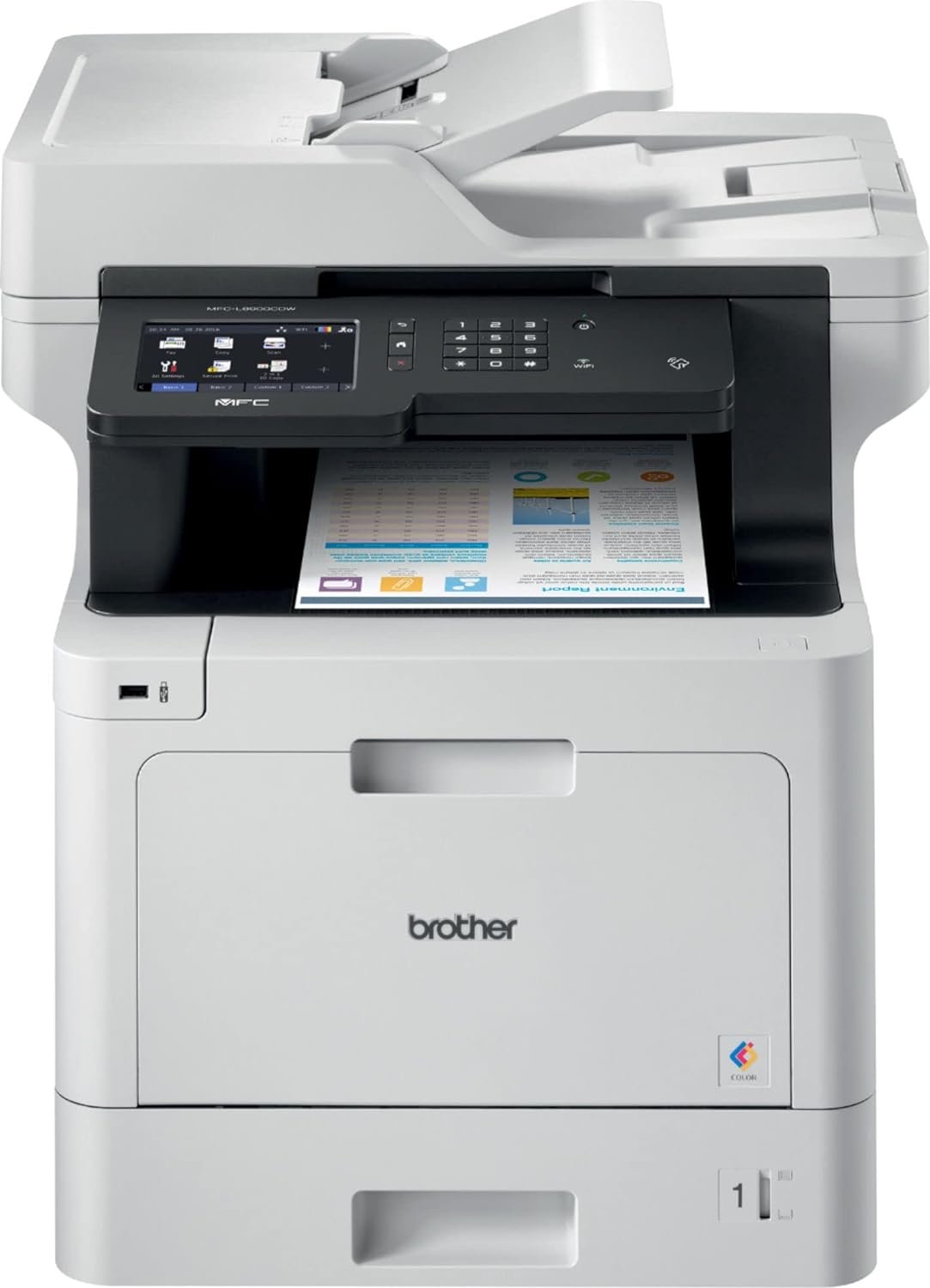
In today’s fast-paced work environments, selecting the right printer can significantly impact productivity and operational efficiency. Whether you’re managing a home office or a small business, the performance of your printing equipment directly affects daily workflows. The Brother Color MFC-L8900CDW stands out as a versatile all-in-one laser printer designed to meet the demands of high-volume tasks while offering a range of integrated functions. Its ability to handle color printing, scanning, copying, and faxing in a single unit makes it an attractive option for users requiring multifunctional capabilities. With a print speed of up to 33 pages per minute and support for various media types, this printer is tailored for environments that require both speed and reliability. Understanding the specific features and limitations of the MFC-L8900CDW is crucial for determining its suitability for different printing needs, from routine office tasks to more complex print management scenarios.
Quick Overview
| Feature | Details |
|---|---|
| Printer Type | Color Laser Printer |
| Supported Functions | Print, Scan, Copy, Fax |
| Print Resolution | 2400 x 600 dpi |
| Print Speed | Up to 33 ppm (color), 33 ppm (monochrome) |
| Media Sizes | 3 x 5″ to 8.5 x 14″ |
| Connectivity | Ethernet, USB, Wi-Fi, NFC |
| Duty Cycle | 15,000 pages per month |
| Toner System | TN431 (BK/C/M/Y) Toner Cartridge |
| Warranty | Limited warranty |
The Brother MFC-L8900CDW combines high-speed printing with advanced connectivity options, making it suitable for both home and office environments. Its 70-sheet auto document feeder and 5″ touchscreen LCD enhance user experience by simplifying complex tasks. The printer’s ability to handle duplex printing and support a wide range of media types ensures versatility in handling various print jobs, from standard documents to larger formats.

Print Speed and Volume Capacity
The MFC-L8900CDW’s performance is defined by its ability to process high-volume print jobs efficiently. With a maximum print speed of 33 pages per minute in both color and monochrome modes, this printer is designed to meet the demands of busy offices and workgroups. The printer’s duty cycle of 15,000 pages per month indicates its capacity to handle sustained workloads without compromising reliability. This specification is particularly important for users who require consistent output, such as those in administrative or clerical roles. The printer’s duplex printing capability further enhances its efficiency by reducing paper usage and lowering operational costs over time.

High-Speed Printing for Productivity
The printer’s 33 ppm print speed ensures that large print jobs can be completed quickly, which is essential in environments where time is a critical factor. This speed is achieved through the use of advanced laser technology and optimized print engines that minimize processing delays. The printer’s ability to handle both color and monochrome printing simultaneously allows users to manage multiple tasks without switching between different devices. For users who frequently deal with complex documents, the high-speed printing capability ensures that reports, presentations, and other materials can be produced efficiently.
Duty Cycle and Reliability
The 15,000 pages per month duty cycle is a key indicator of the printer’s reliability and durability. This specification suggests that the MFC-L8900CDW is built to withstand continuous operation, making it suitable for environments with high print volumes. The printer’s design incorporates robust components that are engineered to maintain performance under prolonged use. Users who require a printer that can handle daily operations without frequent maintenance or downtime will find this specification particularly appealing. The duty cycle also provides insight into the printer’s expected lifespan, ensuring that it can meet the demands of both short-term and long-term projects.
Duplex Printing and Cost Efficiency
The MFC-L8900CDW’s duplex printing capability is another factor that contributes to its efficiency. By printing on both sides of a sheet, the printer reduces paper consumption, which can lead to significant cost savings over time. This feature is especially beneficial for users who need to produce large quantities of documents, as it minimizes the need for additional paper purchases. The ability to manage both sides of a page also helps in reducing the environmental impact of printing, making the MFC-L8900CDW a more sustainable option for users concerned about resource usage.
Media Handling and Versatility
The MFC-L8900CDW is designed to accommodate a wide range of media types, ensuring that users can handle various print jobs with ease. The printer features a 50-sheet multipurpose tray and a 250-sheet standard input tray, which allows for flexibility in managing different paper sizes and types. This media handling capability is particularly important for users who need to print on specialized materials such as envelopes, labels, and transparencies. The printer’s support for media sizes ranging from 3 x 5″ to 8.5 x 14″ further enhances its versatility, making it suitable for both standard and larger format printing tasks.

Support for Envelopes and Special Media
One of the standout features of the MFC-L8900CDW is its ability to handle envelopes and other specialized media. The built-in support for envelopes ensures that users can print on these materials without the need for additional accessories or modifications. This capability is particularly useful for users who frequently send out formal correspondence or require printed materials that are not standard paper sizes. The printer’s design includes mechanisms that accommodate envelopes, ensuring that they are fed and printed correctly without causing jams or misfeeds.
Media Size Flexibility
The printer’s support for a wide range of media sizes is another factor that contributes to its versatility. The ability to handle media sizes up to 8.5 x 14″ means that users can print on large format documents, which is essential for tasks such as creating posters, banners, or detailed reports. This flexibility ensures that the MFC-L8900CDW can adapt to different printing needs, making it a valuable asset for users who require a printer that can handle a variety of media types.
Paper Handling and User Experience
The MFC-L8900CDW’s paper handling capabilities are designed to enhance the user experience by minimizing the need for manual intervention. The printer’s dual trays allow for efficient management of different paper types, ensuring that users can switch between media without interrupting their workflow. The 70-sheet auto document feeder further simplifies the process of scanning and copying, as it reduces the need for manual feeding of documents. This design ensures that users can focus on their tasks without the distraction of managing paper feeds, thereby improving overall productivity.
Connectivity and Network Integration
The MFC-L8900CDW is equipped with a range of connectivity options that enhance its integration into modern work environments. The printer supports Ethernet, USB, Wi-Fi, and NFC technologies, providing users with multiple ways to connect and manage their printing needs. This versatility in connectivity is particularly important for users who require the ability to print from various devices, including desktop computers, laptops, and mobile devices. The inclusion of NFC technology further simplifies the process of connecting to the printer, allowing users to initiate printing with a simple touch.

Ethernet and USB Connectivity
The Ethernet and USB connectivity options ensure that the MFC-L8900CDW can be seamlessly integrated into both wired and wireless networks. This feature is particularly beneficial for users who operate in environments where stable network connections are essential. The Ethernet port allows for direct printing from a networked computer, while the USB port provides an alternative for users who prefer a direct connection. These connectivity options make the printer suitable for both small offices and larger workgroups that require reliable printing solutions.
Wi-Fi and NFC for Mobile Printing
The inclusion of Wi-Fi and NFC technologies enhances the MFC-L8900CDW’s appeal for users who rely on mobile devices. Wi-Fi connectivity allows for printing from smartphones and tablets, providing a convenient solution for users who need to print on the go. The NFC feature further simplifies the process by enabling users to initiate printing with a simple touch, eliminating the need for complex setup procedures. These connectivity options make the printer an ideal choice for users who require flexibility in their printing workflow.
Network Printing and Device Compatibility
The MFC-L8900CDW’s network printing capabilities ensure that it can be used in a variety of environments, from home offices to small businesses. The printer’s compatibility with a range of devices, including PCs, smartphones, and other networked equipment, makes it a versatile solution for users who need to print from multiple sources. This compatibility is further enhanced by the printer’s support for mobile printing technologies such as Apple AirPrint, which simplifies the process of printing from iOS devices.
Print Quality and Resolution
The MFC-L8900CDW’s print quality is defined by its resolution of 2400 x 600 dpi, which ensures that printed documents are clear and precise. This resolution is particularly important for users who require high-quality output, such as those in professional environments where documents must be visually appealing and legible. The printer’s ability to produce both color and monochrome prints at this resolution ensures that users can meet a variety of printing needs without compromising on quality.

Color and Monochrome Output
The printer’s color printing capabilities are enhanced by its use of a four-color toner system, which allows for the production of vibrant and accurate color prints. This is particularly beneficial for users who require color output for presentations, marketing materials, or other visual content. The monochrome printing capability ensures that black and white documents are also produced with high clarity and precision, making the MFC-L8900CDW suitable for a wide range of applications.
Resolution and Document Clarity
The 2400 x 600 dpi resolution ensures that printed documents are free from pixelation and maintain a high level of detail. This is especially important for users who need to print detailed graphics, charts, or other complex visual content. The printer’s ability to maintain consistent resolution across different print jobs ensures that users can produce high-quality output without the need for manual adjustments or additional post-processing steps.
Text and Graphics Performance
The MFC-L8900CDW’s performance in text and graphics printing is another factor that contributes to its overall quality. The printer’s ability to produce sharp and legible text is essential for users who require documents that are easy to read, such as reports, forms, and correspondence. The graphics printing capability ensures that visual content is reproduced accurately, making the printer a suitable choice for users who require both text and image output.

Pros and Cons
Pros
- High-Speed Printing: The MFC-L8900CDW’s 33 ppm print speed ensures that large print jobs can be completed quickly, enhancing productivity in busy environments.
- Auto Duplex Printing: The printer’s ability to print on both sides of a sheet reduces paper usage and lowers operational costs over time.
- Versatile Media Handling: The printer supports a wide range of media types, including envelopes and specialized formats, making it suitable for various printing tasks.
- Robust Connectivity Options: The inclusion of Ethernet, USB, Wi-Fi, and NFC technologies ensures that the printer can be integrated into different network environments.
- Color Printing Capabilities: The four-color toner system allows for the production of vibrant and accurate color prints, suitable for a variety of applications.
- User-Friendly Interface: The 5″ touchscreen LCD simplifies navigation and operation, enhancing the user experience.
- Durable Design: The printer’s 15,000 pages per month duty cycle indicates its reliability and suitability for high-volume environments.
- Integrated Features: The combination of print, scan, copy, and fax functions in a single unit provides a convenient solution for multifunctional printing needs.
Cons
- Toner Cost Consideration: The printer’s high-speed operation may lead to increased toner consumption, which could affect long-term operational costs.
- Limited Photo Printing: While the printer excels in text and graphic printing, its capabilities for photo printing are limited, making it less suitable for users requiring high-quality photographic output.
- Complex Setup Process: The printer’s extensive connectivity options may require a more involved setup process, which could be challenging for less tech-savvy users.
- Media Support Limitations: Although the printer supports a wide range of media types, some specialized materials may not be fully compatible, limiting its versatility in certain scenarios.
- Potential Maintenance Needs: The printer’s high duty cycle may result in more frequent maintenance requirements, which could impact its overall reliability if not properly managed.
Final Verdict: Who This Printer Is Best For (and Who Should Skip It)
The Brother Color MFC-L8900CDW is an excellent choice for users who require a high-speed, multifunctional printer for both home and office environments. Its ability to handle color printing, scanning, copying, and faxing in a single unit makes it particularly suitable for small to medium-sized businesses and workgroups that need reliable and efficient printing solutions. The printer’s robust connectivity options and user-friendly interface ensure that it can be easily integrated into various network environments, making it a versatile option for users with diverse printing needs.
However, the MFC-L8900CDW may not be the best choice for users who require specialized photo printing capabilities or have a need for high-volume print jobs that exceed its 15,000 pages per month duty cycle. Additionally, users who are less familiar with complex setup processes or prefer simpler, more straightforward printing solutions may find the printer’s extensive connectivity options overwhelming. For those seeking a printer that prioritizes photo quality or has a higher tolerance for maintenance requirements, alternative models may be more appropriate.

Frequently Asked Questions (FAQs)
What is the maximum print speed of the Brother MFC-L8900CDW?
The Brother MFC-L8900CDW can print up to 33 pages per minute in both color and monochrome modes, making it suitable for high-volume print tasks.
Does the Brother MFC-L8900CDW support duplex printing?
Yes, the printer features automatic duplex printing, which prints on both sides of a sheet to reduce paper usage and lower costs.
What connectivity options are available for the Brother MFC-L8900CDW?
The printer supports Ethernet, USB, Wi-Fi, and NFC connectivity, allowing for flexible integration into various network environments.
What media types can the Brother MFC-L8900CDW handle?
The printer supports a wide range of media types, including standard paper, envelopes, and specialized formats up to 8.5 x 14 inches.
What is the print resolution of the Brother MFC-L8900CDW?
The printer offers a print resolution of 2400 x 600 dpi, ensuring high-quality output for both text and graphics.
What is the duty cycle of the Brother MFC-L8900CDW?
The printer has a duty cycle of 15,000 pages per month, indicating its ability to handle sustained high-volume printing tasks.
Is the Brother MFC-L8900CDW suitable for home office use?
Yes, the printer’s multifunctional capabilities and connectivity options make it an excellent choice for home office environments.
What is the warranty coverage for the Brother MFC-L8900CDW?
The printer comes with a limited warranty, providing basic support and coverage for manufacturing defects.