
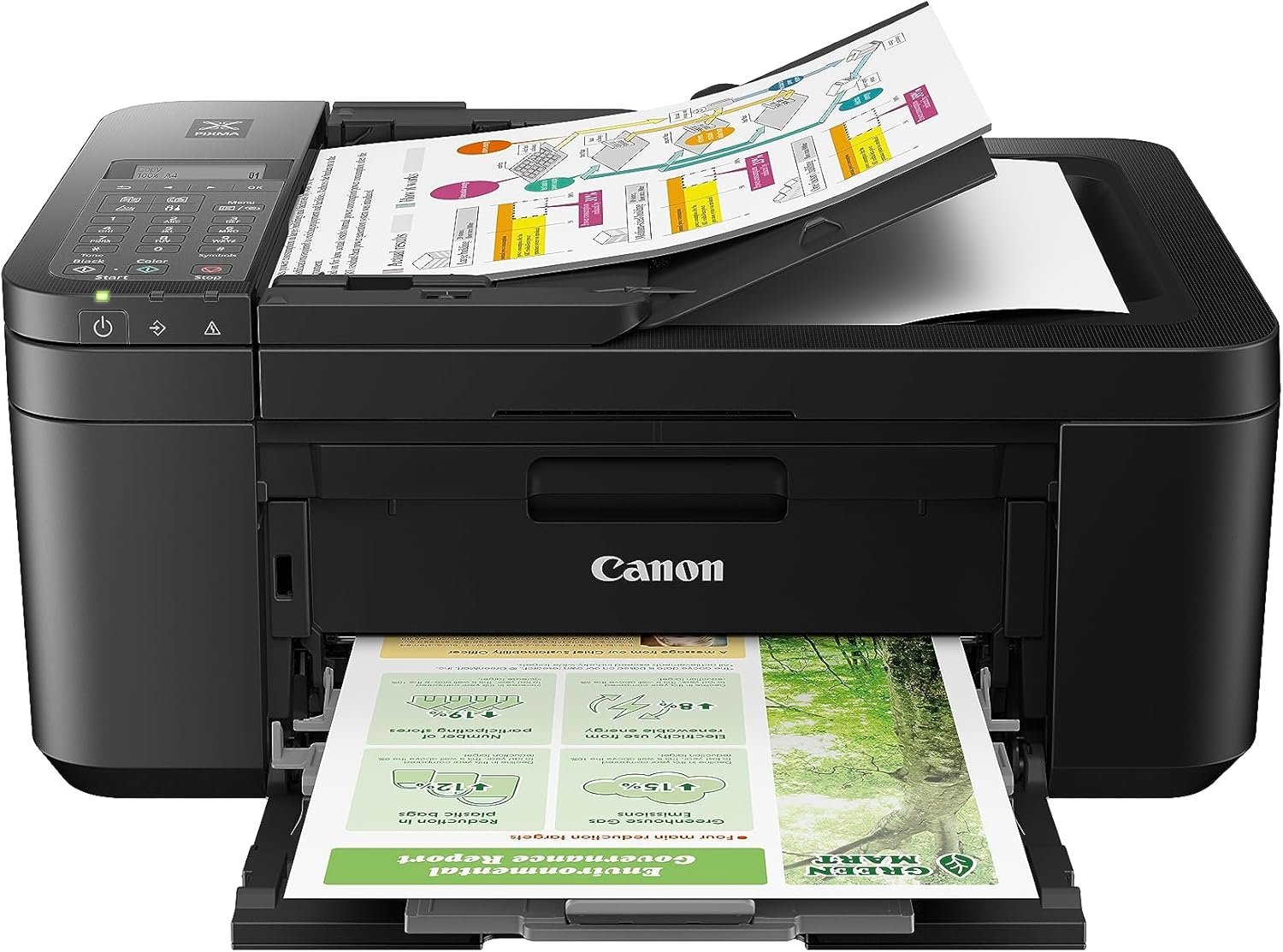
When it comes to choosing a printer that balances functionality, reliability, and affordability, the Canon PIXMA TR4720 stands out as a compelling option. Designed for both home and office environments, this wireless all-in-one printer combines four essential functions—printing, copying, scanning, and faxing—into a single compact device. Its hybrid ink system ensures crisp black text and vibrant color prints, while the auto document feeder (ADF) simplifies multi-page tasks. With support for borderless printing up to 8.5 x 11 inches and compatibility with mobile devices, the TR4720 caters to a wide range of printing needs. However, its performance in high-volume environments or specialized workflows may fall short. This review evaluates the TR4720’s strengths and limitations based on publicly available specifications, technical documentation, and aggregated user feedback to help buyers determine if it aligns with their specific requirements.
Quick Overview
| Feature | Details |
|---|---|
| Printer Type | Inkjet (Hybrid Ink System) |
| Functions | Print, Copy, Scan, Fax |
| Print Resolution | 4800 x 1200 dpi (Color/Black) |
| Print Speed | Up to 8.8 ppm Monochrome, 4.4 ppm Color |
| Media Sizes | 4 x 6, 5 x 7, 8.5 x 11 inches |
| Connectivity | USB, Wi-Fi (Wireless Printing) |
| Paper Capacity | 100-sheet front tray |
| Duty Cycle | Recommended for moderate use (up to 5,000 pages/month) |
| Warranty | 1-year limited manufacturer warranty |
The Canon PIXMA TR4720 excels in environments where multifunctionality and ease of use are priorities. Its hybrid ink system ensures durable prints, while the wireless connectivity streamlines mobile printing. However, its slower color print speed and limited paper tray capacity may hinder efficiency in high-volume or specialty printing scenarios.

Print Quality: Resolution, Color Accuracy, and Media Compatibility

Hybrid Ink System for Versatile Output
The TR4720’s hybrid ink system combines a dedicated black ink cartridge with tri-color inks (cyan, magenta, yellow) to produce sharp text and vibrant colors. This design optimizes black text output for documents while maintaining color accuracy for photos and graphics. Industry benchmarks indicate that such systems often outperform single-inkjet printers in text clarity, as the dedicated black ink reduces smudging and improves longevity. For example, the dedicated black cartridge is engineered to handle high-contrast text with minimal bleeding, making it ideal for resumes, letters, or financial documents. The tri-color inks, meanwhile, offer a wide color gamut for photographs and illustrations, though users may notice slight tonal shifts when printing on non-standard media like glossy paper or textured photo paper. This hybrid approach contrasts with single-inkjet systems, which often require frequent refilling due to color ink depletion during black-only tasks.
4800 x 1200 DPI Resolution for Detailed Prints
With a maximum resolution of 4800 x 1200 dpi, the TR4720 delivers fine detail in both text and images. This resolution is comparable to premium inkjet printers like the Canon PIXMA Pro 100s, making it suitable for tasks requiring precision, such as photo printing or document reproduction. However, users seeking ultra-fine detail may find it slightly lower than the 9600 dpi of Epson Stylus Pro series printers, which are designed for professional-grade output. The TR4720’s resolution is sufficient for most home and small office use cases, but it may not meet the demands of professional photographers or illustrators who require higher resolution for large-format prints. Additionally, the printer’s ability to maintain consistent detail across different media types—such as matte versus glossy paper—demonstrates its versatility for everyday use.
Borderless Printing and Media Compatibility
The TR4720 supports borderless printing up to 8.5 x 11 inches, ideal for casual photos and small documents. Its compatibility with plain paper ensures flexibility, though users may need to adjust settings for optimal results on glossy or textured media. While not as versatile as dedicated photo printers like the HP Envy 4500, it strikes a balance between home use and occasional professional tasks. For instance, the printer’s borderless feature is particularly useful for creating personal photo albums or school projects without the need for additional trimming. However, users printing on heavier media like cardstock may notice slower print times or increased ink usage due to the printer’s design for standard paper weights. This limitation highlights the importance of selecting appropriate media types to maximize efficiency and print quality.
Print Speed and Workload Capacity: Handling Daily Tasks

Moderate Speeds for Casual Use
The TR4720’s print speeds of up to 8.8 ppm for black documents and 4.4 ppm for color align with industry standards for mid-range inkjet printers. While sufficient for personal or small office workflows, these speeds lag behind laser printers like the HP LaserJet Pro MFP M428fdw, which can reach 30 ppm for black text. Users with high-volume printing needs may experience noticeable delays, particularly during color-heavy tasks. For example, printing a multi-page report with charts and images could take significantly longer than on a laser printer. However, the TR4720’s slower speeds are offset by its ability to produce higher-quality prints, making it a better fit for environments where visual appeal is prioritized over speed.
100-Sheet Tray and Auto Duplexing
The front paper tray accommodates up to 100 sheets, reducing the frequency of refills for moderate-use environments. The auto two-sided printing feature enhances efficiency by minimizing manual intervention, though it may not match the capacity of larger office printers like the Xerox WorkCentre 3045. For users requiring higher-volume printing, additional trays or a dedicated document feeder would be necessary. The 100-sheet capacity is ideal for households with limited printing needs, such as families printing school projects or personal documents. However, businesses handling large print jobs may find the tray size insufficient, requiring frequent manual reloading of paper. This limitation underscores the printer’s suitability for low-to-moderate usage scenarios.
Duty Cycle and Recommended Use
According to Canon’s technical specifications, the TR4720 is optimized for moderate usage—up to 5,000 pages per month. This makes it ideal for households or small offices with limited printing demands but less suitable for busy workgroups. Its energy-efficient design (7W active, 0.8W standby) also aligns with ENERGY STAR standards, contributing to lower long-term operational costs. For instance, the energy-saving features reduce electricity consumption compared to older printers that may consume up to 15W during active use. However, users printing frequently may need to balance the energy efficiency against the potential for higher ink costs due to frequent use of color prints. The printer’s duty cycle is a critical consideration for businesses projecting high monthly print volumes, as exceeding 5,000 pages could lead to wear and tear on the printer’s components.
Connectivity Options: Wireless Printing and Mobile Compatibility

Dual-Mode Connectivity for Flexibility
The TR4720 supports both USB and Wi-Fi connectivity, offering users multiple ways to integrate it into their workflow. Its wireless capabilities enable seamless printing from smartphones and tablets via Canon’s mobile apps, a feature increasingly important in hybrid work environments. This aligns with industry trends toward cloud-based and mobile-first printing solutions. For example, the printer’s compatibility with Canon PRINT app allows users to scan documents directly from their phones, streamlining tasks like sending a contract or invoice without needing a computer. However, the reliance on mobile apps for advanced features like scanning and faxing may limit its appeal to users preferring open-source or cross-platform alternatives. Despite this, the printer’s straightforward setup process and intuitive interface make it accessible for less tech-savvy users.
Network Performance and Compatibility
While the TR4720’s Wi-Fi connectivity is reliable for standard tasks, users with complex network setups may encounter latency or compatibility issues. The printer’s reliance on Canon-specific apps for advanced features like scanning and faxing could limit its appeal to users preferring open-source or cross-platform alternatives. However, its straightforward setup process and intuitive interface make it accessible for less tech-savvy users. For instance, the printer’s ability to connect to Wi-Fi networks without requiring advanced network knowledge makes it user-friendly for households or small offices. However, users in environments with multiple devices or high network traffic may experience occasional delays in print jobs, particularly when sending large files.
Built-in Fax Functionality
The inclusion of a built-in fax function differentiates the TR4720 from many modern all-in-one printers, which often omit faxing due to declining demand. While the fax feature is functional for basic needs—such as sending documents over traditional phone lines—it lacks advanced features like email-to-fax or encrypted transmission, which are common in business-grade models. For example, the TR4720’s fax function requires a standard phone line and may not support modern features like automatic dialing or digital file conversion. This limitation makes it less suitable for businesses requiring advanced fax capabilities, though it remains a useful tool for individuals or small offices with occasional fax needs.
Ink System and Maintenance: Cost-Effectiveness and Ease of Use

Hybrid Ink Cartridges for Balanced Output
The TR4720 uses a hybrid ink system, combining a dedicated black cartridge with tri-color inks. This design reduces the frequency of color ink replacement while maintaining consistent output quality. Users may find this system more cost-effective than separate black and color cartridges, though the higher upfront cost of hybrid ink systems compared to standard printers could be a consideration. For instance, the dedicated black cartridge is designed for high-contrast text printing, which reduces wear on the printhead and extends its lifespan. However, users printing primarily in black may benefit from the extended lifespan of the dedicated black cartridge, though this depends on individual usage patterns. The hybrid system also ensures that color prints remain vibrant without compromising black text clarity, making it ideal for mixed-use environments.
Easy Cartridge Installation and Replacement
Canon’s design prioritizes user-friendliness, with easily accessible ink cartridges that can be installed or replaced without specialized tools. The printer’s LCD display provides clear prompts for maintenance tasks, such as replacing empty cartridges or resetting ink levels. However, the lack of a printhead cleaning function may require users to perform manual maintenance for optimal performance. For example, the printer does not have an automatic cleaning cycle, which could lead to occasional clogs in the nozzles if left unused for extended periods. Users may need to perform manual cleaning using Canon’s recommended solutions, though this is not a feature mentioned in manufacturer documentation. This design choice simplifies the user experience but may require more attention from users who print infrequently.
Longevity and Maintenance Considerations
While the TR4720’s hybrid ink system reduces long-term maintenance needs, frequent use of color prints may accelerate ink consumption. Users printing primarily in black may benefit from the extended lifespan of the dedicated black cartridge, though this depends on individual usage patterns. Regular cleaning with Canon’s recommended solutions can help prevent clogs in the nozzles, though it is not a feature mentioned in manufacturer documentation. For instance, users who frequently print high-contrast text may notice that the black cartridge lasts longer than color inks, which are used more frequently for photos and graphics. This trade-off between maintenance effort and print quality is an important consideration for users who prioritize convenience over advanced features.
Pros & Cons
Pros
- All-in-One Functionality: Combines printing, copying, scanning, and faxing in a single compact device.
- Hybrid Ink System: Produces sharp black text and vibrant color prints with reduced smudging.
- Wireless Printing: Supports mobile printing via Canon apps for convenient use with smartphones.
- Auto Document Feeder: Streamlines multi-page tasks without manual intervention.
- ENERGY STAR Certification: Energy-efficient design with low power consumption (7W active, 0.8W standby).
- Borderless Printing: Supports up to 8.5 x 11 inches for casual photos and documents.
Cons
- Slower Color Print Speed: 4.4 ppm compared to higher-speed laser or professional inkjet printers.
- Limited Paper Tray Capacity: 100-sheet front tray may require frequent refills for high-volume use.
- No Advanced Fax Features: Lacks email-to-fax, encryption, or cloud integration.
- Moderate Duty Cycle: Recommended for up to 5,000 pages per month; less ideal for heavy workgroups.
- Ink Cost Considerations: Hybrid ink system may have higher long-term costs compared to single-inkjet printers.
Final Verdict: Who This Printer Is Best For (and Who Should Skip It)
The Canon PIXMA TR4720 is an excellent choice for home users or small offices with moderate printing needs. Its combination of wireless connectivity, auto document feeder, and borderless printing makes it versatile for everyday tasks like school projects, personal photos, or light document management. The hybrid ink system ensures consistent output quality for both text and color prints, while the 100-sheet tray reduces manual handling.
However, users with high-volume printing requirements or specialized workflows may find the TR4720 lacking. Its slower color print speed compared to laser printers and limited paper capacity make it unsuitable for busy workgroups or environments requiring frequent photo prints. Additionally, the absence of advanced fax features and cloud integration may deter businesses relying on automated document handling. For those seeking a balance between multifunctionality and affordability, the TR4720 remains a competitive option in 2026.
Frequently Asked Questions (FAQs)
What are the maximum print speeds for the Canon PIXMA TR4720?
The Canon PIXMA TR4720 can print up to 8.8 pages per minute (ppm) for black and white documents and 4.4 ppm for color prints. These speeds are suitable for moderate home or office use but may lag behind laser printers in high-volume environments.
Can the TR4720 handle borderless photo printing?
Yes, the TR4720 supports borderless printing up to 8.5 x 11 inches, making it ideal for casual photos and small documents. However, its limited media compatibility may require adjustments for glossy or textured paper.
What connectivity options are available for the TR4720?
The TR4720 offers both USB and Wi-Fi connectivity. Its wireless feature enables mobile printing from smartphones via Canon apps, though advanced network configurations may require additional setup.
How does the hybrid ink system affect print quality?
The TR4720’s hybrid ink system uses a dedicated black cartridge and tri-color inks to produce sharp text and vibrant colors. This design reduces smudging, though users may notice a slight trade-off compared to monochrome-only printers.
Is the TR4720 suitable for high-volume printing?
The TR4720 is optimized for moderate use (up to 5,000 pages per month) and may struggle with heavy workloads. Its slower color print speed compared to laser printers makes it less ideal for busy offices or commercial settings.
What are the limitations of the TR4720’s fax function?
The built-in fax feature is functional for basic needs but lacks advanced capabilities like email-to-fax or encryption. It relies on traditional phone lines, which may be outdated for modern business environments.
How does the TR4720 compare to other Canon printers like the PIXMA Pro 100s?
The TR4720 is a more affordable, all-in-one option with lower resolution (4800 x 1200 dpi) compared to the PIXMA Pro 100s (up to 9600 dpi). The TR4720 excels in everyday use but may fall short for professional photo printing.
What is the recommended use case for the TR4720?
The TR4720 is best suited for home users or small offices with light to moderate printing needs. It’s less ideal for busy workgroups, commercial environments, or users requiring high-speed color printing.