
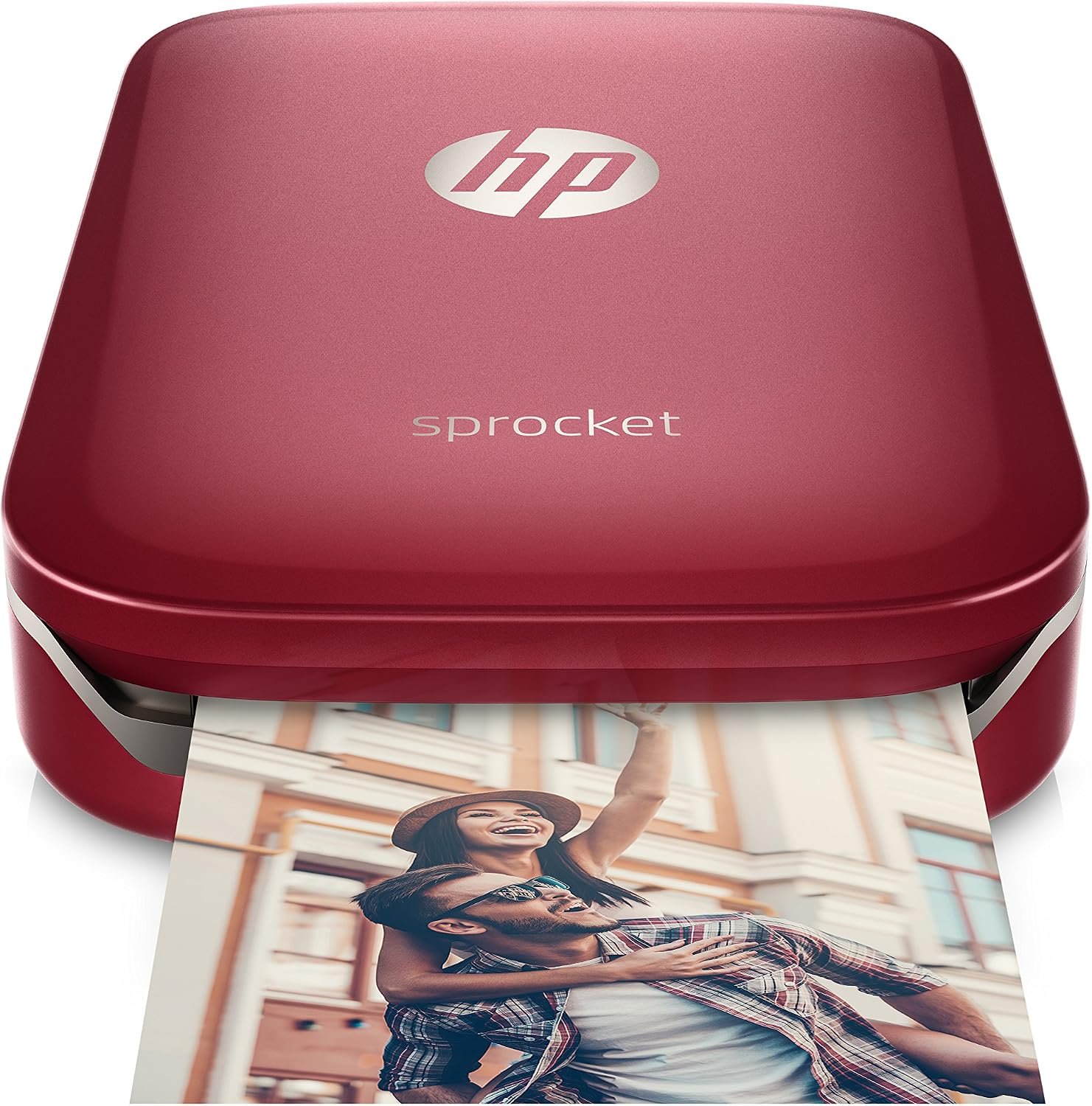
HP Sprocket Portable Photo Printer Review: A Pocket Printer for Instant Photo Sharing
HP Sprocket Z3Z93A is a pocket-sized portable photo printer built around Zink zero-ink printing technology, allowing photos to move from a smartphone screen to a physical 2 x 3 inch sticky-backed print in under a minute. This HP Sprocket portable photo printer print review looks at how the device fits into a market that spans full desktop photo printers, everyday inkjets, and dedicated snapshot makers, since the right choice depends heavily on how and where images will actually be printed. Casual users capturing party moments, students building scrapbooks, and social media enthusiasts who want tangible keepsakes all approach printing with different workload expectations than a home office running a laser printer for documents.
Print technology, output size, and connectivity all shape whether a printer matches a buyer’s routine. A device optimized for occasional 2 x 3 inch novelty prints serves a very different purpose than a flatbed photo printer designed for gallery-quality 4×6 photo printer output or a multifunction unit handling scanning and copying alongside printing. Understanding where the HP Sprocket sits within that spectrum, including its resolution ceiling, paper capacity, and battery-powered portability, helps clarify realistic expectations before deciding whether it belongs in a bag, at a party, or on a desk.
Quick Overview
| Feature | Details |
|---|---|
| Printer Type | Zink (zero-ink) thermal dye photo printer |
| Functions | Print only; photo re-scan via companion app, no fax or copy |
| Print Resolution | 313 x 400 dpi, color and black and white |
| Print Speed | Rated at approximately 1.00 page per minute |
| Media Size | 2 x 3 inch sticky-backed Zink photo paper |
| Paper Capacity | Up to 10 sheets per tray load |
| Connectivity | Bluetooth only, HP Sprocket app required (iOS and Android) |
| Duty Cycle | Light, personal and event use; not rated for high-volume runs |
| Ink or Toner System | Cartridge-free; color crystals embedded in Zink paper |
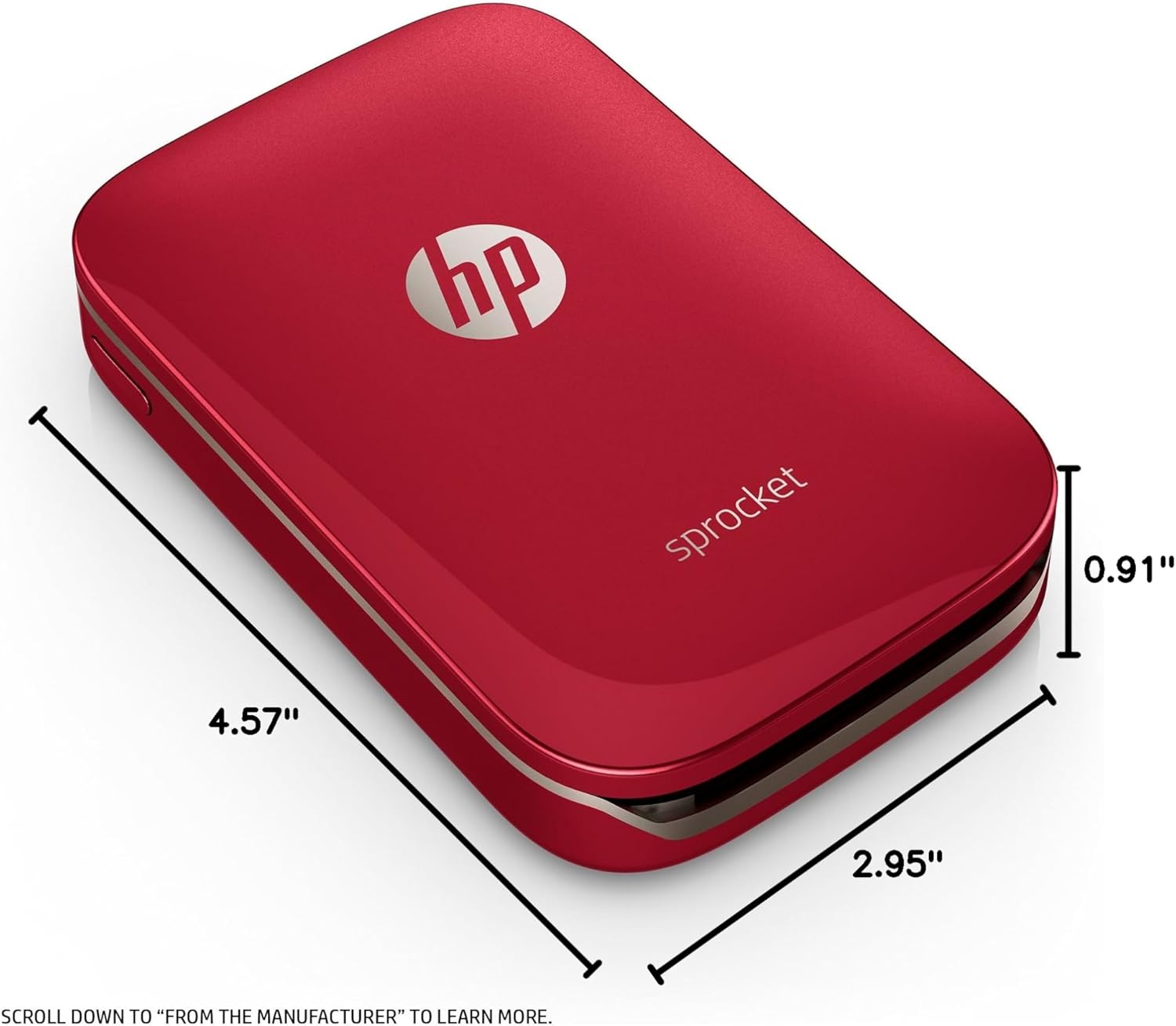
| Weight and Dimensions | 6.08 ounces; 2.95″D x 4.57″W x 0.91″H |
| Power | Rechargeable internal battery; 34.49 watts power consumption |
| Warranty | One-year limited hardware warranty |
These specifications point to a printer designed for lightweight, on-demand photo sharing rather than high-volume output. The Bluetooth-only connection and Zink paper system mean the HP Sprocket photo printer skips ink cartridges entirely, trading print speed and duty cycle for portability and simplicity. Anyone expecting document printing, scanning, or large-format output should look elsewhere, but for parties, travel, and quick social prints, the compact dimensions and app-based control translate directly into a printer that can be pulled from a pocket and used within moments.
HP Sprocket Portable Photo Printer Review: Print Technology and Photo Quality
Print quality expectations for the HP Sprocket hinge on its Zink printing engine, a zero-ink, zero-cartridge system that activates heat-sensitive color crystals embedded directly inside the paper stock rather than spraying liquid ink or fusing toner. At a maximum resolution of 313 x 400 dpi, output is calibrated for small-format 2 x 3 inch prints rather than the finer detail expected from a dedicated 4×6 photo printer or a professional-grade device like the Canon Pixma Pro-100S. This makes the Sprocket best suited to casual, snapshot-style photography rather than portrait retouching or fine art reproduction. Buyers weighing photo printers reviews across categories should treat resolution figures as size-relative: a 313 x 400 dpi rating looks modest next to inkjet photo printers, but is proportionate to the compact canvas it is printing onto.

Zink Zero-Ink Printing Explained
Zink, short for zero ink, replaces traditional cartridges with paper that already contains dye crystals in its coating. Heat from the print head activates these crystals selectively, developing color without any liquid ink reservoir, printhead nozzles, or toner cartridge to manage. This design eliminates the smudging and drying time associated with some inkjet output, and it removes a common point of failure in home photo printers: clogged nozzles from infrequent use.
The tradeoff is that image quality depends entirely on the paper’s embedded chemistry rather than adjustable ink formulations, so color accuracy is fixed by the Zink paper design rather than user-tunable printer settings or driver-level color profiles.
Resolution and Color Output Expectations
At 313 x 400 dpi across both color and black-and-white modes, the printer targets small prints where pixel density remains visually sharp at typical viewing distances. Color depth is rated at 24 bpp, supporting standard full-color photo reproduction without the extended gamuts found in professional pigment-based systems that separate color and monochrome channels for finer tonal control.
Text reproduction and fine linework are not the printer’s focus, since it lacks any monochrome document mode or higher-resolution print path used by dedicated document printers. Users comparing photo printer reviews across formats should expect vibrant, snapshot-quality color suited to social sharing rather than the tonal range and gradation associated with archival-grade prints from professional imaging systems.
2×3-Inch Sticky-Backed Photo Paper
The maximum media size is fixed at 2 x 3 inches, with each sheet doubling as a peel-and-stick label thanks to its adhesive backing. This format supports scrapbooking, locker decorations, and party favors more naturally than framed photography, since there is no path to enlarging output to standard frame sizes without a separate printer entirely.
Unlike a 4×6 photo printer, there is no way to size up a print without cropping or losing detail, which keeps the device firmly positioned as a novelty and keepsake printer rather than a replacement for standard photo lab or desktop photo printing workflows that support multiple output dimensions.
Portability, Design, and Everyday Usability
Physical design is central to how the HP Sprocket is positioned relative to full-size photo printers and multifunction devices. Weighing just 6.08 ounces and measuring 2.95 by 4.57 by 0.91 inches, the unit is close to smartphone-sized, letting it slide into a pocket, purse, or backpack pouch without meaningfully adding bulk. This stands in contrast to desktop units such as Epson Stylus Photo printers or the Canon Pixma Pro-100S, both of which are built for stationary desk placement rather than mobile use. The Sprocket’s battery-powered design further separates it from plug-in printers, since it does not require proximity to an outlet during use. For anyone whose printing needs are tied to travel, events, or spontaneous photo sharing, this compact footprint is the primary differentiator over conventional home photo printers.

Compact Pocket-Sized Footprint
At under five inches in its longest dimension and under an inch thick, the Sprocket is designed to disappear into a bag rather than occupy desk space. This form factor removes the need for a dedicated printing station, which matters for users who print occasionally at social gatherings rather than on a fixed daily schedule.
The tradeoff for this portability is the small print size and modest paper capacity, since a compact chassis cannot house the paper trays or ink systems found in larger photo printers.
Battery, Power, and Setup
Power consumption is rated at roughly 34.49 watts, drawn from an internal rechargeable battery rather than a continuous wall connection during printing. Initial setup involves loading the included Zink paper, pairing over Bluetooth, and installing the HP Sprocket app, a process that generally takes only a few minutes and requires no external power adapter once charged.
Because there is no warm-up cycle comparable to laser engines or inkjet nozzle priming, the printer is ready to output as soon as pairing completes, which suits impromptu use at events, travel stops, or gatherings away from a wall outlet.
Build Quality and Handling
The single-color, single-tray design keeps moving parts to a minimum, reducing the likelihood of paper jams or mechanical wear over time compared to printers with multiple paper paths, ink lines, or duplexing mechanisms. A one-year limited hardware warranty backs the build, which is standard coverage for consumer-grade portable electronics in this category.
LED status indicators communicate power and paper status without a full display screen, keeping the interface simple but limiting at-a-glance diagnostic information compared to printers with LCD panels. The compact housing prioritizes durability for travel over the expandability found in larger, desk-bound photo printers.
Connectivity, App Control, and Device Compatibility
Connectivity is limited to Bluetooth, with no USB data printing, Wi-Fi direct, or Ethernet option, positioning the Sprocket strictly as a mobile-companion device rather than a shared office or home network printer. The HP Sprocket app, required for all printing functions, handles pairing, image selection, editing, and social media import, meaning the printer itself has no standalone control panel beyond basic power and paper-loading mechanics. This app dependency mirrors the broader shift among portable photo printers reviews toward smartphone-first workflows, but it also means functionality is tied to app updates and mobile OS compatibility rather than built-in firmware. Buyers who need direct computer printing, network sharing, or scan-to-email capability found in office multifunction printers will not find those functions here, since the device is purpose-built around single-user mobile printing.

Bluetooth Pairing and the HP Sprocket App
Every print job routes through the HP Sprocket app, which manages Bluetooth pairing, image queuing, and printer status monitoring. This centralizes control on the phone rather than the printer, so features like filters, borders, and layout options are entirely software-driven and can expand or change through app updates rather than firmware revisions.
The absence of Wi-Fi means printing is limited to devices within Bluetooth range, which is sufficient for personal or small-group use but not for shared network printing across a household or office environment with multiple simultaneous users.
iOS and Android Compatibility
The printer supports both iOS and Android devices through the same app, broadening its usable base beyond a single mobile ecosystem and avoiding platform lock-in for households with mixed device types. Compatible devices are limited to smartphones and tablets rather than desktop computers, since there is no listed driver support for direct computer-to-printer connections.
This positions the Sprocket differently from desktop photo printers like Epson Stylus Photo printers, which typically connect to computers via USB or network protocols rather than exclusively through a mobile app tied to a single companion application.
Social Media and Photo Editing Features
Within the app, users can pull images directly from connected social media accounts and apply filters, emojis, borders, and drawings before printing, turning a stored digital image into a personalized physical print within a few taps. A scan function also allows previously printed photos to be re-imported and organized into digital collections stored on the device.
These features emphasize casual creative editing over color-accurate reproduction, reinforcing that the printer’s strength lies in quick, personalized prints rather than precise photographic output for professional or archival purposes.
Paper Handling, Running Costs, and Maintenance
Ongoing consumable costs and paper handling define the long-term ownership experience of any photo printer, and the Sprocket’s single-tray, 10-sheet Zink paper system keeps this simple but limited. Because color is embedded in the paper rather than supplied by a separate ink or toner cartridge, there is no printhead to replace and no risk of ink drying out between uses, a common concern with inkjet photo printers left idle for weeks. However, running costs scale directly with paper purchases rather than being split between paper and ink, which changes the cost-per-print calculation compared to a 4×6 photo printer or a professional system like the Canon Pixma Pro-100S. Consumer reports photo printers coverage generally treats this cartridge-free model as lower-maintenance but less cost-efficient at high print volumes.

Zink Photo Paper Capacity and Reloading
The single tray holds up to 10 sheets of 2 x 3 inch Zink paper, requiring frequent reloading during extended printing sessions such as parties or events. This capacity is modest compared to home photo printers with multi-sheet cassettes, reflecting the device’s design priority of portability over unattended, high-volume output that would require carrying spare paper stock.
Reloading is straightforward, involving no ink alignment or calibration step, since the printer has no separate ink delivery system to maintain or purge between paper changes, unlike inkjet systems that periodically require nozzle cleaning cycles.
Consumable Costs and Long-Term Ownership
Because Zink paper combines the print medium and the color source into a single consumable, all running costs are tied to paper purchases rather than split between paper and replaceable ink or toner cartridges. This simplifies budgeting for occasional users but can make cost-per-print less favorable than traditional inkjet or laser systems at higher volumes, a tradeoff frequently noted across photo printer reviews of Zink-based devices.
There are no printheads to clean or ink lines to flush, reducing maintenance tasks to simply keeping paper stocked.
Comparing Instant Photo Printers to Traditional Photo Printers
Traditional desktop options such as Epson Stylus Photo printers or the Canon Pixma Pro-100S use pigment or dye-based inkjet systems capable of producing 4×6 photo printer output and larger, with resolution and color range suited to framed prints or professional portfolios. The HP Sprocket instead targets a narrower niche of small, shareable, sticker-backed prints, trading resolution and format flexibility for pocket-sized convenience.
Readers researching photo printers reviews across both categories should treat these as complementary rather than competing tools, since one serves archival or large-format needs and the other serves spontaneous, mobile photo sharing.

Pros & Cons
Pros
- Highly portable design. At just over six ounces and smartphone-sized, it fits easily into pockets or bags for travel and parties.
- Cartridge-free Zink printing. The zero-ink system removes cartridge management and the risk of dried-out nozzles from infrequent use.
- Sticky-backed, versatile prints. Each photo doubles as a peel-and-stick sticker, useful for scrapbooking, decorating, and labeling beyond plain printing.
- Simple Bluetooth setup. Pairing through the HP Sprocket app is quick, with no drivers or network configuration required.
- Broad mobile compatibility. Support for both iOS and Android keeps the printer usable across mixed-device households.
- App-based creative tools. Built-in filters, borders, emojis, and social media import simplify turning online photos into keepsakes.
- Low mechanical complexity. A single tray and no ink delivery system mean fewer parts that can jam or fail over time.
Cons
- Limited to one small print size. The fixed 2 x 3 inch format cannot be resized toward standard sizes like 4×6.
- Small paper capacity. A 10-sheet tray needs frequent reloading during high-volume sessions such as parties or events.
- Bluetooth-only connectivity. No Wi-Fi or USB data printing rules out network sharing or direct computer printing.
- Modest resolution ceiling. At 313 x 400 dpi, output suits small snapshots but not detail-critical or professional work.
- No true scanning function. The app can only rescan printed photos, so it cannot replace a home office multifunction printer.
Final Verdict: Who This Printer Is Best For (and Who Should Skip It)
The HP Sprocket Z3Z93A suits casual users who want fast, tangible prints from a smartphone without managing ink cartridges, network setup, or large-format paper handling. Its pocket-sized design, sticky-backed 2 x 3 inch Zink prints, and simple Bluetooth pairing make it well suited to parties, travel, scrapbooking, and social media enthusiasts who value spontaneity and shareability over print resolution or archival quality. Students, hobbyists, and anyone looking for a lightweight companion to a phone’s camera roll will likely find its feature set well matched to occasional, informal printing needs in 2026.
Buyers who need document printing, scanning, high-resolution photo reproduction, or larger formats such as 4×6 prints should look toward traditional desktop photo printers instead, since the Sprocket’s fixed resolution, small paper capacity, and Bluetooth-only connectivity rule out office or high-volume use. Those comparing options across consumer reports photo printers coverage should weigh the Sprocket against dedicated photo printers like the Canon Pixma Pro-100S or Epson Stylus Photo printers when print quality and format flexibility matter more than portability. As a mobile-first novelty and keepsake printer, it fills a specific niche rather than replacing a full-featured home photo printer.

Frequently Asked Questions (FAQs)
How does the HP Sprocket portable photo printer work without ink cartridges?
The HP Sprocket uses Zink, or zero-ink, printing technology, in which color crystals are embedded directly into the paper coating rather than supplied through a separate cartridge. Heat from the print head activates these crystals to develop the image, eliminating the need for ink reservoirs, printheads to clean, or toner to replace. This keeps the printer compact and reduces long-term maintenance, though color output depends entirely on the paper’s built-in chemistry rather than adjustable ink settings.
What size prints does the HP Sprocket Z3Z93A produce?
The printer produces fixed 2 x 3 inch prints on sticky-backed Zink photo paper, a size intended for shareable snapshots, stickers, and scrapbook use rather than standard framed photography. Unlike a 4×6 photo printer, there is no option to scale output to larger formats, so buyers wanting bigger prints or more format flexibility should consider a dedicated desktop photo printer instead of this pocket-sized model.
Is the HP Sprocket compatible with both iPhone and Android devices?
Yes, the HP Sprocket connects over Bluetooth and works with both iOS and Android smartphones and tablets through the free HP Sprocket app. The app handles pairing, image selection, editing, and printing, since the device has no standalone control panel of its own. There is no listed support for direct printing from desktop computers, as the printer is designed exclusively around mobile connectivity.
How many photos can the HP Sprocket print before it needs to be reloaded?
The single paper tray holds up to 10 sheets of 2 x 3 inch Zink paper at a time, which is suitable for casual sessions but requires periodic reloading during longer events or parties. This modest capacity reflects the printer’s compact, portable design, which trades larger paper storage for a smaller overall footprint compared to home or office photo printers.
How does the HP Sprocket compare to traditional photo printers like the Canon Pixma Pro-100S?
The Canon Pixma Pro-100S and similar desktop inkjet photo printers use dye-based ink systems capable of producing large-format, high-resolution prints suited to professional or archival use. The HP Sprocket instead focuses on small, instant, mobile-friendly prints using Zink paper, offering far greater portability but a lower resolution ceiling and fixed 2 x 3 inch output size, making the two devices suited to different use cases rather than direct competitors.
Does the HP Sprocket require Wi-Fi to print photos?
No, the HP Sprocket relies solely on Bluetooth connectivity rather than Wi-Fi or wired network access. This means printing is limited to devices paired directly with the printer within Bluetooth range, which suits personal or small-group use but does not support network-shared printing found in office multifunction printers or Wi-Fi-enabled photo printers. Setup simply requires enabling Bluetooth on a paired smartphone and selecting the printer within the HP Sprocket app before sending a print job.
What is the expected print quality of the HP Sprocket compared to other photo printers reviews?
With a maximum resolution of 313 x 400 dpi, the HP Sprocket delivers color output appropriate for small snapshot-style prints rather than the finer detail associated with higher-resolution desktop photo printers such as Epson Stylus Photo printers. Photo printers reviews generally note that Zink-based devices trade resolution for portability, so images should be evaluated at their intended small size rather than against large-format print standards.
Are there ongoing maintenance requirements for the HP Sprocket printer?
Maintenance is minimal since the printer has no ink cartridges, printheads, or toner to clean or replace. The main ongoing requirement is keeping the single paper tray stocked with Zink photo paper, as running costs are tied entirely to paper purchases. This cartridge-free design reduces mechanical upkeep but shifts consumable expenses fully onto the paper supply rather than splitting them across ink and paper as with inkjet printers.