
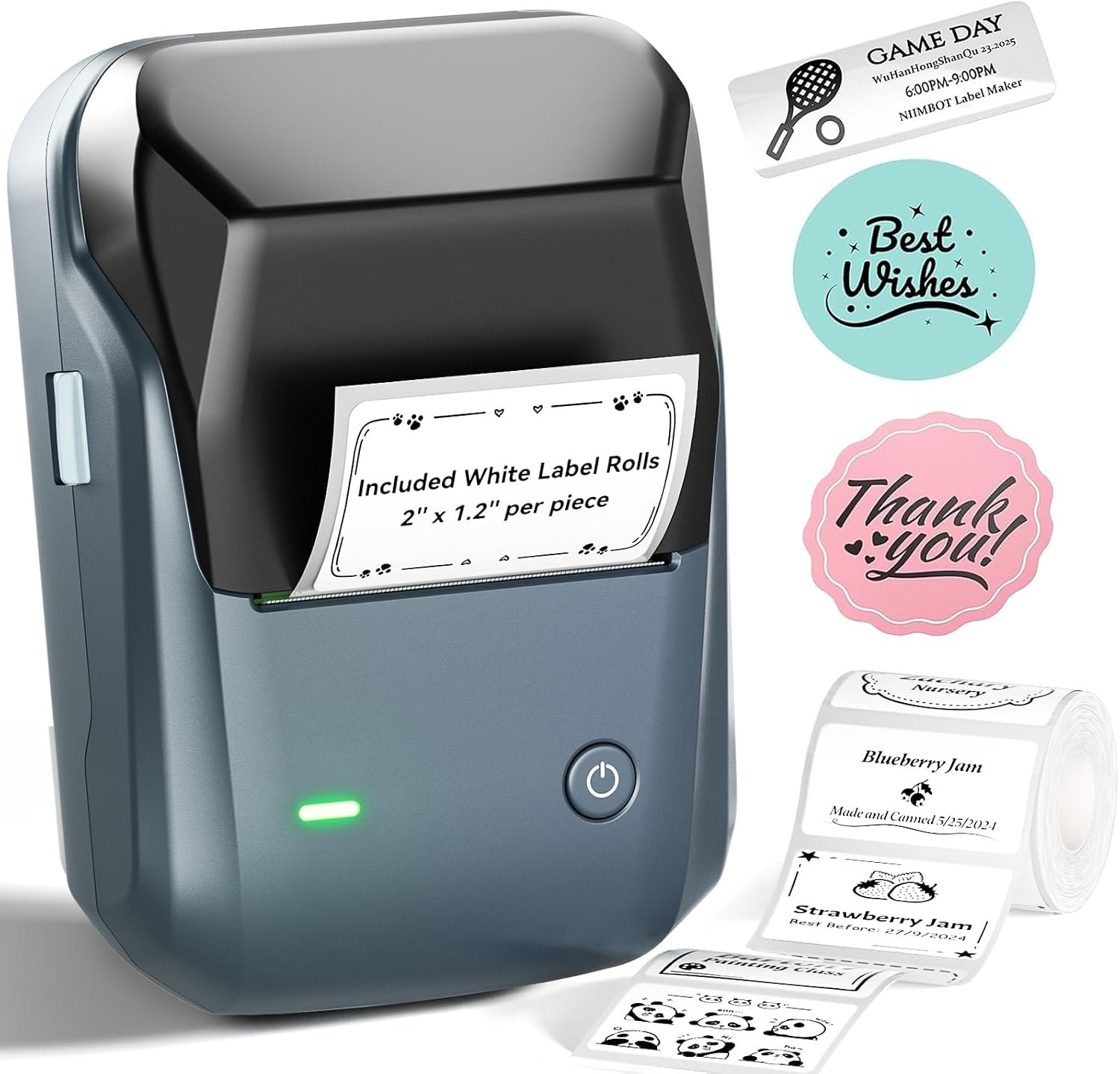
The NIIMBOT B1 Label Maker Machine: A High-Efficiency Thermal Printer for Modern Office Needs
In today’s fast-paced business environment, the ability to produce clear, precise labels quickly and reliably can make a significant difference. The NIIMBOT B1 Label Maker Machine is designed to meet the demands of small businesses, offices, and home users who require a compact, versatile solution for creating labels. This thermal printer stands out for its combination of Bluetooth connectivity, user-friendly app integration, and inkless operation. Its ability to produce high-quality labels without the need for traditional ink or toner makes it an attractive option for those who prioritize efficiency and minimal maintenance. As businesses increasingly look for cost-effective, low-maintenance printing solutions, the NIIMBOT B1 offers a compelling balance of performance and portability. This review explores how its features align with modern printing needs, from connectivity options to print speed and media compatibility.
Quick Overview
| Feature | Details |
|---|---|
| Printer Type | Thermal Label Printer |
| Connectivity Technology | Bluetooth, USB |
| Printing Technology | Thermal |
| Print Resolution | 203 DPI (Monochrome) |
| Print Speed | 40 ppm (Black and White) |
| Media Size | Up to 2 inches wide |
| Supported Media | Labels (White or Colored) |
| Print Output | Monochrome |
| Battery Life | 1500 mAh (Auto-Shutoff After 15 Minutes) |
| Warranty | 18 Months Limited |
| Weight | 293 Grams |
| Dimensions | 2.4″D x 3.6″W x 5.2″H |
The NIIMBOT B1 is designed for users who need a compact, portable label printer that can integrate seamlessly with both mobile and desktop devices. Its thermal printing technology eliminates the need for ink or toner, reducing maintenance while ensuring crisp, smudge-free labels. The combination of Bluetooth connectivity and USB port provides flexibility for different use cases, from small business operations to home organization. With a maximum print speed of 40 pages per minute and support for labels up to 2 inches wide, the B1 is well-suited for environments where efficiency and precision are paramount.

Connectivity Options and Device Compatibility
The NIIMBOT B1 Label Maker Machine offers a range of connectivity options that enhance its usability in diverse settings. Central to its functionality is the Bluetooth 5.0 technology, which allows seamless pairing with both iOS and Android devices. This wireless feature not only streamlines the printing process but also reduces clutter by eliminating the need for physical cables. The integration with the “NIIMBOT” app further simplifies label creation, offering a user-friendly interface for customizing text, fonts, and templates. For users who prefer desktop integration, the USB connectivity ensures compatibility with laptops and other computing devices. The app’s auto-detection of label sizes and support for multiple languages make it an accessible option for a broad range of users. However, the lack of support for tablets may limit its appeal in certain environments where tablet-based printing is a priority. Overall, the B1’s connectivity features make it a versatile choice for both mobile and stationary workflows.

Bluetooth Integration and App Functionality
The B1’s Bluetooth connectivity is a standout feature, offering users the convenience of wireless printing while maintaining high reliability. The “NIIMBOT” app ensures a smooth experience by automating many of the setup processes, such as detecting label dimensions and adjusting print settings. This eliminates the need for manual adjustments, saving time and reducing errors. The app also supports a wide range of fonts, borders, and symbols, allowing for customization tailored to specific organizational needs. For users who frequently create labels, the ability to save and reuse templates enhances productivity. Additionally, the app’s multilingual support ensures that non-English speakers can use the printer without language barriers. However, the app’s effectiveness depends on a stable Bluetooth connection, which may occasionally require re-pairing if the device loses signal.
USB Connectivity and Desktop Use
For users who prefer a wired connection or need additional stability, the B1’s USB port provides a reliable alternative. This option is particularly beneficial for environments where Bluetooth connectivity may be intermittent or subject to interference. The USB interface also allows the printer to function as a standalone device, making it ideal for users who need a consistent printing solution without relying on mobile networks. The ability to connect via USB ensures compatibility with both Windows and macOS systems, expanding its usability across different computing platforms. While the B1 does not support tablet devices, this limitation is offset by its robust app integration and ease of setup for desktop environments.
Cross-Platform Compatibility and Limitations
The B1’s connectivity features make it a strong contender for users who value flexibility in their printing workflows. The combination of Bluetooth and USB ensures that it can be integrated into both mobile and stationary setups, accommodating a wide range of applications. However, the lack of tablet compatibility may be a drawback for professionals who rely on tablets for label creation. Additionally, while the app provides a comprehensive interface for customization, its reliance on Bluetooth means that users must maintain an active connection to access certain features. These considerations highlight the B1’s strengths in cross-platform environments while also noting its limitations in scenarios where alternative devices are required.
Print Quality and Resolution Performance
The print quality of the NIIMBOT B1 Label Maker Machine is a critical factor in determining its suitability for various applications. As a thermal printer, it utilizes heat to produce images on label media without the need for ink or toner. This technology ensures that printed labels remain smudge-free and resistant to fading, making it ideal for environments where durability is essential. The printer’s resolution of 203 DPI provides sufficient clarity for text and simple graphics, though it may fall short when compared to higher-resolution printers in the same category. The B1’s output is particularly well-suited for applications such as barcode printing, inventory management, and small-scale labeling tasks. However, users who require intricate designs or high-resolution images may find the B1’s capabilities limited, especially when compared to inkjet printers with superior resolution. The consistent print quality across all label sizes further enhances its reliability for daily use.

Monochrome Output and Color Limitations
As a monochrome thermal printer, the B1 offers precise black-and-white printing that is ideal for applications requiring clarity and minimal color variation. The absence of color options may be a drawback for users who need to create labels with varying hues or incorporate images. However, this limitation is offset by the printer’s ability to produce sharp, readable text without the need for color ink. The lack of color support also helps reduce maintenance costs and eliminates the complexity of managing multiple ink cartridges. For small businesses and offices focused on efficiency, this streamlined approach to printing can be a significant advantage.
Media Compatibility and Print Durability
The B1’s thermal printing technology ensures that labels produced on compatible media remain legible under a variety of conditions. The printer supports standard label widths up to 2 inches, making it suitable for applications such as shipping labels, product tags, and inventory identifiers. The use of thermal paper or compatible label media ensures that printed information remains crisp without smudging, even in humid environments. However, users must exercise caution with the type of media used, as certain materials may not perform optimally on thermal printers. The B1’s reliance on thermal technology also means that labels can be sensitive to direct heat or light exposure, which could affect long-term readability. Despite these considerations, the printer’s durability in everyday use makes it a reliable choice for frequent label production.
Print Speed and Workload Capacity
The B1’s print speed of 40 pages per minute (ppm) is a key consideration for users who need to produce labels quickly without compromising on quality. This speed makes it well-suited for environments where time-sensitive labeling is required, such as retail inventory management or logistics operations. The printer’s ability to handle continuous printing sessions without frequent halts enhances its efficiency for daily use. However, the 40 ppm rating should be viewed in context of its target applications; for high-volume printing, the B1 may not match the throughput of larger label printers. Additionally, users should be aware that print speed can vary depending on factors such as media type and the complexity of the label design. For most small to medium-sized operations, the B1’s speed is more than adequate for meeting standard workload demands.

Pros & Cons
Pros
- Bluetooth Connectivity: The B1’s wireless Bluetooth 5.0 technology allows seamless pairing with both iOS and Android devices, eliminating the need for physical cables in many use cases.
- Thermal Printing Technology: The inkless design reduces maintenance and ensures smudge-free, long-lasting labels suitable for a variety of applications.
- User-Friendly App Integration: The “NIIMBOT” app simplifies label creation with features like auto-detection of sizes, font customization, and template saving for quick reprints.
- Compact and Portable Design: Weighing only 293 grams, the B1 is lightweight enough for on-the-go use while still maintaining durability in daily office environments.
- Versatile Media Support: The printer handles standard label sizes up to 2 inches wide, making it ideal for inventory management, product tagging, and small-scale labeling.
- Long Battery Life: The built-in 1500 mAh battery provides up to 15 minutes of continuous printing, with an auto-shutoff feature that conserves energy during periods of inactivity.
Cons
- Limited Media Compatibility: While the B1 supports most thermal labels, it may not work optimally with all types of label media, requiring users to check compatibility before purchasing.
- No Color Printing Option: The monochrome output may limit the printer’s appeal for users who need to create labels with color-coded information or intricate designs.
- Battery Life Constraints: Although the battery life is sufficient for occasional use, extended printing sessions may require frequent recharging, which could be inconvenient in some scenarios.
- No Tablet Compatibility: The lack of support for tablet devices may be a drawback for professionals who rely on tablets for label creation and management.
- Print Speed Limitations: While the 40 ppm rating is adequate for many small business applications, it may not meet the requirements of high-volume printing operations.
Final Verdict: Who This Printer Is Best For (and Who Should Skip It)
The NIIMBOT B1 Label Maker Machine is an excellent choice for users who prioritize convenience, portability, and minimal maintenance in their labeling needs. Its thermal printing technology ensures reliable output without the need for ink or toner, making it ideal for small businesses, offices, and home users. The B1’s Bluetooth connectivity and app integration also make it a versatile option for those who need to create labels on-the-go or in mobile environments. However, its lack of color printing and limited tablet compatibility may make it less suitable for professionals who require more advanced features. Additionally, users with high-volume printing requirements or those who need faster print speeds may find the B1’s capabilities insufficient. Overall, the B1 is best suited for individuals and small teams who need a dependable, low-maintenance solution for everyday labeling tasks.

Frequently Asked Questions (FAQs)
Is the NIIMBOT B1 Label Maker compatible with both iOS and Android devices?
Yes, the NIIMBOT B1 Label Maker supports Bluetooth connectivity with both iOS and Android devices. Users can download the NIIMBOT app to pair their device with the printer seamlessly, ensuring compatibility across different mobile platforms. However, it does not support direct printing from tablets (iPad) due to the lack of a dedicated tablet app.
What are the key advantages of using a thermal label printer like the B1?
Thermal label printers like the NIIMBOT B1 offer several advantages, including inkless operation that reduces maintenance, smudge-free prints for long-lasting labels, and the ability to produce crisp text on a wide range of label media. These features make them ideal for environments where durability and precision are essential, such as inventory management and product tagging.
How does the NIIMBOT B1 handle label customization through its app?
The NIIMBOT app allows users to customize labels with 30+ fonts, 100+ borders, and over 1500 symbols. The app automatically detects label sizes, eliminating the need for manual adjustments, while also supporting multilingual text. Users can save templates for future use, making the process of creating and reprinting labels efficient and straightforward.
What are the limitations of the B1’s print resolution and output quality?
The NIIMBOT B1 produces labels at a resolution of 203 DPI, which is sufficient for clear text and simple graphics. However, this resolution may not be adequate for intricate designs or high-resolution images, making it less suitable for applications requiring detailed visuals. The monochrome output also means color-coded labels are not supported, which could be a limitation for certain use cases.
Is the B1 suitable for high-volume or continuous printing operations?
The B1’s print speed of 40 ppm makes it suitable for most small to medium-sized operations, but it may fall short for high-volume printing needs. While the printer can handle continuous sessions, users should be aware that extended print runs may require frequent battery recharging. Its thermal technology ensures reliability, but the lack of advanced features like automatic label feeding may limit its use in large-scale environments.
How does the B1’s battery life affect its usability in different settings?
The B1 features a built-in 1500 mAh battery that provides up to 15 minutes of continuous printing, with an automatic shutoff after inactivity. This makes it ideal for short-term use and on-the-go labeling but may require frequent recharging for extended sessions. The auto-shutoff feature helps conserve energy, making the B1 a good choice for users who prioritize battery efficiency in mobile applications.
What are the best use cases for the NIIMBOT B1 Label Maker Machine?
The B1 is best suited for applications such as inventory management, product tagging, and small-scale labeling in offices, retail stores, or home environments. Its compact design and portability make it ideal for users who need to create labels quickly without the constraints of a desktop printer. However, it may not be suitable for high-volume printing or tasks requiring color output.
What should users consider before purchasing the B1 for their business?
Potential buyers should evaluate whether their labeling needs align with the B1’s capabilities, such as its monochrome output and limited media compatibility. Businesses requiring color printing or higher-resolution outputs may need to consider alternative printers. Additionally, users should ensure that their labeling tasks do not exceed the B1’s print speed and battery life limitations to avoid operational disruptions.